 Hack the Route Start free Open app
 The idea
Single sign-on gives each person one place to prove who they are, an identity provider (IdP), and every application trusts the IdP's signed word instead of holding passwords. Here idp runs Dex, an OpenID Connect IdP, and a SAML responder; portal is a finance app that trusts it. From the laptop, follow one login: the password reaches only idp, and portal accepts a signed token.
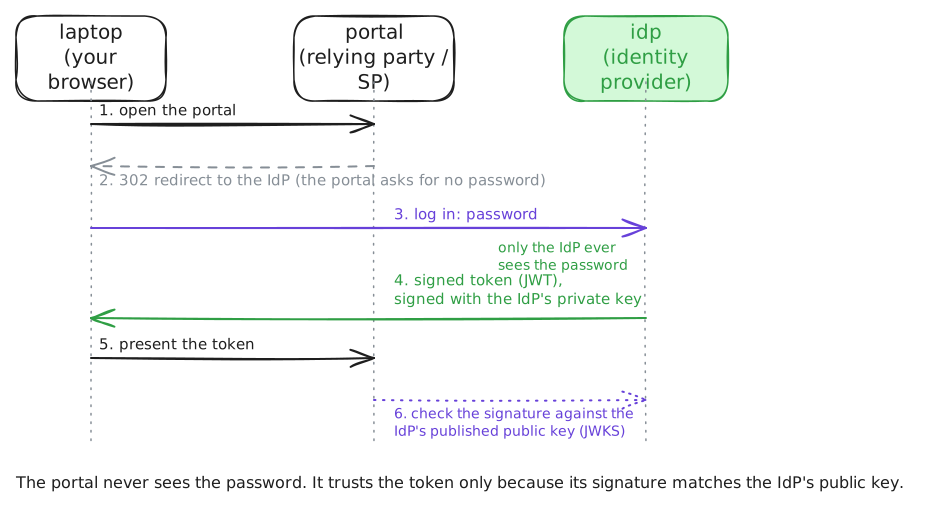
Steps
-
What the IdP advertises
An OpenID Connect IdP publishes a discovery document at a fixed URL: its issuer (the name it signs every token with), where a browser logs in, where tokens are issued, and its jwks_uri, where its public signing keys live. Every relying party, an app that trusts the IdP, starts here. Fetch the document, then the keys.
laptop:~# curl -sS http://idp.lab:5556/dex/.well-known/openid-configuration
laptop:~# curl -sS http://idp.lab:5556/dex/keys
-
The portal sends you to the IdP
Open the portal's login, and it does not ask for a password. It answers with a redirect to the IdP, carrying its own
client_id, theredirect_urito come back to, andresponse_type=code: it wants an authorization code, not your password. Start a login and read the headers.laptop:~# curl -sS -i http://portal.lab:8080/login
Pro
3 more steps in the app
- Exchange at the token endpoint
- The portal validates the token
- The same login as a SAML assertion