 Hack the Route Start learning Open app
The idea
The Valley Courier prints at half past one, and right now anyone on the guest network can stop the press. Write access lists on courierRouter, the one machine every packet has to cross.
Steps
-
A list on one card, one way
Marta looks after the computers at the Valley Courier, a newspaper.
courierRouterjoins its four networks:newsroom, thepressHallwherepressControlruns the printing press, theguestsnetwork for visitors, andoutside. A Router passes on whatever it can deliver, so a guest's laptop can reach the press.The oldest tool for this lives on the router itself: an access list, or ACL.
An ACL is a numbered list of permit and deny lines, read from the top, first match wins. You hang it on one card, in one direction:
infor packets arriving through that card,outfor packets leaving through it.On a Cisco router, list number 10 says "only the newsroom may reach the press hall" (the
0.0.0.255comes next step):access-list 10 permit 10.42.0.0 0.0.0.255 interface pressHall ip access-group 10 outLinux has no ACL command, but it has the same parts, and
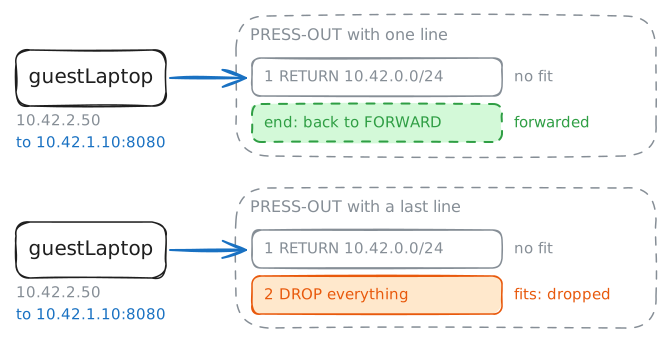
iptablescalls a list a chain.iptables -Nmakes a chain of your own, and a line inFORWARDwith-o pressHallhangs it on that card, outbound. A permit line ends in-j RETURN, which hands the packet back toFORWARD, and the router forwards whatever no list stopped.Build it, hang it, and send the guest at the press again.
guestLaptop:~# curl -sS -m 3 http://10.42.1.10:8080/
courierRouter:~# iptables -N PRESS-OUT
courierRouter:~# iptables -v -A PRESS-OUT -s 10.42.0.0/24 -j RETURN
courierRouter:~# iptables -v -A FORWARD -o pressHall -j PRESS-OUT
guestLaptop:~# curl -sS -m 3 http://10.42.1.10:8080/
courierRouter:~# iptables -v -A PRESS-OUT -j DROP
guestLaptop:~# curl -sS -m 3 http://10.42.1.10:8080/
layoutDesk:~# curl -sS -m 3 http://10.42.1.10:8080/
courierRouter:~# iptables -L PRESS-OUT -v -n --line-numbers
-
Standard lists, wildcard masks, and where they go
Next, Marta wants the guests off every inside network, while they keep the internet. First, see that a guest can read the layout desk's page today.
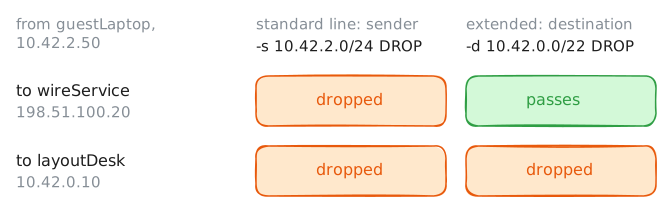
A standard list can name only one thing: who sent the packet. Her first idea is a standard list on the
guestscard, inbound, with one line: drop anything from10.42.2.0/24. Try it.Either way, she needs to say "the inside networks" in one line. The Courier owns
10.42.0.0/22, 1024 addresses from10.42.0.0to10.42.3.255, holding every inside Subnet and prefix length.Cisco writes that range with a wildcard mask, which is a subnet mask turned inside out. In a mask, a 1 bit means "part of the network". In a wildcard, a 0 bit means "must match" and a 1 bit means "anything goes".
Each byte is 255 minus the mask's byte, so
/24, mask255.255.255.0, is wildcard0.0.0.255, and/22, mask255.255.252.0, is0.0.3.255.Her second idea names where the packet goes, which makes the list an extended one: drop anything bound for
10.42.0.0/22. Cisco writes itdeny ip any 10.42.0.0 0.0.3.255.guestLaptop:~# curl -sS -m 3 http://10.42.0.10/ courierRouter:~# iptables -N GUESTS-IN courierRouter:~# iptables -v -A GUESTS-IN -s 10.42.2.0/24 -j DROP courierRouter:~# iptables -v -A FORWARD -i guests -j GUESTS-IN guestLaptop:~# curl -sS -m 3 http://198.51.100.20/ courierRouter:~# iptables -v -R GUESTS-IN 1 -d 10.42.0.0/22 -j DROP guestLaptop:~# curl -sS -m 3 http://198.51.100.20/ guestLaptop:~# curl -sS -m 3 http://10.42.0.10/ courierRouter:~# iptables -L GUESTS-IN -v -n --line-numbers
-
Keep the press hall quiet
The press hall should never start a conversation with anyone.
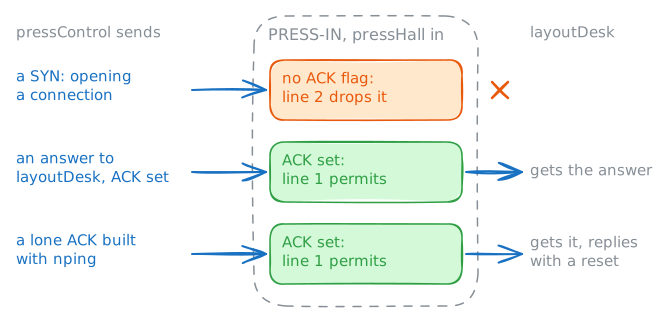
pressControlanswerslayoutDesk, and that's all it should ever do. A list on thepressHallcard, inbound, can say "drop everything", but then the press's answers die too.A router's access list reads each packet alone, with no memory of which conversations exist. Cisco's answer, decades old, is the keyword
established.Nearly every TCP packet after the very first carries a flag called ACK, so a packet without it is almost always someone opening a connection.
establishedpermits a TCP packet with ACK or RST set, which lets answers out and keeps openings in:access-list 120 permit tcp any any establishedLinux says it as
-p tcp --tcp-flags ACK ACK: of the flags, look at ACK, and match when it's set. BuildPRESS-INthat way, and see whatpressControlcan still do.Last,
npingbuilds a packet by hand. With--tcp --flags ackit sends a lone TCP packet with the ACK flag set, opening nothing, answering nothing.pressControl:~# curl -sS -m 3 http://10.42.0.10/ courierRouter:~# iptables -N PRESS-IN courierRouter:~# iptables -v -A PRESS-IN -p tcp --tcp-flags ACK ACK -j RETURN courierRouter:~# iptables -v -A PRESS-IN -j DROP courierRouter:~# iptables -v -A FORWARD -i pressHall -j PRESS-IN pressControl:~# curl -sS -m 3 http://10.42.0.10/ layoutDesk:~# curl -sS -m 3 http://10.42.1.10:8080/ pressControl:~# nping --tcp --flags ack -p 80 -c 1 10.42.0.10
-
Name the port as well as the sender
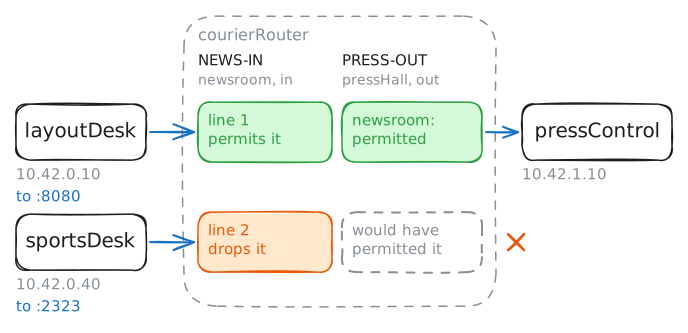
PRESS-OUTlets the whole newsroom through, to anything in the press hall.pressControlruns two services: the press page on port 8080, and a maintenance page on port 2323 that can flash new firmware onto the press.Only
layoutDesk, which sends the finished pages, has any business with the press, and only on port 8080. A standard list can't say that, so this is a job for an extended list, which can name the sender, the receiver, the protocol and the port, all on one line. In Cisco's words:ip access-list extended NEWS-IN permit tcp host 10.42.0.10 host 10.42.1.10 eq 8080 deny ip any 10.42.1.0 0.0.0.255 permit ip any any interface newsroom ip access-group NEWS-IN inIt goes close to the source, inbound on the
newsroomcard. The second line keeps the rest of the newsroom off the press hall. Cisco needs the third because of its hidden deny, while on Linux the newsroom's other packets run off the end and go on.First, check what
sportsDeskcan reach today.sportsDesk:~# curl -sS -m 3 http://10.42.1.10:2323/ courierRouter:~# iptables -N NEWS-IN courierRouter:~# iptables -v -A NEWS-IN -s 10.42.0.10 -d 10.42.1.10 -p tcp --dport 8080 -j RETURN courierRouter:~# iptables -v -A NEWS-IN -d 10.42.1.0/24 -j DROP courierRouter:~# iptables -v -A FORWARD -i newsroom -j NEWS-IN sportsDesk:~# curl -sS -m 3 http://10.42.1.10:2323/ layoutDesk:~# curl -sS -m 3 http://10.42.1.10:8080/ layoutDesk:~# curl -sS -m 3 http://10.42.1.10:2323/ sportsDesk:~# curl -sS -m 3 http://198.51.100.20/
-
The router's own door
One machine has been missing from every test:
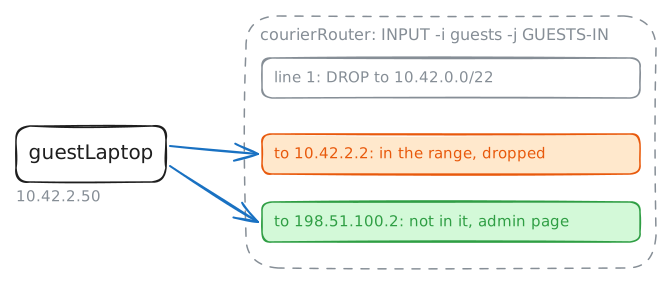
courierRouteritself. It runs an admin page on port 80, and whoever reaches it can change every list you've written.GUESTS-INdrops anything a guest sends to10.42.0.0/22, and the router's own address on the guest network,10.42.2.2, sits inside that range. Try it fromguestLaptop.On a Cisco router, an inbound list also guards the router itself: a packet arriving on a card meets the list, whoever it's for. Linux sorts packets by who they're for before any list is read.
FORWARDonly ever sees packets passing through, and a packet for the router itself goes to a chain calledINPUT.The fix is the same list, hung a second time, on
INPUTwith-i guests. A list is a named thing, so the one you've already written can guard two doors.The router has four addresses, though, one on each card, and a guest can aim at any of them. Try the one on
outside.guestLaptop:~# curl -sS -m 3 http://10.42.2.2/ courierRouter:~# iptables -v -A INPUT -i guests -j GUESTS-IN guestLaptop:~# curl -sS -m 3 http://10.42.2.2/ guestLaptop:~# curl -sS -m 3 http://198.51.100.2/ courierRouter:~# iptables -v -I GUESTS-IN 1 -d 198.51.100.2 -j DROP guestLaptop:~# curl -sS -m 3 http://198.51.100.2/ guestLaptop:~# curl -sS -m 3 http://198.51.100.20/ courierRouter:~# iptables -S
Run these steps on real machines