 Hack the Route Start learning Open app
The idea
A file crossing a network can be read, and changed, by anyone on the path. Three tools fix that, and every secure protocol is built from them: a key that locks the file, a hash that fingerprints it, and a key pair that signs it.
Steps
-
Anyone on the path can read it
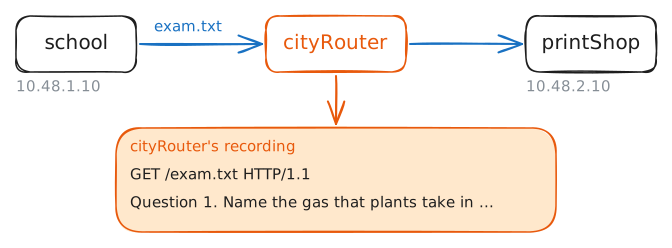
Hillside School prints its exams at a shop across town. Each term Ms Okafor puts the exam in the school's outbox, a folder its web server shares,
/var/www/outbox, and the print shop downloads it fromhttp://school.lab/.Between them sits
cityRouter, the internet provider's Router. Every packet between school and shop crosses it. The same goes for a café's Wi-Fi, a hotel's network, or a cable someone has tapped: whoever runs a box on the path can record what crosses it.A file on the move is in transit; a file sitting on a disk is at rest. This lab protects it in both, with three tools that HTTPS, VPNs, DNSSEC and signed email are built from, each taking the ones it needs.
This term's exam is on
school, in Ms Okafor's home folder,/root/exam.txt. Copy it into the outbox, then download it onprintShopwhilecityRouterrecords the trip.school:~# cp /root/exam.txt /var/www/outbox/ printShop:~# curl -sS -O http://school.lab/exam.txt
-
Scrambled is not secret
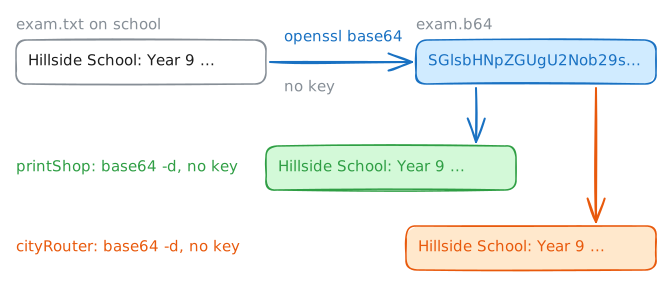
A colleague suggests sending the exam as base64. Base64 rewrites any file in 64 safe characters, letters, digits,
+and/, so it survives systems built for text. Email attachments travel this way, and so does the password in an HTTPAuthorization: Basicheader.It looks like noise:
Hillsidecomes out asSGlsbHNpZGU=, the=padding the end. But base64 is an encoding, a fixed recipe written down in RFC 4648, and the recipe needs no secret.Encryption is different: it needs a key, and without the key the recipe gets you nowhere.
Make a base64 copy in the outbox with
openssl base64, download it onprintShopwhilecityRouterrecords, and turn it back withbase64 -d.school:~# openssl base64 -in /root/exam.txt -out /var/www/outbox/exam.b64 printShop:~# curl -sS -O http://school.lab/exam.b64 printShop:~# base64 -d exam.b64
-
One password at both ends
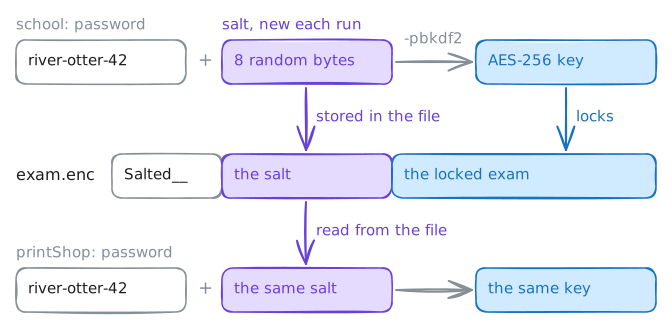
Encryption mixes a file with a key, so only someone holding the key can unmix it. AES, the Advanced Encryption Standard, is the cipher nearly everything uses. It is symmetric: one key locks and unlocks.
-aes-256-cbcis AES with a 256-bit key, in CBC mode. People remember passwords, not 256-digit binary numbers, so-pbkdf2turns the password into a key by stirring it through a one-way function thousands of times. That costs a password guesser the same thousands of rounds for every guess, which is called key stretching.-awrites the result as base64 text: a wrapping around the locked bytes, not the lock.Ms Okafor agreed a password with the shop on the phone,
river-otter-42. Lock the exam onschooland look at the result; she then saves a locked copy in the outbox and deletes the readable ones.Download the locked copy on
printShop, and unlock it with the same password.school:~# openssl enc -aes-256-cbc -pbkdf2 -a -in /root/exam.txt -pass pass:river-otter-42 school:~# openssl enc -aes-256-cbc -pbkdf2 -a -in /root/exam.txt -out /var/www/outbox/exam.enc -pass pass:river-otter-42 school:~# rm -f /var/www/outbox/exam.txt /var/www/outbox/exam.b64 printShop:~# curl -sS -O http://school.lab/exam.enc printShop:~# openssl enc -d -aes-256-cbc -pbkdf2 -a -in exam.enc -pass pass:river-otter-42
-
A fingerprint for the file
Secrecy is half the job. The shop also has to know that the exam it prints is the exam the school wrote, with no question swapped on the way.
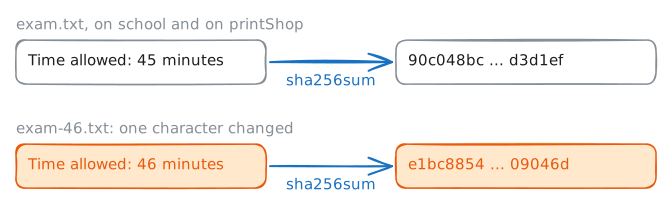
A hash function such as SHA-256 reads a file of any size and gives back 32 bytes, written as 64 hex digits (0 to 9 and a to f): the file's fingerprint. The same file always gives the same hash. Nobody can run it backwards to get the file, and it uses no key at all.
So the shop can hash its copy and compare the result with the hash Ms Okafor reads out on the phone.
Hash the exam on
school, and the copyprintShopdownloaded at the start. Then hash a copy with one character changed:45 minutesturned into46 minutes.school:~# sha256sum /root/exam.txt printShop:~# sha256sum exam.txt school:~# sha256sum /root/exam.txt /root/exam-46.txt
-
Two keys: one signs, one checks
Both problems so far come from one root: a secret both ends must share, passed on some safe way. In 1976 Whitfield Diffie and Martin Hellman published a way out, and RSA made it work a year later: keys made in pairs.
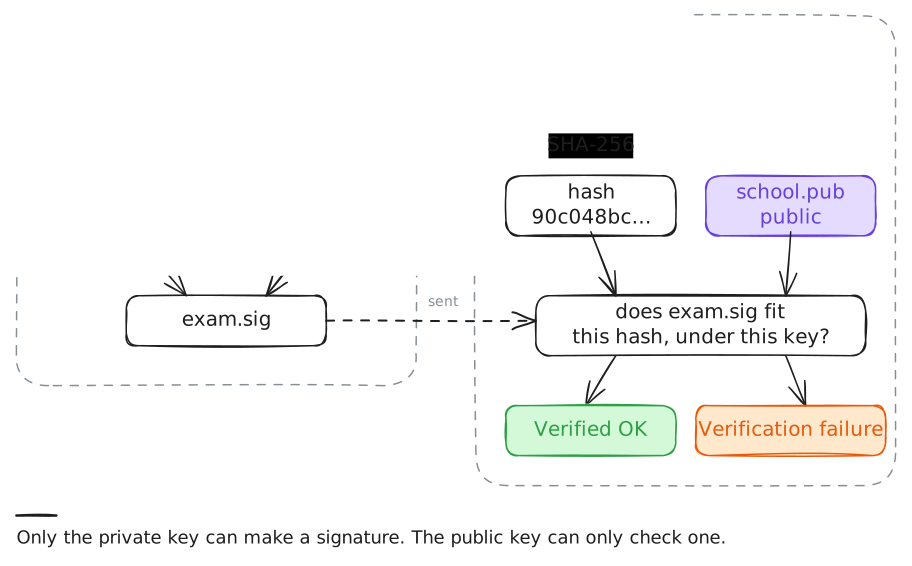
A key pair is a private key and a public key, made together. What the private key signs, the public key can check, and the public key can't sign anything. So the school keeps
school.keyto itself and handsschool.pubto anyone.A signature is the file's hash, signed with the private key. To check it,
printShophashes its own copy and asks the public key whether the signature fits that hash.Make a key pair on
schoolon P-256, an elliptic curve: a kind of key pair with short keys, used by TLS and DNSSEC. Publish the public key, sign the exam, and check it onprintShop.school:~# openssl genpkey -algorithm EC -pkeyopt ec_paramgen_curve:P-256 -out /root/school.key school:~# openssl pkey -in /root/school.key -pubout -out /var/www/outbox/school.pub school:~# cat /var/www/outbox/school.pub school:~# openssl dgst -sha256 -sign /root/school.key -out /var/www/outbox/exam.sig /root/exam.txt printShop:~# curl -sS -O http://school.lab/school.pub -O http://school.lab/exam.sig printShop:~# openssl dgst -sha256 -verify school.pub -signature exam.sig exam.txt
-
Signed, but by whom?
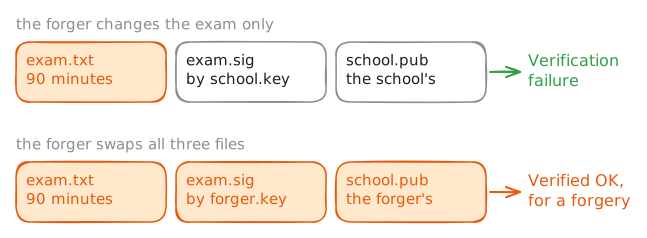
Someone on the path wants a longer exam:
90 minutesinstead of45. They change the shop's copy on its way. The lab makes the change onprintShopitself to save a trip; on a real path the forger's box would swap the file inside the reply.The signature should catch that. So the forger goes further: they make a key pair of their own, sign the changed exam with it, and swap both
exam.sigandschool.pubon the way too.Then the shop runs exactly the same check as before.
printShop:~# sed -i 's/45 minutes/90 minutes/' exam.txt
printShop:~# openssl dgst -sha256 -verify school.pub -signature exam.sig exam.txt
printShop:~# openssl genpkey -algorithm EC -pkeyopt ec_paramgen_curve:P-256 -out forger.key
printShop:~# openssl pkey -in forger.key -pubout -out school.pub
printShop:~# openssl dgst -sha256 -sign forger.key -out exam.sig exam.txt
printShop:~# openssl dgst -sha256 -verify school.pub -signature exam.sig exam.txt
Run these steps on real machines