 Hack the Route Start learning Open app
The idea
Magnus looks after the controller that runs the greenhouses at Oakhurst Botanic Garden. Last week its admin account was brute forced: an attacker tried password after password until one worked. The team worked the incident through to a clean, recovered box. The incident is closed.
Lessons learned is the phase that happens after that. Teams skip it when they are tired and the box is back, and skipping it is how the same attack works again next month. The job is to turn what happened into something the garden keeps: a clear account of the timeline, the root cause named plainly, and a detection so the next attempt is caught without anyone reading logs by hand.
Magnus starts, as this phase always does, from the evidence rather than from memory.
Steps
-
Start from the evidence, not memory
A week on, everyone half-remembers the incident differently. Lessons learned does not run on memory; it runs on what the machines recorded. The first move is to rebuild the timeline from the logs, and for a login attack that record is the server's auth log.
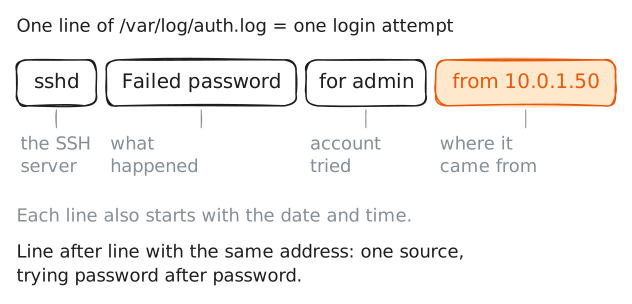
greppulls the matching lines out of/var/log/auth.log. Every refused SSH login writes aFailed passwordline there, with the account tried and the address it came from.server:~# grep 'Failed password' /var/log/auth.log
-
Find the moment it worked
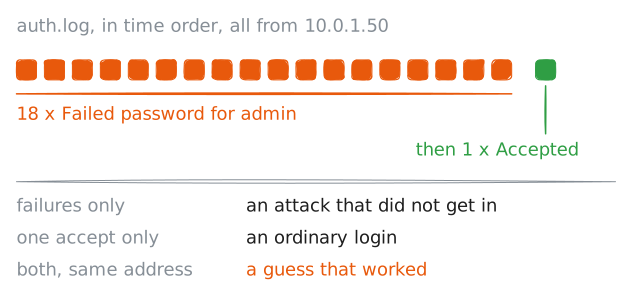
A wall of failures on its own is a failed attack. What turns it into an incident is a success at the end of it, so the next thing to find is the login that got through.
The same log records an
Accepted passwordline for every login that succeeded. Pulling those out shows whether, and when, one of the guesses landed.server:~# grep 'Accepted password' /var/log/auth.log
-
Size it and name the root cause
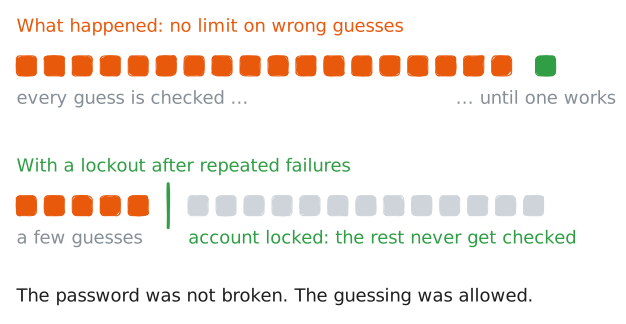
A finding needs a number, not an adjective. "Lots of failures" is a feeling; a count is something a report can stand on, and a number a detection can later use as its limit.
grep -ccounts the matching lines instead of printing them.The count also points straight at the root cause. The question lessons learned has to answer is not only what happened, but why it was possible.
server:~# grep -c 'Failed password' /var/log/auth.log
-
Turn it into a detection
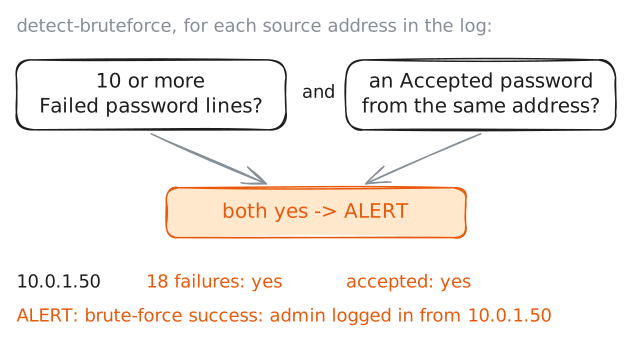
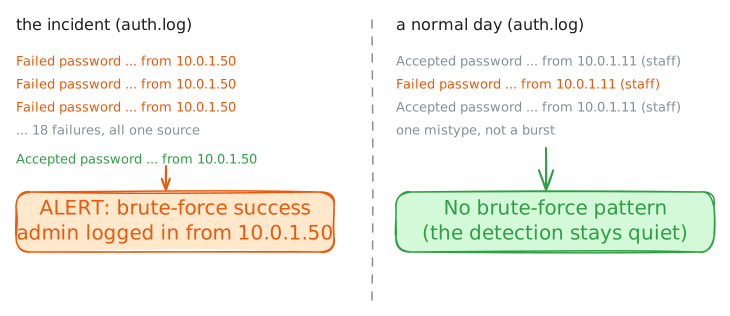
A lesson that lives only in a report is forgotten by the next incident. The lasting output of this phase is a detection: the shape from step two, written down as something a machine checks, so the next brute force is caught without anyone reading logs by hand.
Magnus writes a small detection,
detect-bruteforce, that reads a log and flags any source address with a burst of failed logins followed by a success, the exact shape the incident had. You do not need to read the script line by line; what matters is the rule it encodes.server:~# detect-bruteforce /var/log/auth.log
-
A detection has to be specific
A detection that fires on the incident proves it can catch the attack. It does not prove the detection is any good. A rule that also fires on ordinary logins is noise, and noise gets muted, and a muted detection catches nothing.
So Magnus runs the same detection against a normal day's log from the same controller: ordinary staff logins, with one mistyped password among them. A good detection stays quiet here.
server:~# detect-bruteforce /var/log/auth.normal.log
Run these steps on real machines