 Hack the Route Start learning Open app
The idea
An airport has one feed of departures and a wall of screens that want it. Multicast sends each line once and leaves the copying to the network. Join a group, watch a switch work out who asked by reading IGMP messages that were never meant for it, turn that off to see what it was saving you, and then try to send the feed one hop further.
Steps
-
Join the group and read the feed
Ines looks after the screens at a small regional airport. One computer,
flightFeed, puts out a line of text for every flight, and the boards at the gates and in the lounge show those lines to passengers.A network has two plain ways to reach many machines, and neither fits here. Ines could send a separate copy to each board, which means the feed keeps a list of every screen and sends the same line a hundred times for a hundred screens. Or she could send one broadcast, which reaches every machine on the network, and each one that doesn't want it, like the
coffeeTillby the lounge door, has to stop and throw it away.Multicast is the third way, and it rests on one idea: an address that belongs to no machine, only to a group, meaning whichever machines have asked for it. IPv4 keeps everything from
224.0.0.0to239.255.255.255for these group addresses, and239is the private part, for an organisation's own use, the way10is for private networks. The feed sends each line once, to239.20.0.1on UDP port 5000, which is a number that picks a program on a machine and has nothing to do with the ports on a switch.The surprising part is that the sender never learns who's reading. A machine joins a group by announcing it on its own network, and nothing goes to
flightFeed, so it can't tell whether it has one reader, a thousand or none. That's why multicast runs on UDP: TCP needs a conversation with each receiver, and here there are no conversations.Read the feed from
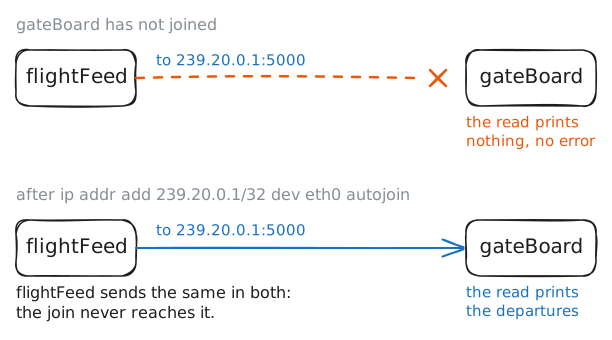
gateBoard, join the group, and read it again.gateBoard:~# timeout 3 socat -d0 -u UDP4-RECV:5000 - gateBoard:~# ip addr add 239.20.0.1/32 dev eth0 autojoin gateBoard:~# timeout 3 socat -d0 -u UDP4-RECV:5000 -
-
Find the address the card listens for
On the wire a packet travels inside an Ethernet frame, and a frame needs a destination hardware address, often called a MAC address. A network card accepts frames sent to its own address and to broadcast, and drops everything else before the machine hears about it. So the card needs telling which address to accept, and the sender needs an address to put on the frame. A sender normally finds one with ARP, by asking who has this IP address, but a group has no owner, so nobody would answer.
The designers' way out was to skip the question and compute the answer. A group's hardware address is
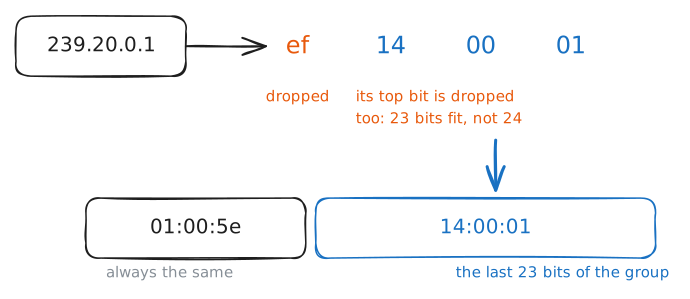
01:00:5efollowed by the last 23 bits of the group address, so the sender and every member work it out alone and arrive at the same result.239.20.0.1in hexadecimal isef.14.00.01, where 20 is14. Drop theef, and that leaves 24 bits. Only 23 fit, so the top one goes too. It's a 0 here, which changes nothing, and you get01:00:5e:14:00:01.A group address has 28 bits that can change, since its first four are always
1110, theeinef, and that's what keeps every group between 224 and 239. With only 23 of them carried over, 5 are lost, so 32 groups share every hardware address. Why only 23? Hardware addresses are sold in blocks that share their first three bytes, which leaves 24 bits free. The usual story, repeated by network engineers and never quite confirmed, is that Deering wanted 16 blocks at about $1000 each, the budget ran to one, and half of that was all he got.Read the card's list, find that address on a real packet at the feed, then join a second group and see what happens to the list.
gateBoard:~# ip maddr show dev eth0
flightFeed:~# timeout 3 tcpdump -n -e -c 1 -i eth0 udp port 5000
gateBoard:~# ip addr add 239.148.0.1/32 dev eth0 autojoin
gateBoard:~# ip maddr show dev eth0
-
Watch the switch learn who asked
In the
learning-switcheslab a switch found each machine by reading the source addresses of its frames. That can't work for a group, because01:00:5e:14:00:01only ever appears as a destination. A plain switch never learns a port for it, so it floods the frame out of every port and turns multicast back into broadcast, and the till gets every line.What saves it is a message nobody wrote for switches. When a machine joins a group, its kernel sends a short IGMP membership report, a packet that says "this network has a member of this group". IGMP was written for routers, so that the one on each network could tell whether anyone there wanted a stream.
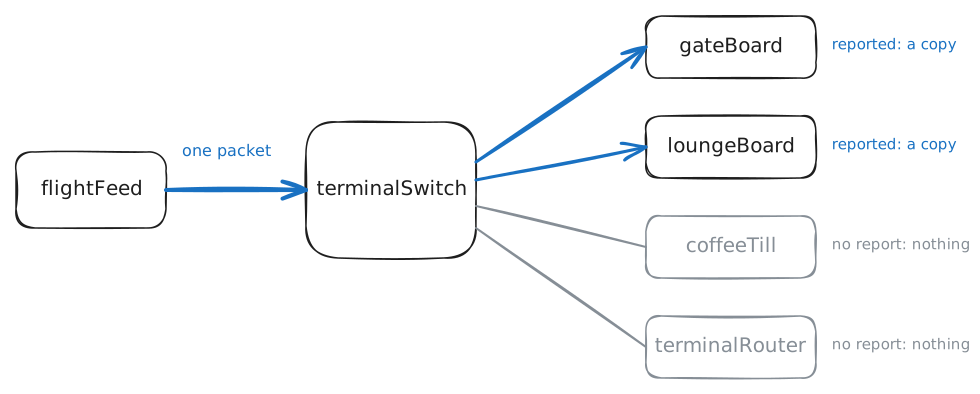
When switches took over from shared cables in the 1990s, video made flooding a real problem, so their makers taught them to read those reports as they went past. A switch normally reads only the Ethernet addresses on a frame, and a report is a message inside it meant for someone else, so reading it is nosy, and the trick is named for exactly that: IGMP snooping. The switch keeps a table of which ports want which group, and copies the group's frames to those ports, and to any port with a multicast router behind it. This lab's router doesn't count as one.
terminalSwitchis a Linux machine acting as a switch. Linux calls a switch a bridge, this one isbr0, and it names each port after the machine plugged into it. Its table is the multicast database, ormdb. Read the table, joinloungeBoardwhile watching its port on the switch, and read the table again. Then count what leaves the feed while both boards and the till are watched.terminalSwitch:~# bridge mdb show loungeBoard:~# ip addr add 239.20.0.1/32 dev eth0 autojoin terminalSwitch:~# bridge mdb show flightFeed:~# timeout 5 tcpdump -n -c 3 -i eth0 udp port 5000
-
Turn snooping off
Snooping is an optimisation, and a network works without it. IGMP's own standards don't define it, switch makers were doing it for years before anyone wrote it down, and plenty of cheap switches leave it off or don't have it.
A line of text a second wouldn't hurt anyone. Video would. Put a few 8 Mbit/s streams on a switch that floods and every port carries all of them, to every office PC, phone and printer. Wi-Fi takes it worst, since an access point normally sends group traffic at a low rate that every device can follow, and one stream can eat most of the air.
Turn snooping off on
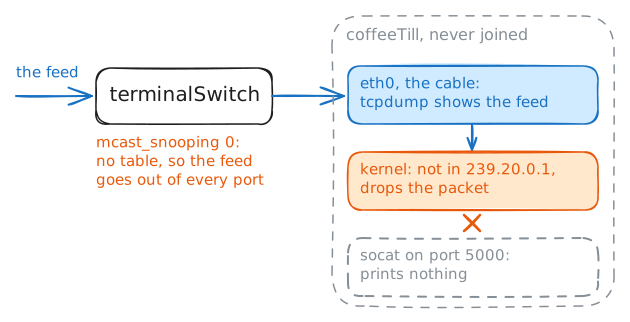
terminalSwitch, and find out what the till gets.terminalSwitch:~# ip link set dev br0 type bridge mcast_snooping 0 terminalSwitch:~# bridge mdb show coffeeTill:~# timeout 3 tcpdump -n -c 2 -i eth0 udp port 5000 coffeeTill:~# timeout 3 socat -d0 -u UDP4-RECV:5000 - terminalSwitch:~# ip link set dev br0 type bridge mcast_snooping 1 terminalSwitch:~# bridge mdb show
-
Leave the group
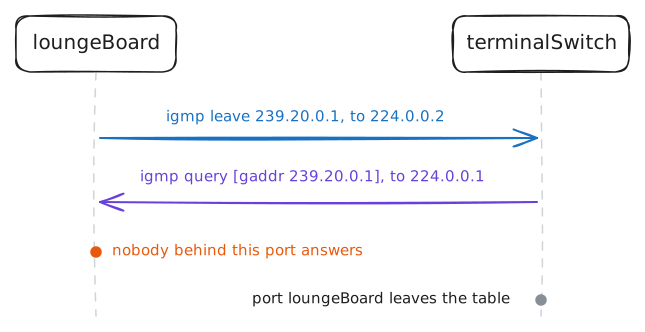
A table of members needs a way of forgetting. A machine can freeze with its cable still up, and without some way of noticing, the switch would send it video for ever. IGMP's first version had one method. One machine on each network, the querier, asks everyone every so often which groups they want, and a group nobody claims is dropped.
The querier is normally the router. Nothing here is doing that job, so
terminalSwitchsteps in, and the lab has it ask every 10 seconds instead of the standard 125. The question goes to224.0.0.1, the group every machine is in, and the boards' answers are what refilled the table in the last step.Each answer restarts a timer for that port and group, 260 seconds here, and a machine that freezes stops answering and falls out when its timer runs down. With no querier at all the timers run out for everyone, and on many switches the stream dies a few minutes in, which is one of multicast's classic faults.
Hotel TV often runs on multicast, with one group for each station. Flick through ten stations with only the timer to clear up, and ten streams keep arriving for four minutes. So IGMP's second version, in 1997, added a leave message, a way to say "I'm done". A switch can't always act on a leave straight away, though, because a port can lead to another switch with more members behind it.
Read the timers, take
loungeBoardout of the group, and watch what passes on its switch port.terminalSwitch:~# bridge -s mdb show loungeBoard:~# ip addr del 239.20.0.1/32 dev eth0 terminalSwitch:~# bridge mdb show gateBoard:~# timeout 3 socat -d0 -u UDP4-RECV:5000 -
-
Try to send it past the router
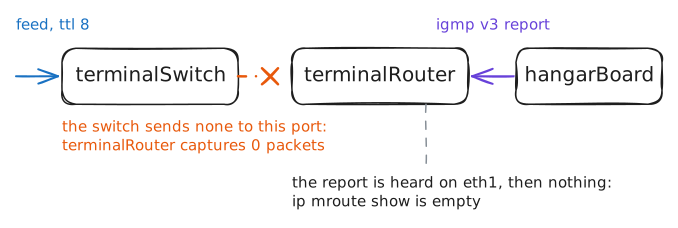
Ines gets a new request. The maintenance hangar is on another network, behind
terminalRouter, and they'd like a board too.hangarBoardcan join the group the same way, while the lab watchesterminalRouterfor what the join sends.A multicast packet has a limit on how far it travels. The TTL is the count every router lowers by one, discarding the packet when it reaches zero, and a multicast sender's default TTL is 1, on purpose. A stream that wandered off its own network by accident could flood a whole company, so leaving the network has to be a decision.
Join the board, read the feed, and look at the TTL on the feed's packets. Then the lab raises it to 8.
hangarBoard:~# ip addr add 239.20.0.1/32 dev eth0 autojoin
hangarBoard:~# timeout 3 socat -d0 -u UDP4-RECV:5000 -
flightFeed:~# timeout 3 tcpdump -n -v -c 1 -i eth0 udp port 5000
hangarBoard:~# timeout 3 socat -d0 -u UDP4-RECV:5000 -
terminalRouter:~# timeout 3 tcpdump -n -c 1 -i any udp port 5000
terminalRouter:~# ip mroute show
Run these steps on real machines