 Hack the Route Start learning Open app
The idea
The Limelight Theatre's rented lighting desk arrived this afternoon, and nobody wrote down its IP address. Wren, the production electrician who also keeps the theatre's network going, needs it before tonight's tech rehearsal. Every device here tells the Switch at the other end of its cable who it is, every few seconds: ask the switch what it heard.
Steps
-
Ask the switch who is plugged in
Most devices have no idea who is at the other end of their cable. LLDP, the Link Layer Discovery Protocol, fixes that. Every few seconds, a device sends a short announcement out of each of its ports, the jacks its cables plug into: my name, which of my ports this is, what kind of device I am, and an address to reach me on.
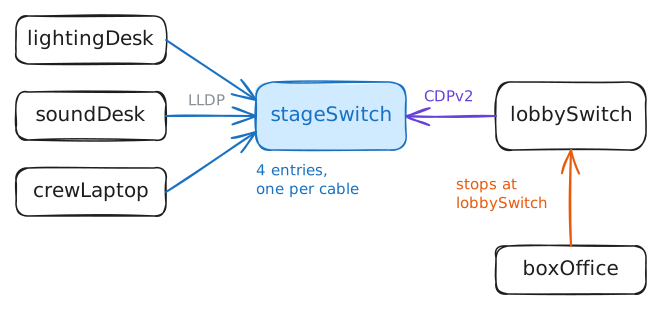
The device at the other end keeps it in its neighbour table, and never passes it on. An announcement crosses one cable and stops, so a switch's table is a list of what's plugged into it, port by port.
The theatre has two switches:
stageSwitchin the stage rack, with the lighting desk, the sound desk and the stage door's jack on its ports (tonight a touring crew's laptop is in that jack), andlobbySwitchin the box office cupboard, with the box office PC. One cable joins them. Every device here runs lldpd, an LLDP agent, andlldpcliasks it things.Your terminal is on
stageSwitch. Ask it for a short list of its neighbours.stageSwitch:~# lldpcli show neighbors summary
-
Find the rented desk's address
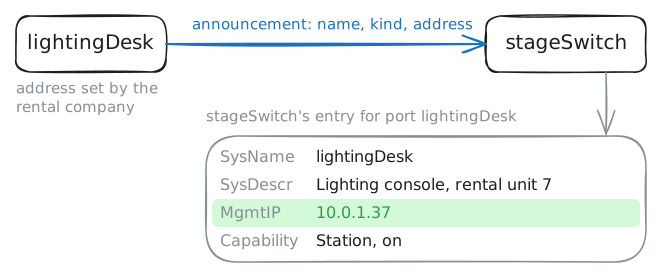
The summary leaves out the part Wren came for. An announcement carries more than a name: a sentence the device writes about itself, what kind of device it is, and its management address, the address you reach it on to control it.
That last one is why LLDP earns its keep in a room full of rented gear. The desk came from the rental company with an address someone there set last week. Nobody wrote it on the flight case, and the theatre's own list of addresses doesn't have it: only the desk itself knows it.
lldpcli show neighborswithoutsummaryprints every detail of every entry. With four neighbours that's a screenful, and on a 48-port switch it's a wall. Addingportsnarrows it to one port: the one the desk is plugged into, which this switch callslightingDesk.stageSwitch:~# lldpcli show neighbors ports lightingDesk
-
Read one announcement on the wire
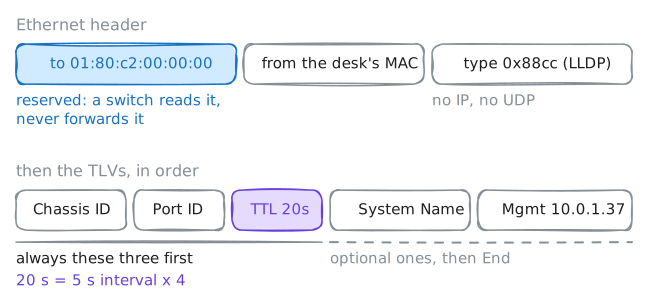
Inside, an announcement is a row of TLVs: type, length, value. Each piece of information gets a type number, then its length in bytes, then the bytes. A receiver skips any type it doesn't know, so vendors can add their own pieces.
Three TLVs open every announcement: who the sender is, which of its ports sent it, and how long to keep the entry. The rest, like step 2's address, are optional.
Every Ethernet frame starts with a header: the MAC address it's for, the one it's from, and a type number for what's inside, its ethertype. A switch reads the first address to pick the port to send the frame out of, and a frame for the broadcast address goes out of every port. An announcement must reach the device at the other end of the cable and nothing beyond it, and the header shows how.
tcpdumpprints frames as they cross a port. Listen onstageSwitch's port to the desk, keep only LLDP frames coming in, and stop after the first.stageSwitch:~# tcpdump -e -n -v -c 1 -Q in -i lightingDesk ether proto 0x88cc
-
Silence the sound desk
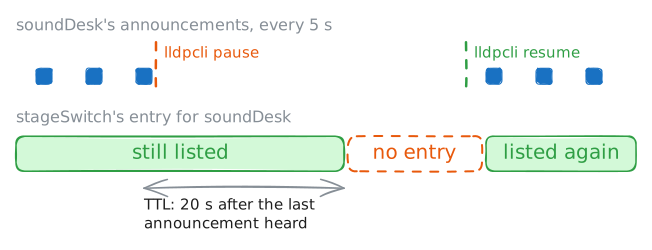
A neighbour table lists what was heard, not what's there now. Each entry lives for its
TTLafter the last announcement, and the switch has no other way to know a device has gone.That matters when you're chasing a fault. A pulled cable is the loud kind: the switch sees its own port go down and clears that port's entries straight away. A device that hangs, or whose LLDP agent stops, is the quiet kind: its port stays up, and the announcements stop.
Try the quiet kind on the sound desk.
lldpcli pausetells the desk's agent to stop sending and receiving, and leaves everything else on the desk running. Look at the switch's entry for it straight after and again once it has aged out, then put it right: wake the desk's agent withlldpcli resumeand watch the entry come back.soundDesk:~# lldpcli pause stageSwitch:~# lldpcli show neighbors ports soundDesk stageSwitch:~# lldpcli show neighbors ports soundDesk soundDesk:~# lldpcli resume stageSwitch:~# lldpcli show neighbors summary ports soundDesk
-
Hear an older switch speak CDP
LLDP is a standard from 2005, written by the IEEE, the body behind Ethernet, and any vendor's gear can speak it. Cisco had been doing the same job since 1994 with its own protocol, CDP, the Cisco Discovery Protocol. Cisco devices still come from the factory running CDP, and most leave LLDP off until someone turns it on.
So a building with a few years of history often has both, like
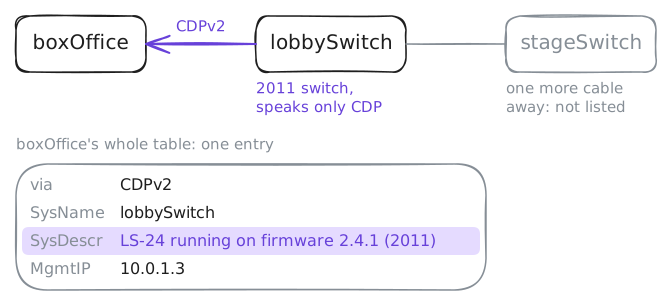
lobbySwitchin the box office cupboard: a 2011 switch that only ever learned CDP. lldpd on the other devices understands CDP as well as LLDP and keeps both kinds in the same table, the way a switch that runs both does. That's whystageSwitchlisted it in step 1 asvia: CDPv2.CDP carries much the same as LLDP: a name, a port, an address, and the device's exact model, which CDP calls its platform. That last one is handy for you, and for anyone else who's curious.
Move to the box office PC,
boxOffice, and print its whole neighbour table with every detail.boxOffice:~# lldpcli show neighbors
-
Stop telling strangers about the switch
Whatever a switch announces, it announces to whoever is plugged in. The stage door has a jack for touring companies, and tonight a visiting crew's laptop,
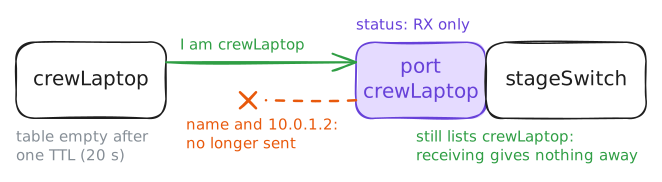
crewLaptop, is in it. Anything on that laptop that listens for LLDP, or captures a frame the way step 3 did, learns the switch's name, what it is, and its management address: free reconnaissance, handed to anyone with a cable.Announcements pay their way on links between switches, and towards the desk phones and Wi-Fi access points that use them. On a jack that strangers plug into, they serve nothing. The usual fix is to stop the switch talking on that port and keep it receiving, so the switch still learns what's plugged in and the visitor learns nothing.
In lldpd that's a port's status, in rx (receive) and tx (transmit):
rx-and-txby default,rx-onlyto listen without talking,tx-onlyto talk without receiving, anddisabledfor neither.lldpcli show interfacesprints each port's status.See what the laptop knows first. Then, on
stageSwitch, set the stage door's port torx-onlyand check it took. The laptop keeps its entry until theTTLruns out, so give it 20 seconds and look again.crewLaptop:~# lldpcli show neighbors stageSwitch:~# lldpcli configure ports crewLaptop lldp status rx-only stageSwitch:~# lldpcli show interfaces ports crewLaptop crewLaptop:~# lldpcli show neighbors stageSwitch:~# lldpcli show neighbors summary ports crewLaptop
Run these steps on real machines