 Hack the Route Start learning Open app
The idea
Rookhaven Water pumps the town's drinking water up from the Hartfell reservoir, a 40-minute drive up a hill road from the office. Callum, the engineer on call this week, looks after the pumping station's Router from his desk in town. Today he gives it a second way in that doesn't share the pump readings' line, closes the first way, and finds out what's left when he shuts both.
Steps
-
Log in over the leased line
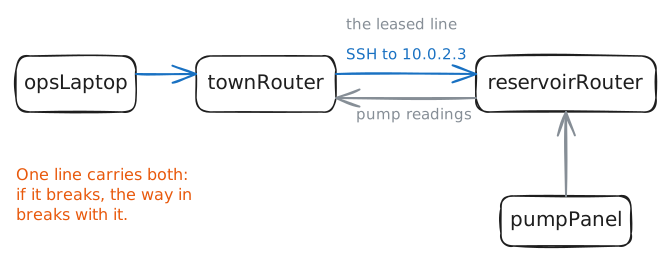
The office and the pumping station are joined by one leased line, a private line the water board rents from the phone company. A router sits at each end:
townRouterin the office, andreservoirRouterat the station, with the pump controls' network behind it.Callum manages
reservoirRouterthe obvious way. He logs in with SSH, the Secure Shell, which opens an encrypted terminal on a far machine, to the router's IP address on the leased line, 10.0.2.3, along the same path the pump readings travel.That's in-band management: the management traffic shares the network it manages. It costs nothing extra, and it has one weakness: when that network breaks, so does the way in to fix it.
sshwith a command after the address logs in, runs that command on the far machine, prints what it printed, and logs out. Your laptop,opsLaptop, already holds a key the router accepts, a file that proves who you are, so there's no password to type.Ask the router for its network cards and their addresses.
opsLaptop:~# ssh root@10.0.2.3 ip -br addr
-
Go in through the back door
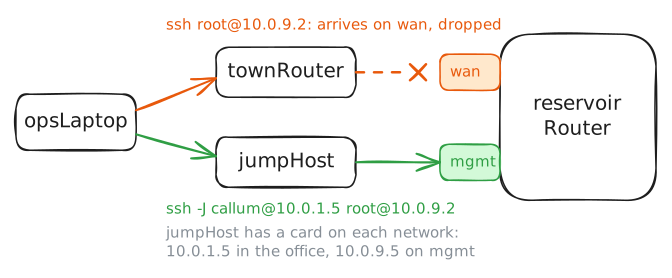
The cure for that weakness is a second way in that shares nothing with the first. The water board rents a small 4G line to the station that carries no pump data, only management: at the station it plugs into the router's management port, and at the office it reaches one machine,
jumpHost. That's out-of-band management: a management network of its own, which keeps working when the network it manages breaks.Real gear keeps its management port apart in a management VRF, a routing table of its own. Here a few firewall rules stand in for one: the management address answers only on the
mgmtcard, anything for it arriving on another card is dropped, thrown away without a reply, and nothing crosses betweenmgmtand the other cards.So the laptop can't reach 10.0.9.2 by itself. It logs in to
jumpHost, the jump host, with cards in both places: 10.0.1.5 in the office, and 10.0.9.5 on the management network.ssh -Jlogs in there and goes on to the router in one command.Try the management address straight from the laptop first, then through the jump host.
opsLaptop:~# ssh root@10.0.9.2 hostname
opsLaptop:~# ssh -J callum@10.0.1.5 root@10.0.9.2 hostname
-
Close the front door
With the back door working, the front door is a risk. Anything that reaches 10.0.2.3 can try the router's SSH: a laptop in the office, or whoever gets onto the leased line. Callum shuts it.
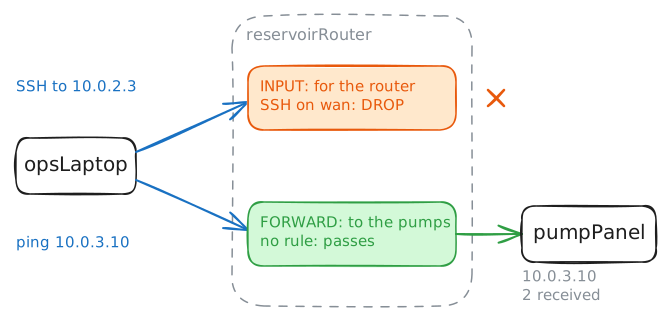
Moving the pump readings from one card to the next is a router's data plane. Answering about itself, SSH logins and the like, is its management plane. A rule can close the management plane on one card and leave forwarding alone.
On Linux,
iptablesholds a machine's packet rules in chains. TheINPUTchain sees packets addressed to the router itself, and packets passing through, on their way to the pumps, use a different chain,FORWARD. So a rule inINPUTthat drops SSH arriving onwancloses the front door and leaves the pump readings alone.Add that rule through the back door. Then try the front door, and ping the pump controls' panel behind the router,
pumpPanelat 10.0.3.10.opsLaptop:~# ssh -J callum@10.0.1.5 root@10.0.9.2 iptables -A INPUT -i wan -p tcp --dport 22 -j DROP opsLaptop:~# ssh root@10.0.2.3 hostname opsLaptop:~# ping -c 2 10.0.3.10
-
Lock yourself out
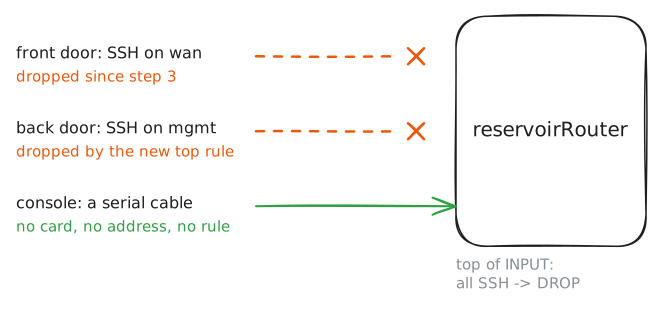
Callum wants one more change: SSH on the management card only, whichever card a login arrives on. His plan is two rules: drop all SSH, then allow it on
mgmtabove that, sinceiptables -Iinserts a rule at the top of a chain, where it's checked first.He types the drop first, the classic way to lose a remote device: the rule that blocks everything goes in before the rule that lets you in, and catches your own login. Do the same through the back door, then try the back door once more.
What's left then is the console port: a serial cable, an old and slow kind that carries typed text, straight into the router's operating system, with no network card, address or rule in the way. For Callum, it means the drive up the hill with a laptop and a console cable, unless the station has a console server: a box cabled to each device's console port, which he could reach on a line of its own.
In this lab, a terminal on
reservoirRouteritself stands in for that cable: it reaches the router without any network. Add the missing rule there.opsLaptop:~# ssh -J callum@10.0.1.5 root@10.0.9.2 iptables -I INPUT -p tcp --dport 22 -j DROP opsLaptop:~# ssh -J callum@10.0.1.5 root@10.0.9.2 hostname reservoirRouter:~# iptables -I INPUT -i mgmt -p tcp --dport 22 -j ACCEPT opsLaptop:~# ssh -J callum@10.0.1.5 root@10.0.9.2 hostname
-
Read the rules from the top
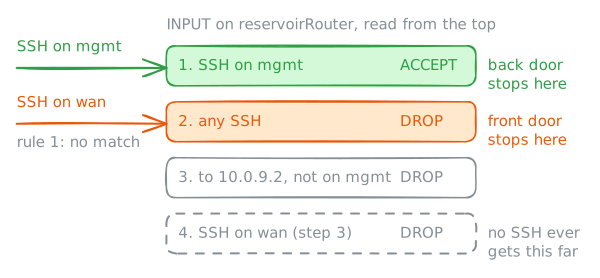
The router's
INPUTchain now holds four rules, and their order is the whole story. For every packet, the router reads the chain from the top and stops at the first rule that matches: that rule decides, and the rules below it are never read. A packet that matches nothing gets the chain's policy, hereACCEPT.So the same two rules mean opposite things in opposite orders. Allow SSH on
mgmt, then drop all SSH, and you have a back door that works; drop all SSH first, as after step 4's first command, and you have a locked router. Every packet filter reads its rules this way, and so does a Cisco router's access list.iptables -Sprints a chain's rules as the commands that would build it, top first. That's handy beyond reading: copy a line, change-Ato-D, and the same command deletes that rule.Print the router's
INPUTchain through the back door, and work out which rule each kind of packet stops at.opsLaptop:~# ssh -J callum@10.0.1.5 root@10.0.9.2 iptables -S INPUT
Run these steps on real machines