 Hack the Route Start learning Open app
The idea
Dalia sets up a climbing gym's new link on a Router whose config changes only through NETCONF. Watch a YANG model refuse a typo, a draft wait for its commit, and a commit undo itself.
Steps
-
A router that speaks NETCONF
Dalia runs the network for Brightwater Climbing: two bouldering gyms and an office, joined by one Router,
core. Quarry Wall has been open for years. Mill Wall, in an old flour mill by the river, opens on Saturday, and yesterday an electrician cabled it tocore'smillcard.Nobody has set that card up yet, and nobody will by logging in and typing commands.
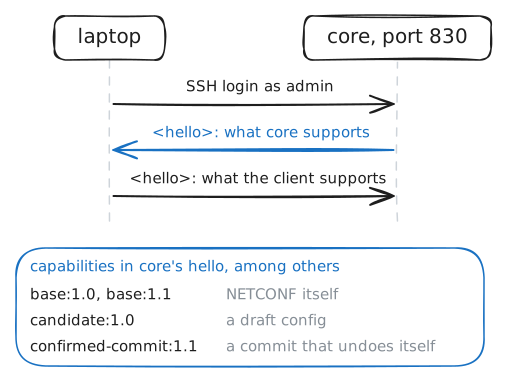
coreis a Linux machine, and anyone may log in to look, but its config is data, read and written over NETCONF: a protocol for configuring network devices that runs over SSH on port 830, with every message in XML.The first thing each side says is a
<hello>, listing its capabilities: the parts of NETCONF it supports. A client reads the router's list to know what it may ask for.Dalia works from
laptopwithnetconf-console2, a command-line NETCONF client.--hellologs in, prints the router's hello, and hangs up.laptop:~# netconf-console2 --host 10.0.1.2 --port 830 -u admin -p netconf-lab --hello
-
The config, as data
A NETCONF router keeps its config in datastores. running is the config it uses right now, and
--get-configreads it unless told otherwise.The shape of that data comes from a YANG model.
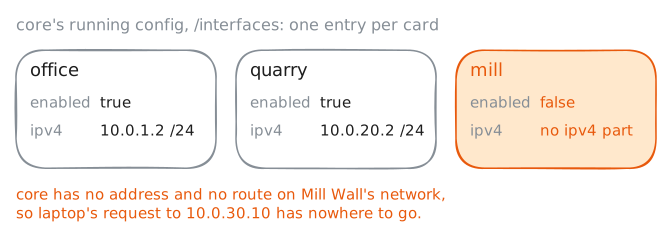
ietf-interfaces, a standard one, says a device has a list of interfaces, its network cards, each with anamethat tells it apart and anenabledsetting, true or false.ietf-ipadds anipv4part, with a list of addresses.Because the models are standard, a script written against
ietf-interfacesworks on any router that supports it. Real routers also carry models of their own, so a script often meets more than one.-x /interfacesis an XPath filter: it keeps only the interfaces part of the reply, so the router's own NETCONF settings stay out of it. Readcore's interfaces, then try Mill Wall's server,10.0.30.10, fromlaptop.laptop:~# netconf-console2 --host 10.0.1.2 --port 830 -u admin -p netconf-lab --get-config -x /interfaces laptop:~# curl -sS -m 3 http://10.0.30.10/
-
The model says no
Kai, who looks after the gyms' Wi-Fi, wrote the
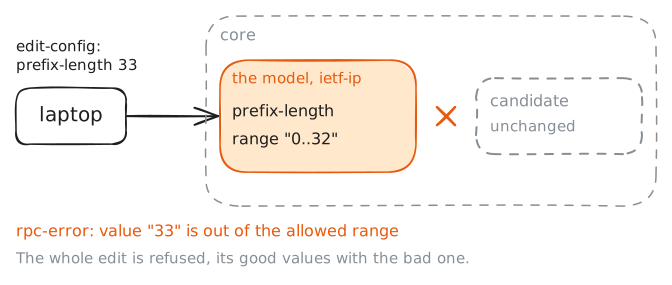
millcard's config for Dalia before he left on Friday. It's in/root/gyms/mill-card.xmlonlaptop:<interfaces xmlns="urn:ietf:params:xml:ns:yang:ietf-interfaces"> <interface> <name>mill</name> <enabled>true</enabled> <ipv4 xmlns="urn:ietf:params:xml:ns:yang:ietf-ip"> <address> <ip>10.0.30.2</ip> <prefix-length>33</prefix-length> </address> </ipv4> </interface> </interfaces>It turns the card on and gives it
10.0.30.2, the address Mill Wall's machines use as their gateway. It also has a typo Kai didn't spot.Changes go to the candidate datastore, the draft.
--db candidate --edit-configsends the file there, merged into what's already in it.Print the file, then send it.
laptop:~# cat /root/gyms/mill-card.xml
laptop:~# netconf-console2 --host 10.0.1.2 --port 830 -u admin -p netconf-lab --db candidate --edit-config /root/gyms/mill-card.xml
-
A draft the router keeps
Fix Kai's typo, prefix length 24 instead of 33, and send the file to the candidate again. This time the router takes it.
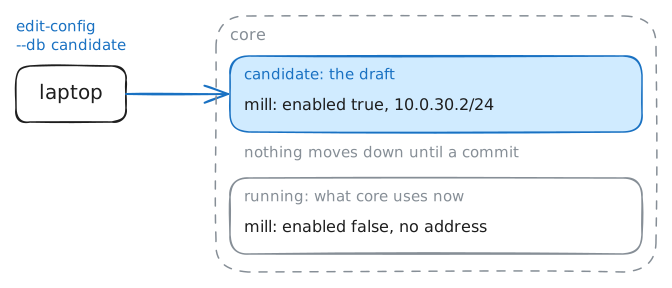
So where is the change? The running config is still what
coreuses, and the candidate sits beside it.That's the point of a draft. A change to a router is often several edits that only make sense together: a card, its address, a route through it. Done one by one on a live router, the network spends a while half-changed.
Read the
millcard from both datastores:--db candidatefor the draft, and no--dbfor running.laptop:~# netconf-console2 --host 10.0.1.2 --port 830 -u admin -p netconf-lab --db candidate --edit-config /root/gyms/mill-card.xml laptop:~# netconf-console2 --host 10.0.1.2 --port 830 -u admin -p netconf-lab --get-config --db candidate -x "/interfaces/interface[name='mill']" laptop:~# netconf-console2 --host 10.0.1.2 --port 830 -u admin -p netconf-lab --get-config -x "/interfaces/interface[name='mill']"
-
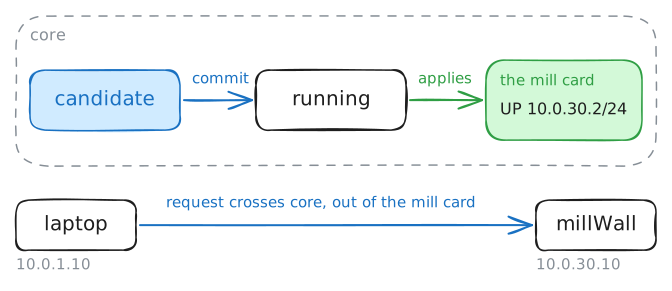
One commit, and the gym is on
--commitcopies the candidate into the running config in one go. Every change in the draft goes live together, or, if any of them fails, none does.A NETCONF server on a real router hands the new running config to the router's own software. On
core, a small program does that job for Linux: it turns themillcard on, and puts the address on it.Then
corehas a card on Mill Wall's network, and a route to it.Commit, look at the card from
core's side with its ownipcommand, and try Mill Wall's page again fromlaptop.laptop:~# netconf-console2 --host 10.0.1.2 --port 830 -u admin -p netconf-lab --commit core:~# ip -br addr show dev mill laptop:~# curl -sS -m 3 http://10.0.30.10/
-
A commit with a way back
Friday night, an electrician rewires Quarry Wall's front desk, and Dalia wants its card on
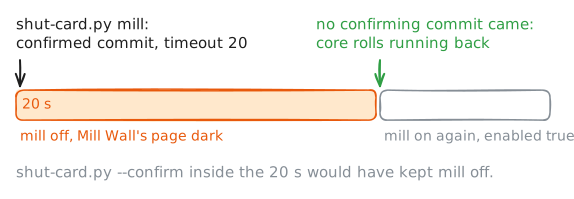
coreshut while he works. She'll do it from home.Shutting a card from far away is how people cut themselves off: one wrong card name, and the session that would fix it has no way back in. That's what a confirmed commit is for: a commit with a timer on it, and a second commit to confirm it.
Dalia uses a Python script,
/root/gyms/shut-card.py, built on ncclient, the NETCONF library behind most Python network tools. It locks the candidate, shuts the card it's given, and commits with a 20-second timer and apersistID, so a later run can confirm it:--confirmkeeps the change.It's late, and meaning to type
quarry, she typesmill.laptop:~# python3 /root/gyms/shut-card.py mill laptop:~# curl -sS -m 3 http://10.0.30.10/ laptop:~# netconf-console2 --host 10.0.1.2 --port 830 -u admin -p netconf-lab --get-config -x "/interfaces/interface[name='mill']/enabled"
Run these steps on real machines