 Hack the Route Start learning Open app
The idea
Ines runs a festival's network from one controller. Watch its switches ask it what to do, read and write their flows through its API, then unplug it and see what keeps working.
Steps
-
Two switches waiting for orders
Ines runs the network at Lakeside Festival: three days of music on a lake shore, and a wristband for everyone who gets in. At the gate, a
scannerchecks wristbands and akioskcharges phones. Backstage, theticketsserver counts each scan, andstagePcruns the lights.Two switches join them,
gateandbackstage, and they aren't like the one under your desk. An ordinary switch works out for itself where to send each frame: which port leads to which MAC address, which links to leave unused. That deciding is its control plane, and moving frames by those decisions is its data plane.Here the deciding lives on one server,
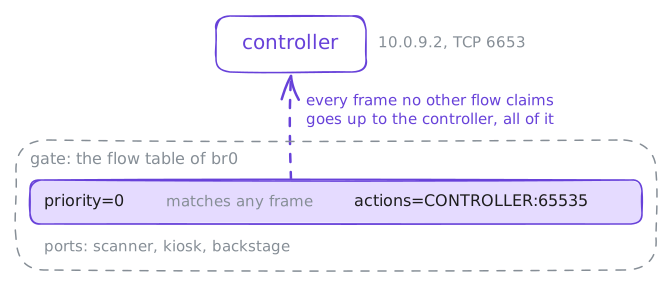
controller, and the switches only forward. Each one looks up every frame in its flow table, a list of rules the controller writes over OpenFlow: match these fields, then do this.Both switches run Open vSwitch, a software switch for Linux that calls each switch a bridge, and each has one,
br0. Ongate,ovs-vsctl showprints how the bridge is set up, andovs-ofctl dump-flows br0prints its flow table. Nobody has used the network yet.gate:~# ovs-vsctl show gate:~# ovs-ofctl -O OpenFlow13 --names dump-flows br0
-
The first frame asks the controller
The
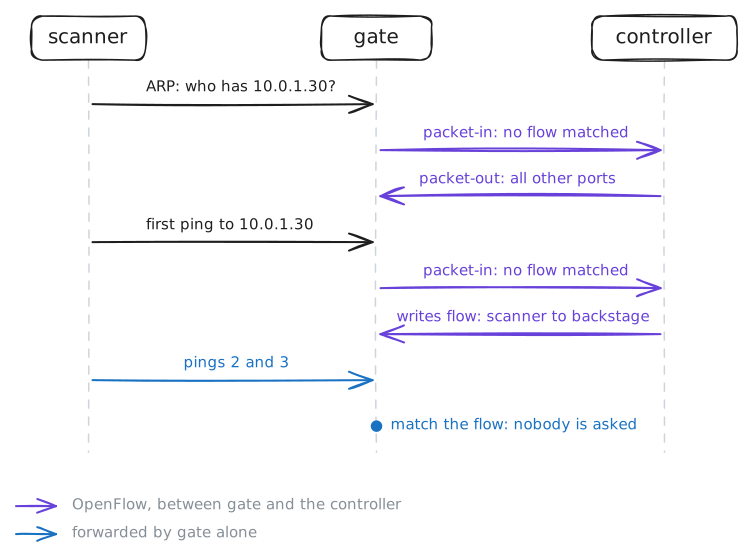
scanneris about to check its first wristband, so it needs theticketsserver,10.0.1.30. Before its first ping can leave, it has to learn the server's MAC address, so it sends an ARP request to everyone.That frame reaches
gate, and only the table-miss flow matches. Sogatewraps it in an OpenFlow packet-in message and asks the controller what to do.The controller runs os-ken, the maintained fork of the Ryu controller, with its sample learning-switch app: an ordinary switch's job, done from the middle. It notes that the scanner's MAC address lives behind
gate'sscannerport.It doesn't know yet where the server is, so it answers with a packet-out: send this frame out of every other port. At
backstagethe request misses too, andbackstageasks the same question.A controller that answered every frame like that would be slow. Ping
ticketsfrom thescanner, then printgate's flow table again.scanner:~# ping -c 3 10.0.1.30 gate:~# ovs-ofctl -O OpenFlow13 --names dump-flows br0
-
Ask the controller, not the switch
Logging in to each switch to read its flows is fine with two switches. Lakeside's big sister festival has forty, and nobody wants forty logins at 2 a.m.
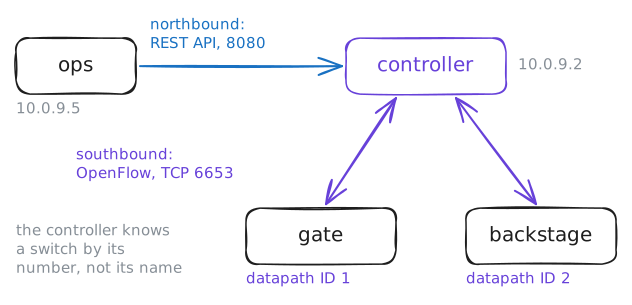
That's what a network controller is for: one place that knows every switch, with two sides. Its southbound side talks OpenFlow to the switches, as you saw. Its northbound side faces people and programs: here a REST API on port 8080, served by os-ken's
ofctl_restapp.Ines works from her laptop,
ops, on the management network next to the controller. The API answers in JSON, one long line of it, so Ines saves the answers to files withcurl -oand reads them withjq, a command-line tool that picks fields out of JSON.Ask the controller which switches it knows:
/stats/switches. Then readgate's flows through the API, and the list of its ports.ops:~# curl -s http://10.0.9.2:8080/stats/switches ops:~# curl -s -o /root/flows.json http://10.0.9.2:8080/stats/flow/1 -o /root/ports.json http://10.0.9.2:8080/stats/portdesc/1 ops:~# jq -c '.["1"][] | {priority, match, actions}' /root/flows.json ops:~# jq -c '.["1"][] | {port_no, name}' /root/ports.json -
A rule from the laptop
Saturday, 11 a.m.: the
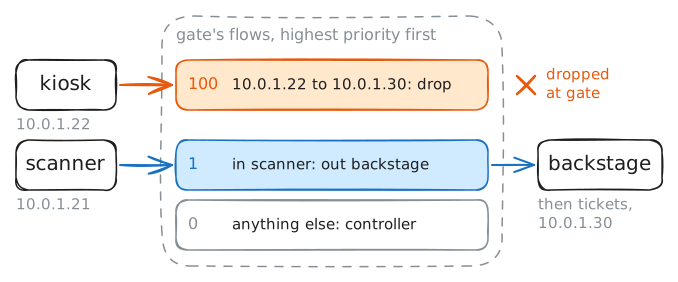
kioskvendor's tablet keeps knocking on the ticket server's admin page, and the vendor can't say why. The kiosk has no business withtickets, so Ines wants it kept off for the weekend, without logging in to a switch.She writes the rule as JSON on
ops, in/root/rules/kiosk.json:{ "dpid": 1, "priority": 100, "match": { "eth_type": 2048, "ipv4_src": "10.0.1.22", "ipv4_dst": "10.0.1.30" }, "actions": [] }dpidsays which switch: 1 isgate, the first switch the kiosk's packets reach, so they stop there.matchpicks IPv4 packets (eth_type2048 is0x0800, IPv4) from the kiosk totickets. An emptyactionslist means drop.priority100 puts the rule above the learned flows at 1, since the highest priority that matches wins.POST the file to the API's
/stats/flowentry/add, then let the kiosk try the ticket server.ops:~# curl -si -X POST -d @/root/rules/kiosk.json http://10.0.9.2:8080/stats/flowentry/add kiosk:~# curl -sS -m 3 http://10.0.1.30/ scanner:~# curl -sS -m 3 http://10.0.1.30/ gate:~# ovs-ofctl -O OpenFlow13 --names dump-flows br0
-
Unplug the controller
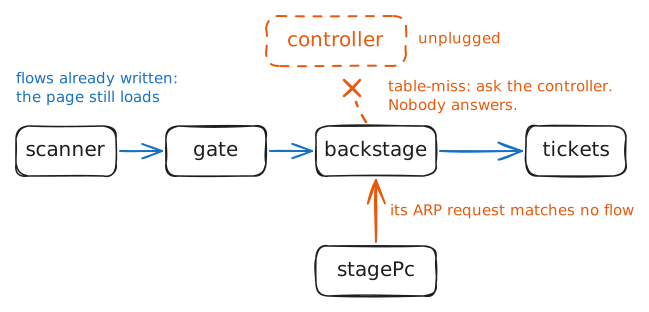
Saturday, 9 p.m.: the headliner is on, and someone backstage kicks the controller's cable out. Every decision in this network came from that one box, and now nothing answers on
10.0.9.2.Two conversations put the network to the test. The
scannerhas talked toticketsall day, so both switches hold flows for that pair.stagePchas never talked to thescanner. Its first frame, an ARP request, will meet only the table-miss flow atbackstage, and the table-miss flow says to ask the controller.Fetch the ticket page from the
scanner, then ping thescannerfromstagePc. Keep in mindfail_mode: secure, from the first step: it's what a switch does when its controller is gone.scanner:~# curl -sS -m 3 http://10.0.1.30/ stagePc:~# ping -c 3 10.0.1.21
Run these steps on real machines