 Hack the Route Start learning Open app
The idea
A rumor can't be checked, so the routers at this airport share a map instead, and each one works out its own paths from it. Bring a replaced router onto the map, teach the map which link is slow, then break the network in a way that leaves every neighbor reading Full while the paths vanish.
Steps
-
Shake hands first
An airport runs six routers across its grounds.
checkInRouterserves the check-in hall, whereflightServerkeeps the day's departures, andgateRouterserves the gate hall, wheregateScannerchecks every boarding pass against that server.Two ways join those halls: old copper through the baggage tunnel, and the way round by
towerRouter, along fiber fromcheckInRouterand then acrossapron, the network thatgateRouter,towerRouter,hangarRouterandfuelRouterall share. The fuel depot sits behindfuelRouter, and the cargo yard sits behindhangarRouter.The
rip-routinglab ended with a dead network looping between routers, because each RIP router passed on a conclusion it had drawn from what somebody else told it, and nothing in the message could be checked.The people running the ARPANET, the network that grew into the internet, hit that wall at the end of the 1970s, when their distance vector routing looped and reacted slowly as the network grew. Their replacement turned the idea around: a router stops passing on conclusions and passes on facts about itself, written down as a short record, and those records reach every router unchanged.
Every router then works out its own paths from the same set of records. That family of protocols is called link state.
OSPF, Open Shortest Path First, is the link state protocol most companies and campuses run. "Open" says the specification is public and free to build on, at a time when the strongest rival belonged to Cisco, and "Shortest Path First" is the calculation each router runs. The first version came out in 1989 as RFC 1131, and the version you'll use here is RFC 2328, written by John Moy and published in 1998.
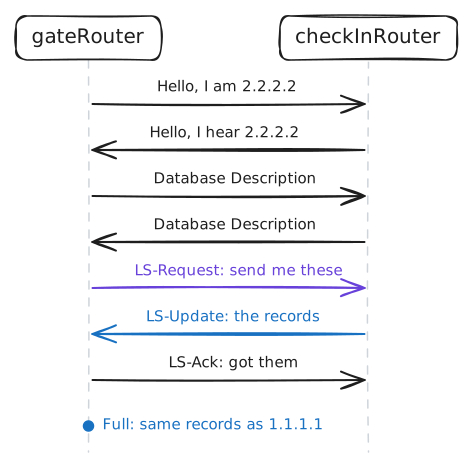
Before any records travel, two routers have to find each other. Each OSPF router sends a small hello out of every card, once a second in this lab and every 10 seconds on most real networks, to
224.0.0.5, a multicast address that only OSPF routers listen to.A hello carries the sender's router ID, which is a name written like an address and identifies that router everywhere in OSPF, and a list of the neighbors it has already heard. A router that finds its own ID in a neighbor's list knows the link works in both directions.
gateRouterwas replaced last night and has OSPF turned off, so its routing table stops at its own cards and the gate hall is cut off. Ping the flight server, turn OSPF on, and read what the two routers said to each other on the baggage tunnel.gateScanner:~# ping -c 1 -W 2 10.0.1.10 gateRouter:~# vtysh -c "configure terminal" -c "router ospf" -c "network 10.0.0.0/8 area 0" gateRouter:~# vtysh -c "show ip ospf neighbor" gateRouter:~# vtysh -c "show ip route" gateScanner:~# ping -c 1 -W 2 10.0.1.10
-
Read the shared map
What
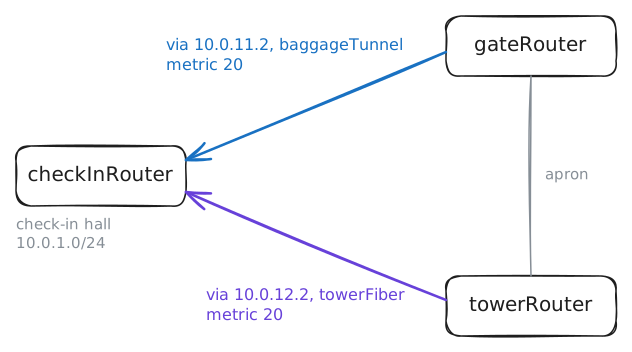
gateRouterreceived is called the link state database, and it's the map. It's made of records called LSAs, link state advertisements, and the ones you'll read first are a router's description of itself: its cards, what's on each one, and what it costs to leave through each.Two rules set this apart from RIP. A router writes only its own record, and every other router copies that record whole, changing nothing, out of its other cards. That copying is called flooding, and it carries one router's record to all of them in moments.
Every record carries its author's router ID and a sequence number that rises with each new edition, and a router holding two copies keeps the higher number. In the
rip-routinglab a stale story could beat the truth. Here the author is the one source of a record, and the newest edition wins.You'll print the map on the two routers at opposite ends of the tunnel, read one record in full, and then ask
gateRouterandtowerRouterhow each reaches the check-in hall.checkInRouter:~# vtysh -c "show ip ospf database" gateRouter:~# vtysh -c "show ip ospf database" checkInRouter:~# vtysh -c "show ip ospf database router 2.2.2.2" gateRouter:~# vtysh -c "show ip route 10.0.1.0/24" towerRouter:~# vtysh -c "show ip route 10.0.1.0/24"
-
Let speed set the cost
The gates are slow this morning. Packets from
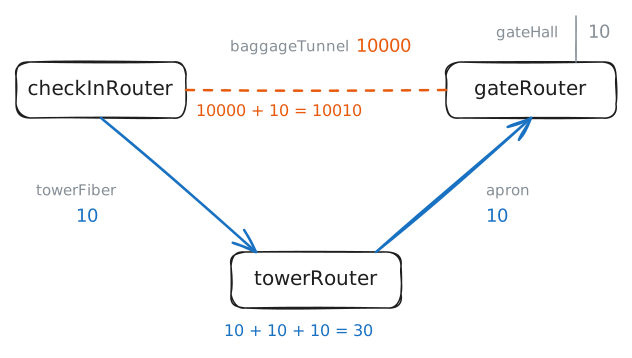
gateScannerto the flight server cross the tunnel's old copper: one hop from hall to hall, 20 ms each way, and 10 Mbit of speed. The way round bytowerRoutertakes one router more and is far faster.The
rip-routinglab hit the same choice. RIP counted hops, picked the slow radio, and you had to add a false penalty by hand. OSPF has a real measure, the cost: every card has a cost, and a path's cost is the sum of the cards a packet leaves through on the way.The protocol says only that a card has a cost, and it leaves the number to the router. FRR, the routing software here, works it out as 100000 divided by the card's speed in Mbit, and a cost can't go below 1. Cisco's routers do the same division with 100 on top, so a 1 Gbit card and a 10 Gbit card both come out at 1, and a Cisco network usually raises that 100 by hand.
The router reads the speed from the card, and a card knows nothing about the link behind it. Every card in this lab reports 10000 Mbit, the tunnel's included, because the limit sits out on the link, and the same thing happens on a real network when a carrier sells you 100 Mbit over a gigabit link. OSPF believes the tunnel is as good as the fiber, and the setting
bandwidthis how you tell it otherwise.See the slow path first, then tell both ends of the tunnel the truth.
gateScanner:~# traceroute -n -w 1 10.0.1.10
gateScanner:~# ping -c 3 -W 2 10.0.1.10
checkInRouter:~# vtysh -c "show ip ospf interface baggageTunnel"
checkInRouter:~# vtysh -c "configure terminal" -c "interface baggageTunnel" -c "bandwidth 10"
gateRouter:~# vtysh -c "configure terminal" -c "interface baggageTunnel" -c "bandwidth 10"
checkInRouter:~# vtysh -c "show ip ospf interface baggageTunnel"
checkInRouter:~# vtysh -c "show ip route 10.0.2.0/24"
gateScanner:~# ping -c 3 -W 2 10.0.1.10
gateScanner:~# traceroute -n -w 1 10.0.1.10
towerRouter:~# vtysh -c "show ip ospf database router 1.1.1.1"
-
Cut the fiber quietly
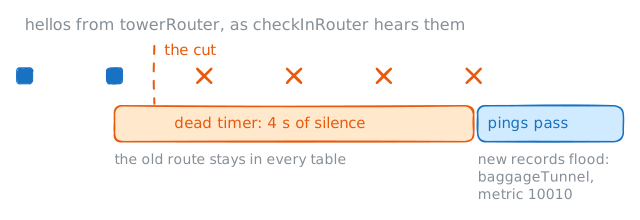
Most fiber cuts are loud: the light goes out, the card goes down, and OSPF reacts straight away. The failure to fear is the quiet one, when something between the two routers dies, such as a carrier's box, and both cards stay up and go on looking healthy. All OSPF has left is the hellos that stop arriving.
Each router keeps a countdown for each neighbor, and every hello sets it back. That countdown is the dead timer: 4 seconds in this lab, and 40 on most real networks, where a network that can't wait that long adds a faster check called BFD, Bidirectional Forwarding Detection.
When the countdown reaches zero, the router writes a new edition of its own record without that neighbor. The record floods out, each copy is acknowledged, and a copy that gets no acknowledgment is sent again, so the news can't get lost the way it did in the
rip-routinglab. The neighbor list you read earlier has a column for this,RXmtL, which counts the records still waiting for an acknowledgment.gateScannerwill ping the flight server ten times a second while the lab silencestowerFiberin both directions. This cut is on purpose, and the lab puts the fiber back at the end of the step.gateScanner:~# ping -i 0.1 -c 140 -W 1 10.0.1.10 gateRouter:~# vtysh -c "show ip route 10.0.1.0/24" gateRouter:~# vtysh -c "show ip ospf database router 1.1.1.1"
-
Elect a speaker
Four routers share
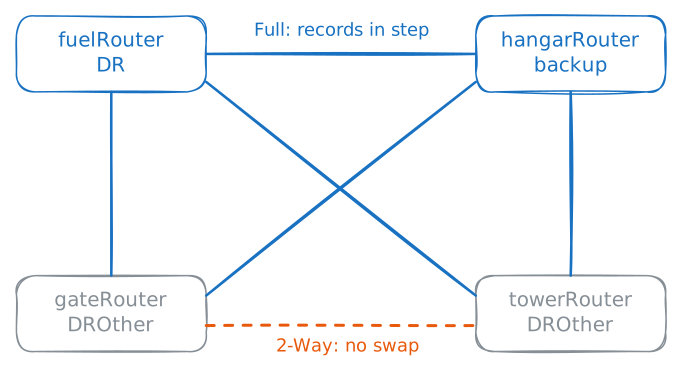
apron:gateRouter,towerRouter,hangarRouterandfuelRouter. If each pair kept its records in step separately, that's 6 pairs here, and 4950 on a network of 100 routers, all flooding the same records at one another.OSPF stops that with an election. One router on the network becomes its speaker, the designated router or DR, another becomes the backup, the BDR, and every other router keeps its records in step with those two only. Those others are called DROther in the output, and between themselves they stop at
2-Way, which means "I hear you, and I have no reason to swap records".A DROther sends news to
224.0.0.6, which only the DR and BDR listen to, and the DR repeats it to224.0.0.5, so one message reaches everybody. The DR also writes the one kind of record that isn't about its writer, the network's own, which is what you saw underNet Link States.The rules are short. The highest priority wins, 1 is the default, and a tie goes to the highest router ID, and a priority of 0 means a router never stands. The backup hears everything the DR hears, so when the DR goes, the backup takes over at once, and the network elects a new backup.
A real vote also depends on timing, because routers that finish starting first can vote before the others are heard. So the lab has held this one in stages, taking routers out of the running and putting them back, to give you the same result on every run:
fuelRouteris the DR,hangarRouteris the backup, and all four have priority 1.The airport's team wants the role on
towerRouter, the biggest box of the four, because the DR does the most work on this network.towerRouter:~# vtysh -c "show ip ospf neighbor" towerRouter:~# vtysh -c "configure terminal" -c "interface apron" -c "ip ospf priority 200" gateRouter:~# vtysh -c "show ip ospf neighbor" fuelRouter:~# vtysh -c "clear ip ospf process" gateRouter:~# vtysh -c "show ip ospf neighbor" hangarRouter:~# vtysh -c "clear ip ospf process" gateRouter:~# vtysh -c "show ip ospf interface apron"
-
Match the network type
towerFiberhas two routers on it, and OSPF treats it exactly as it treatsapron. It holds an election with two voters and writes a record for a network with two ends, and each time the link comes up the routers sit out theWaittime before voting, 4 seconds here, so that every router on the network gets heard.That comes from a card's network type, and the ospf network types you'll meet are these:
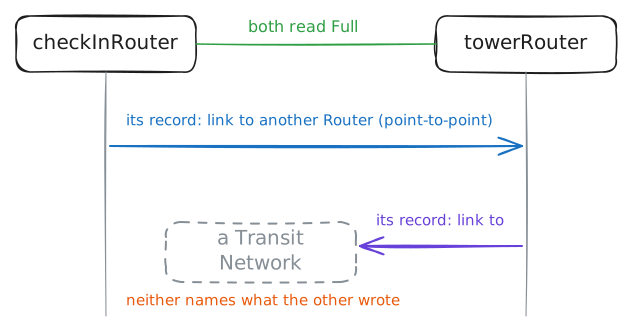
broadcastis the default on Ethernet: a shared network, so an election and a network record.point-to-pointmeans two routers and nothing else: no election, no wait, and no network record. A router's own record says "link to router 3.3.3.3".- Non-broadcast and point-to-multipoint are for networks that can't carry multicast. You'll rarely meet them.
The type is a setting on each end, and nothing in a hello carries it, so the protocol has no check for two ends that differ. FRR stays silent, and some vendors can only guess from other fields in the hello.
One more rule matters here. Before the calculation follows a link, it looks in the far end's record for that same link coming back, and it skips a link that only one end describes.
You're about to make them differ on purpose, by changing
checkInRouterfirst, which is the state a network sits in when somebody's work stops halfway. This step goes on to change the other end, so nothing stays broken.gateScanner:~# ping -c 3 -W 2 10.0.1.10 checkInRouter:~# vtysh -c "configure terminal" -c "interface towerFiber" -c "ip ospf network point-to-point" checkInRouter:~# vtysh -c "show ip ospf neighbor" towerRouter:~# vtysh -c "show ip ospf neighbor" checkInRouter:~# vtysh -c "show ip route 10.0.2.0/24" gateScanner:~# ping -c 3 -W 2 10.0.1.10 checkInRouter:~# vtysh -c "show ip ospf database router 1.1.1.1" checkInRouter:~# vtysh -c "show ip ospf database router 3.3.3.3" towerRouter:~# vtysh -c "configure terminal" -c "interface towerFiber" -c "ip ospf network point-to-point" towerRouter:~# vtysh -c "show ip ospf interface towerFiber" gateScanner:~# ping -c 3 -W 2 10.0.1.10
-
Split the map
A shared map has a price. Every router holds every record and reruns the calculation for every change, so a link that keeps failing in the cargo yard makes the router in the gate hall rerun the calculation for a corner of the airport it never uses. Nobody notices at six routers, and on a big network of small routers it hurts.
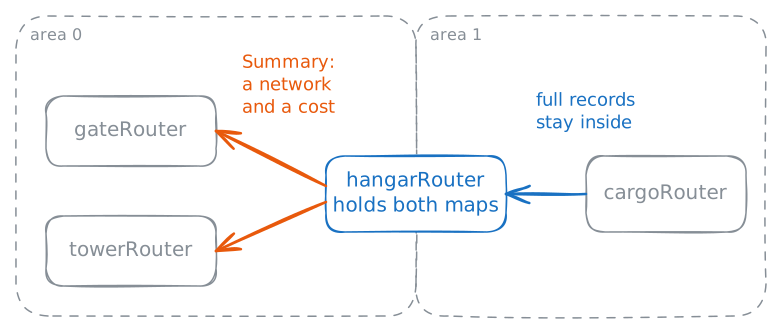
OSPF's answer is areas: cut the network into parts and keep one map per part. Every area joins area 0, the backbone, and a router with cards in both is an area border router, an ABR.
hangarRouteris the border here, withapronin area 0 andcargoRoadin area 1, andcargoRouterlives wholly in area 1. That's why5.5.5.5was missing from the map you read earlier.Inside an area, routers share full records. Across the border,
hangarRouterpasses on one short record per network, called a Summary, with a cost, so the rest of the airport knows that cargo's networks exist and how far away they are, and nothing about their shape. Look closely and that's distance vector, kept on purpose at the border of a link state protocol.A border router can go one step further and replace many Summaries with a single summary route for a whole block, and it keeps that one route for as long as any network in the block is alive.
cargoRouterhascargoBayat10.0.20.64/26andcargoOfficeat10.0.20.128/26, and both sit inside10.0.20.0/24.You'll read the map from inside the area, then shorten what the rest of the airport hears, then take one cargo network down.
That last command turns off a card on
cargoRouter, and the lab turns it back on when the step ends.cargoRouter:~# vtysh -c "show ip ospf database" checkInRouter:~# vtysh -c "show ip route ospf" hangarRouter:~# vtysh -c "configure terminal" -c "router ospf" -c "area 1 range 10.0.20.0/24" checkInRouter:~# vtysh -c "show ip route ospf" hangarRouter:~# vtysh -c "show ip route ospf" checkInRouter:~# vtysh -c "show ip ospf" cargoRouter:~# ip link set cargoOffice down checkInRouter:~# vtysh -c "show ip ospf" checkInRouter:~# ping -c 1 -W 2 10.0.20.130
Run these steps on real machines
Keep reading
- What is OSPF?, a step-by-step tour of neighbors, the database and the shortest path calculation article
- What is OSPF and How Does It Work?, CBT Nuggets on link state routing video
- OSPF DR BDR Selection Process Explained, the election worked through by hand article
- Computer Networks: A Systems Approach, section 3.4 on distance vector and link state routing book