 Hack the Route Start learning Open app
The idea
The council wants no games and no downloaded programs on the library's reading-room PCs, and a Firewall sees addresses, not websites. Put a forward proxy in the way, and find out what it reads, what it refuses, and what slips past it.
Steps
-
The only way out
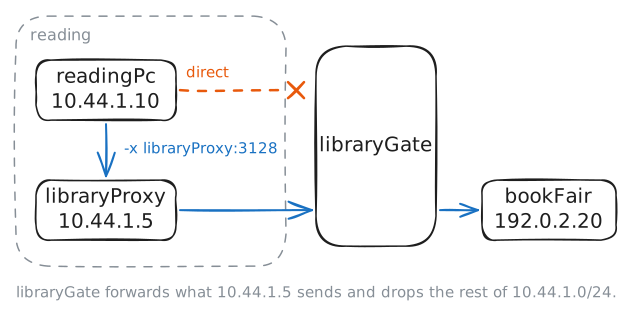
Kofi runs the computers at Elm Street Library. The reading room's PCs,
readingPcamong them, sit on a network calledreading. Everything else isoutside: thebookFair's website, a game site called thearcade, and thechessClub.The council gave Kofi two rules for the reading room: no games, and no downloading programs. A firewall can't keep them well: it sees addresses and ports, never a file, and a site's address can change or be shared with others.
So Kofi set the library up the way schools and offices do:
libraryGate, the firewall, lets nothing out of the reading room except one machine,libraryProxy. That machine is a forward proxy, a server that fetches pages for other machines. A PC hands it the whole request, and the proxy decides whether to fetch it.The idea is nearly as old as the web: in 1994 CERN's web server could already work as a proxy, so a building full of PCs shared one connection and one stored copy of each page. Control came with it, since the one machine that fetches is the one place to say no. Kofi's proxy runs squid, the best-known free one, on port 3128.
Fetch the book fair's page from
readingPcdirectly, then again through the proxy, withcurl -x.readingPc:~# curl -sS -m 3 http://bookFair.lab/ readingPc:~# curl -sS -m 3 -x http://libraryProxy:3128 http://bookFair.lab/
-
Two requests, two connections
An ordinary request to a web server starts with a line like
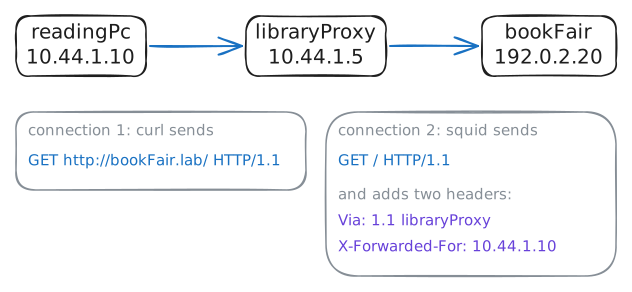
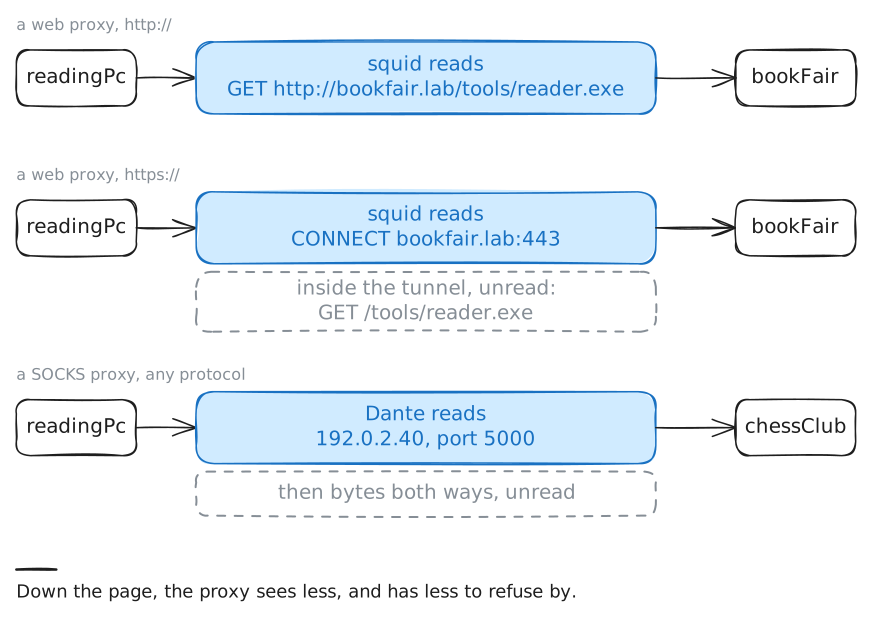
GET / HTTP/1.1. The server already knows it is the book fair, so the line names only the path,/. Headers follow it, one per line, such asHost: bookFair.labandUser-Agent: curl/8.14.1: notes about the request.A proxy needs more than a path: it has to know where to go. So a client talking to a proxy puts the whole address in the request line,
GET http://bookFair.lab/ HTTP/1.1, which the HTTP standard calls the absolute form.The proxy reads that, decides, and makes a new request of its own on a new TCP connection, from its own address. Going by addresses, the book fair's visitor is
libraryProxy, every time, whichever PC asked.Ask again with
-v, which prints whatcurlsends (the lines starting>) and the headers of the answer (<). The lab records the request that reachesbookFair, and prints its text as well as its addresses.readingPc:~# curl -v -sS -m 3 -x http://libraryProxy:3128 http://bookFair.lab/
-
The proxy says no
The whole address arrives at the proxy, so the proxy can judge any part of it: the name, the path, the end of the file name. That is what a firewall can't do, and it is the council's two rules.
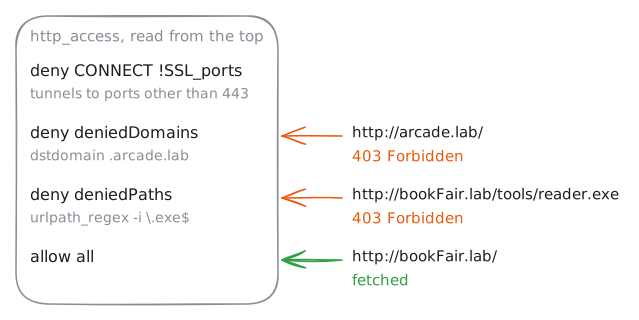
Squid's rules come in two kinds of line. An
aclline gives a test a name:acl deniedDomains dstdomain .arcade.labmeans "the address isarcade.lab, or any name under it". Anhttp_accessline allows or denies the requests a test matches.The
http_accesslines are read from the top, and the first one that matches decides, the same way a firewall reads its rules. The last line,http_access allow all, catches everything nobody refused. Read squid's rules onlibraryProxy, then ask for the arcade and for the book fair's reader app, and read the proxy's log.libraryProxy:~# cat /etc/squid/squid.conf readingPc:~# curl -sS -I -m 3 -x http://libraryProxy:3128 http://arcade.lab/ readingPc:~# curl -sS -I -m 3 -x http://libraryProxy:3128 http://bookFair.lab/tools/reader.exe libraryProxy:~# tail -n 2 /var/log/squid/access.log
-
HTTPS shows only the name
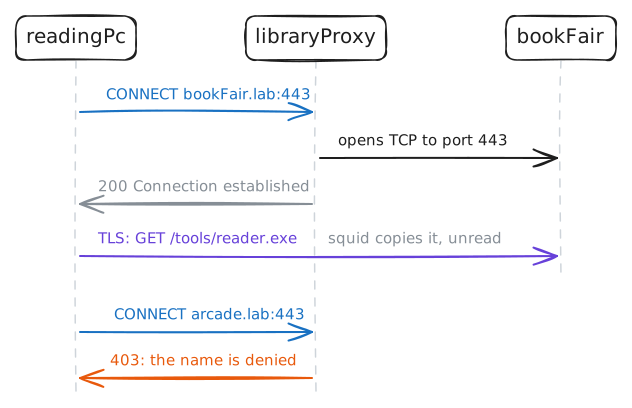
With HTTPS, everything between the browser and the site is encrypted, the path included. A proxy that received the whole request in the clear would undo that. So for an
https://address,curlasks the proxy for a tunnel instead:CONNECT bookFair.lab:443.The proxy reads the name and port, connects to the site, answers
200 Connection established, and from then on copies bytes both ways without reading them. The encryption starts inside the tunnel, betweenreadingPcand the book fair, and the request, path and all, travels inside it.That is also where the first decision line comes in:
deny CONNECT !SSL_portsrefuses any tunnel to a port other thanSSL_ports, here 443 (SSL is TLS's old name). It limits the port, not what runs there: a server listening on 443 gets whatever bytes the client sends.Fetch the same reader app, through the same proxy, over HTTPS. Then try the arcade the same way.
readingPc:~# curl -sS -m 3 -x http://libraryProxy:3128 https://bookFair.lab/tools/reader.exe
readingPc:~# curl -sS -m 3 -x http://libraryProxy:3128 https://arcade.lab/
libraryProxy:~# tail -n 2 /var/log/squid/access.log
-
A SOCKS door reads nothing
Not everything is a website. The chess club speaks its own protocol on port 5000: connect, and the club's server announces itself in one line. Squid tunnels only to port 443, so the reading room can't reach it.
Kofi opened a second door on
libraryProxyfor this: a SOCKS proxy, Dante, on port 1080. SOCKS dates from 1992, and SOCKS5, the version in use, from 1996.SOCKS is a circuit-level gateway: the client names a host and a port, and the proxy opens the TCP connection and copies bytes both ways, unread. It carries any protocol for exactly that reason, and can judge only the host and port it is asked for, never a URL.
curlspeaks to both kinds. Atelnet://address makescurlopen a plain TCP connection and print what comes back. With-pit asks the web proxy for a tunnel, and--socks5-hostnamesends the connection through SOCKS, leaving the name for the proxy to look up; plain--socks5looks the name up on the PC and hands the proxy an address.Try the chess club through squid, then through SOCKS. Then ask SOCKS for the arcade, and read Dante's log.
readingPc:~# curl -sS -m 3 -p -x http://libraryProxy:3128 telnet://chessClub.lab:5000
readingPc:~# curl -sS -m 3 --socks5-hostname libraryProxy:1080 telnet://chessClub.lab:5000
readingPc:~# curl -sS -m 3 --socks5-hostname libraryProxy:1080 http://arcade.lab/
libraryProxy:~# tail -n 3 /var/log/sockd.log
Run these steps on real machines