 Hack the Route Start learning Open app
The idea
Every attack on a website arrives on the site's own port, 80 or 443, in an ordinary-looking request, so a Firewall that reads addresses and ports lets it in. Put a firewall in front of the site that reads the request itself, and find out what it catches, what slips past, and whom it refuses by mistake.
Steps
-
A firewall that reads the request
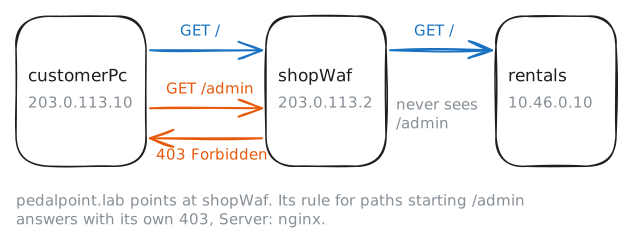
Pedal Point rents bikes from stations around town, and Inés runs its booking site. The site,
rentals, sits on the shop's own network. The name customers type,pedalpoint.lab, points somewhere else: atshopWaf.A packet firewall in front of a website has to allow port 80, or 443 for HTTPS, or nobody can book a bike. Every attack on the site arrives on that port too, inside an ordinary HTTP request: a strange path, a strange search, a few thousand requests a minute. Addresses and ports can't tell those apart from customers.
A web application firewall, a WAF, reads the request.
shopWafis a reverse proxy: customers connect to it, it reads each request whole, and it passes on only the ones its rules allow, over its own connection torentals. A forward proxy speaks for one building's PCs to the whole web; a reverse proxy speaks for one site to everyone.WAFs grew up with web shops. ModSecurity, the best-known open-source one, appeared in 2002, and from 2008 the card industry's rules, PCI DSS, told sites taking cards to run a WAF or have their code reviewed.
rentalshas an admin page at/admin, which Inés wants kept from the public. Fetch the home page fromcustomerPc, then the admin page.customerPc:~# curl -sS -m 3 http://pedalpoint.lab/ customerPc:~# curl -sS -i -m 3 http://pedalpoint.lab/admin
-
Two disguises for one path
The rules live in their own file on
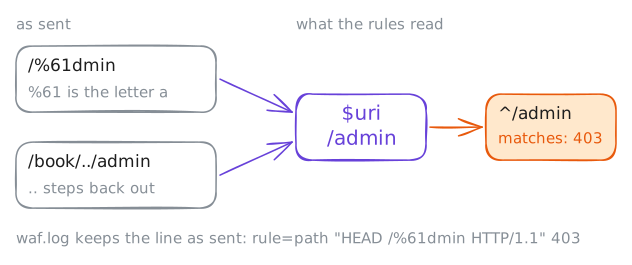
shopWaf,/etc/nginx/waf.rules. Each line is anif: a part of the request,~*meaning "matches this pattern, in any case", the pattern, and the name of the rule to log.$uriis the path.^/adminis a regular expression:^means "at the start", so the rule matches any path that starts with/admin.Nobody probing a site stops at the polite spelling. A URL can write any byte as
%and two hex digits (0 to 9 and a to f), so%61is the letteraand/%61dminis/adminin disguise.A path can also wander:
/book/../admingoes into/bookand back out, and lands on/admin.curltidies..away before sending, so--path-as-ismakes it send the path exactly as typed.Read the rules, try both disguises, then read the WAF's own log,
/var/log/nginx/waf.log, one line per refusal.shopWaf:~# cat /etc/nginx/waf.rules customerPc:~# curl -sS -I -m 3 http://pedalpoint.lab/%61dmin customerPc:~# curl -sS -I -m 3 --path-as-is http://pedalpoint.lab/book/../admin shopWaf:~# tail -n 2 /var/log/nginx/waf.log
-
An attack in the query string
Everything after the
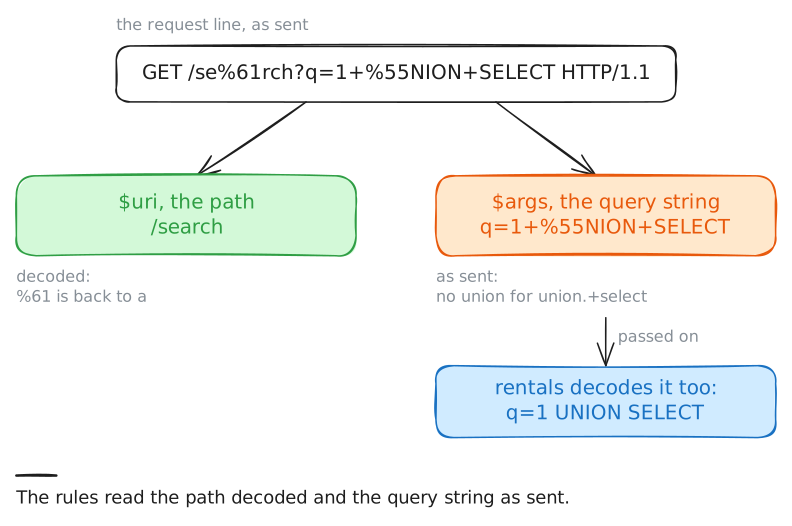
?is the query string, where a search form's fields travel:/search?q=harbour. It is also where a classic attack on database-backed sites, SQL injection, travels.The attacker types database commands into a field, hoping the site pastes them into its own database query.
union selectis two words from that attack: it makes a query return rows from another table, such as the passwords.The argument rule reads
$args, the query string, with the patternunion.+select:union, then at least one of anything, thenselect.Send the attack twice: plainly, then with the
Uwritten%55, which the application decodes back intoUwhen it reads the field. Then readrentals' own log,/var/log/httpd.log, which notes each request it was handed.customerPc:~# curl -sS -I -m 3 "http://pedalpoint.lab/search?q=1+union+select+password+from+users" customerPc:~# curl -sS -m 3 "http://pedalpoint.lab/search?q=1+%55NION+SELECT+password+from+users" rentals:~# tail -n 2 /var/log/httpd.log
-
Refusing a customer
A WAF can fail the other way: refuse an honest request. That is a false positive, and it is worse than it sounds. The customer gets a
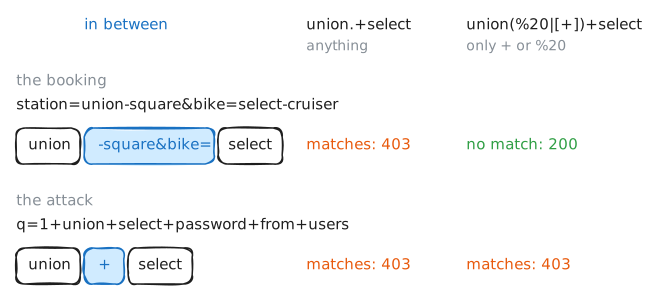
403and leaves,rentalsnever hears of it, and only the WAF's log knows.Pedal Point's booking form searches by station and bike. Someone picking up a Select Cruiser at Union Square sends
station=union-square&bike=select-cruiser.The fix is a tighter pattern, closer to the attack as it was sent:
union, then spaces, thenselect.In a query string a space is sent as
+or%20, so the new pattern isunion(%20|[+])+select.(%20|[+])means%20or+, since|means "or", and the+after it means one or more of them. Brackets make the inner+a plain character.Try the booking. Then write the new rules file on
shopWafand tell nginx to read it again withnginx -s reload, which swaps the rules without dropping a single connection. Then try the booking and the attack again.customerPc:~# curl -sS -I -m 3 "http://pedalpoint.lab/search?station=union-square&bike=select-cruiser" shopWaf:~# nginx -s reload customerPc:~# curl -sS -I -m 3 "http://pedalpoint.lab/search?station=union-square&bike=select-cruiser" customerPc:~# curl -sS -I -m 3 "http://pedalpoint.lab/search?q=1+union+select+password+from+users"
-
Too many, too fast
Some trouble looks innocent one request at a time. Someone guessing passwords, a bot copying every price, a flood meant to knock the site over: each request is ordinary, and there are thousands of them.
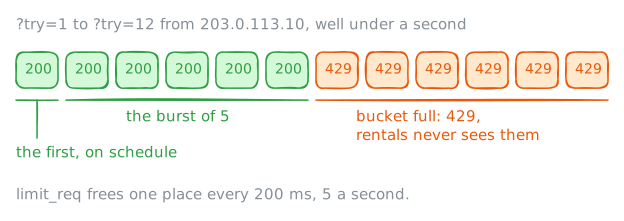
shopWafcounts requests from each address with nginx'slimit_req: one request every 200 ms, 5 a second. The first request is on schedule, and up to 5 more may come early, each taking a place in a bucket that empties at the same pace. A request that finds the bucket full gets429 Too Many Requests, andrentalsnever hears of it.Two more lines of the rules read the
User-Agentheader, the name a client sends for itself.niktotests web sites for holes, andmasscansweeps networks for open ports. Both send their names by default.Ask for the home page calling yourself
nikto, then calling yourself a browser. Then send 12 requests at once:[1-12]in a URL makescurlsend twelve, one after another, and-wprints each one's status code. Then read the WAF's log.customerPc:~# curl -sS -I -m 3 -A "Nikto/2.5.0" http://pedalpoint.lab/ customerPc:~# curl -sS -I -m 3 -A "Mozilla/5.0" http://pedalpoint.lab/ customerPc:~# curl -sS -m 3 -o /dev/null -w "%{http_code} " "http://pedalpoint.lab/?try=[1-12]" shopWaf:~# tail -n 3 /var/log/nginx/waf.log
Run these steps on real machines