 Hack the Route Start learning Open app
The idea
A cloud server sits behind two firewalls: a security group around the server and a network ACL at its subnet's edge. Open one to a new server, and find the answer that the other one drops.
Steps
-
Who may reach the orders
Priya runs Lumen Books, an online bookshop, in a VPC. Two web servers,
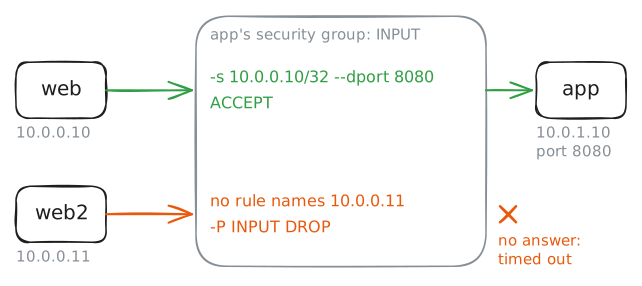
webandweb2, sit in the public subnet. The orders service,app, sits in the private subnet and answers on port 8080.Every server in a cloud has a security group: a firewall the provider wraps around the server's network card. It holds allow rules only. Whatever no rule allows is dropped, so a new group lets nothing in.
The provider runs the group outside the server, where nothing on the server can turn it off. Here it's
iptables, Linux's packet rules, onappitself, with the same rules.web2went live this morning. Askappfor the orders fromweb, then fromweb2. Then listapp's rules.web:~# curl -sS -m 3 http://10.0.1.10:8080/ web2:~# curl -sS -m 3 http://10.0.1.10:8080/ app:~# iptables -S
-
One more sender
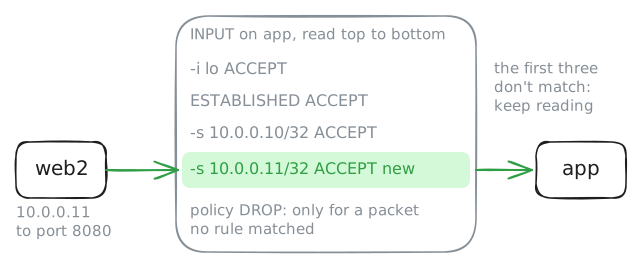
web2needs the orders too. On AWS, you'd openapp's group and add an inbound rule: TCP, port 8080, from10.0.0.11/32. Here it's one command onapp.-Aadds the rule at the end of the list, after the three rules already there. Does that matter?app:~# iptables -v -A INPUT -s 10.0.0.11/32 -p tcp --dport 8080 -j ACCEPT web2:~# curl -sS -m 3 http://10.0.1.10:8080/
-
A list for the whole subnet
A security group guards one server. A network ACL, or NACL, guards a whole subnet's edge, and it works differently in three ways:
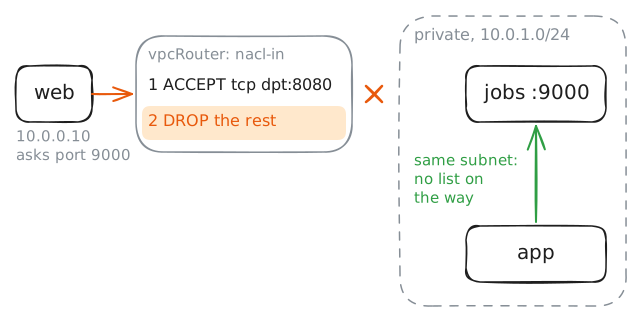
- its rules are numbered and read in order, and the first one that matches decides;
- a rule can allow or deny;
- it remembers nothing, so every packet is judged on its own.
The private subnet's ACL lives on
vpcRouter, the Router that every packet into or out of the subnet crosses.nacl-inis for packets going in,nacl-outfor packets leaving.jobs, the nightly job server, has a group that lets anything in: someone set it up in a hurry. Askjobsfor its page, on port 9000, fromweband fromapp. Then list both of the ACL's lists.web:~# curl -sS -m 3 http://10.0.1.30:9000/ app:~# curl -sS -m 3 http://10.0.1.30:9000/ vpcRouter:~# iptables -L nacl-in -n --line-numbers vpcRouter:~# iptables -L nacl-out -n --line-numbers
-
The answer needs a rule too
A colleague reads
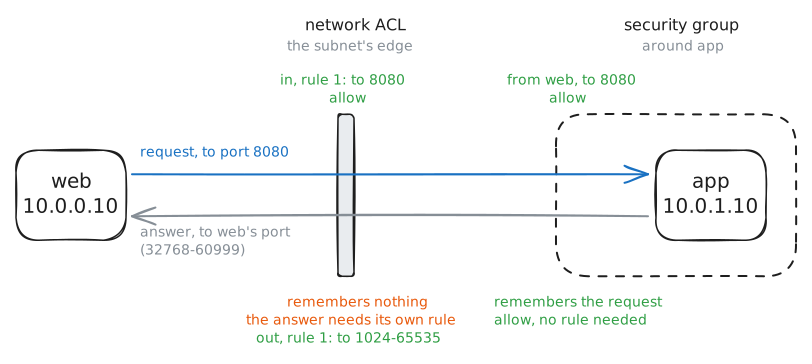
nacl-outand frowns. Rule 1 lets the private subnet send to more than 64,000 ports in the public subnet. The shop only talks toappon port 8080, so surely port 8080 is enough?Try it:
iptables -R nacl-out 1replaces rule 1 with a narrower one. Then ask for the orders fromwebwhile the lab records onvpcRouter's card in the private subnet. Last, put the wide rule back and ask again.vpcRouter:~# iptables -R nacl-out 1 -d 10.0.0.0/24 -p tcp --dport 8080 -j ACCEPT web:~# curl -sS -m 3 http://10.0.1.10:8080/ vpcRouter:~# iptables -R nacl-out 1 -d 10.0.0.0/24 -p tcp --dport 1024:65535 -j ACCEPT web:~# curl -sS -m 3 http://10.0.1.10:8080/
Run these steps on real machines
Keep reading
- Security groups: allow rules only, stateful, around each resource article
- Network ACLs: numbered allow and deny rules at the subnet's edge, and stateless article
- Ephemeral ports: which range a network ACL must let the answers through article
- Azure network security groups: priorities, allow and deny, and still stateful article