 Hack the Route Start learning Open app
The idea
Philippa runs the platform at Dovetail Mail. A small serverless function (code the cloud runs on demand, with
no server to manage), welcome-mailer, greets every new subscriber. It builds the greeting with a tiny in-house
template engine. To let the marketing team tweak the wording, the event that triggers it may carry its own
greeting template. That is the flaw.
A serverless function receives the short-term keys of the role it runs as in environment variables, and this
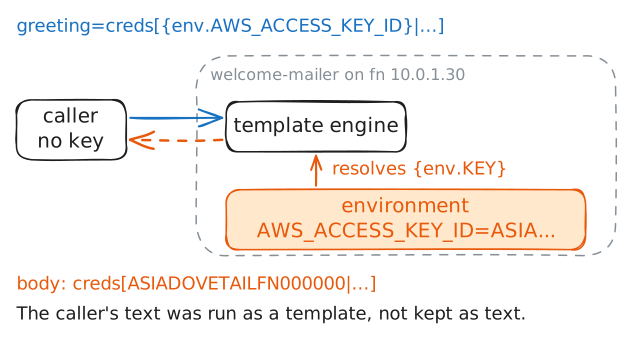
template engine will resolve an {env.KEY} token. So a caller who controls the template can read the function's
environment back out.
You are on operator with curl and aws and no credentials. Call the function, inject a template that
discloses the role's keys, use them to read a bucket you could not touch, then harden the function so the caller's
input is treated as data.
Steps
-
The welcome mailer
The function on
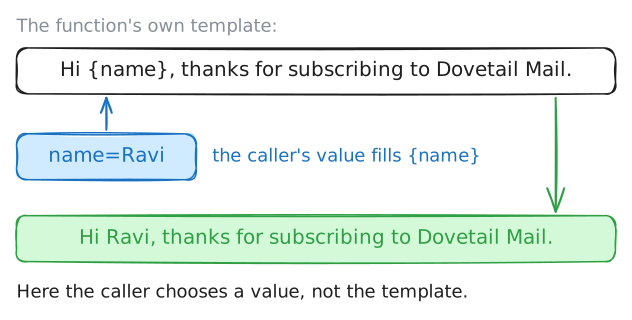
fn(10.0.1.30) takes a subscriber name and returns a greeting. Call it the ordinary way first, with only a name. The engine fills{name}into its template and hands back the line a new subscriber would see. Nothing alarming yet.operator:~# curl -s "http://10.0.1.30/invoke?name=Ravi"
-
A template you control
Here is the flaw. The event may carry its own
greetingtemplate, and the engine renders it with the function's environment in scope: it resolves an{env.KEY}token to that environment variable. A serverless function is handed its role's credentials as environment variables (AWS_ACCESS_KEY_ID,AWS_SECRET_ACCESS_KEY,AWS_SESSION_TOKEN). So hand it a greeting template built from those tokens.This is injection: the caller's input is treated as code (here, a template) instead of as data. (
curl -gturns off curl's own{}and[]globbing so the braces and brackets in the template reach the function intact.)operator:~# curl -gs "http://10.0.1.30/invoke?name=x&greeting=creds[{env.AWS_ACCESS_KEY_ID}|{env.AWS_SECRET_ACCESS_KEY}|{env.AWS_SESSION_TOKEN}]" -
Walk out with the subscriber list
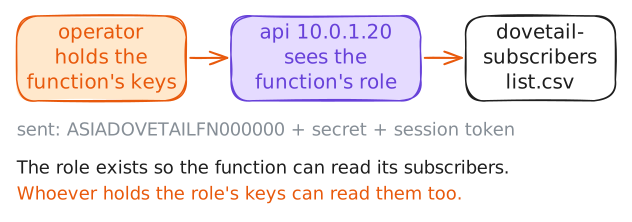
Those are live credentials for the function's role, and that role may read the subscriber bucket. Put the three values in the environment (a short-term
ASIA…key must carry its session token) and read the list fromdovetail-subscribers.One honest line: this is lawful here only because the estate is Dovetail's own and Philippa's to inspect. The same steps against a function whose owner has not authorised you in writing are a crime.
operator:~# AWS_ACCESS_KEY_ID=ASIADOVETAILFN000000 AWS_SECRET_ACCESS_KEY=dovetailFnRoleSecretLabOnlyNotReal000000 AWS_SESSION_TOKEN=IQoJb3JpZ2luX2VjDOVETAILsessionTokenLabOnlyB= aws --endpoint-url http://10.0.1.20 s3 cp s3://dovetail-subscribers/list.csv -
-
Treat the input as data
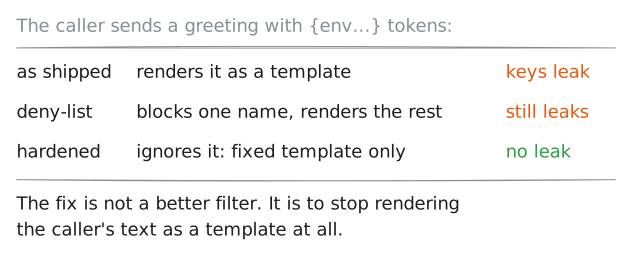
The fix is to stop treating the caller's input as code. A hardened
welcome-mailerignores any caller-supplied template and always renders its own fixed greeting, with the name substituted as data. So{env.…}in an event is only text that never gets resolved.This fix closes the whole class, not one payload. A deny-list that blocks
AWS_ACCESS_KEY_IDstill runs the caller's text as a template, so a renamed variable or a different token gets straight through. Refusing to render caller input as a template at all shuts every one of them at once.In this lab, the function switches to that safe behaviour the moment a hardening marker file exists on
fn. Create it.fn:~# touch /opt/cloud/fn-hardened
-
Prove the injection fails
Run the exact injection from before: the same URL, the same
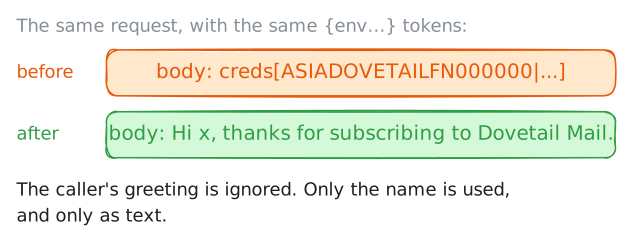
{env.…}tokens that leaked the keys a moment ago. A defence is proven by re-running the original attack, not by checking that something looks different.The function now ignores the
greetingthe caller sent and renders its own fixed template with the name as data, so the credential tokens are never resolved. The response is still the same JSON shape, but itsbodyholds only the plain greeting: no key id, no secret, no session token. If the exact attack returns nothing sensitive, the hole is closed.operator:~# curl -gs "http://10.0.1.30/invoke?name=x&greeting=creds[{env.AWS_ACCESS_KEY_ID}|{env.AWS_SECRET_ACCESS_KEY}|{env.AWS_SESSION_TOKEN}]"
Run these steps on real machines