 Hack the Route Start learning Open app
The idea
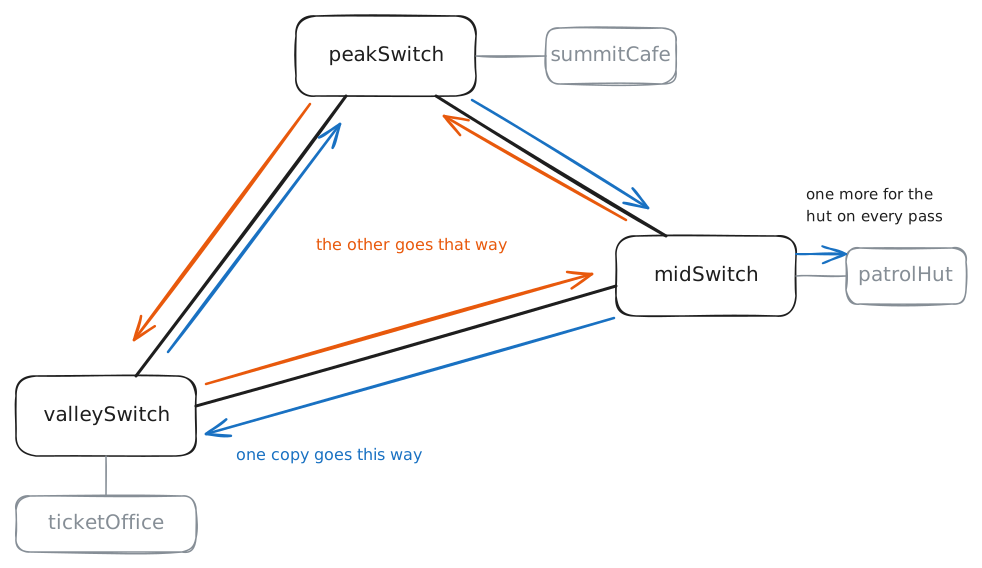
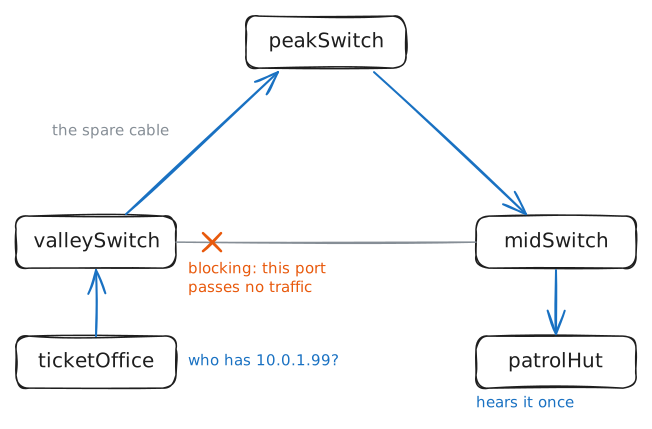
Tomas wants a spare cable up the mountain, so he plugs one in, and one small broadcast goes round his ring of switches for ever. Watch that storm take the network down, then turn on spanning tree and watch three switches agree, with nobody in charge, on the one port to stop using.
Steps
-
Plug in the spare cable
Tomas looks after the network at a ski resort with three stations up one mountain.
ticketOfficesells passes in the valley,patrolHutwatches the slopes from the mid-station, andsummitCafefeeds people at the top. Each station has a Switch, the box that joins the cables at that spot, and the three switches hang in a chain,valleySwitchtomidSwitchtopeakSwitch.Last winter an avalanche took out the cable below the mid-station, and everything above it fell off the network for a day. So this summer a contractor buried a third cable straight from the valley to the summit.
It's plugged into both switches, and its port on
valleySwitchis the last thing still turned off. The lab names each port after whatever is plugged into it, so that port is calledpeakSwitch.Turning that port on gives every station two ways out, which sounds like nothing but good news. First check that the chain works, then turn the port on and look at the ports.
After that,
ticketOfficeasks one question, an ARP request, of every machine on the network: who has10.0.1.99? No machine does. A message to everyone like this is a broadcast. It travels as a frame, the unit a switch carries, and a switch copies a broadcast frame out of every port except the one it came in on.Then go to
patrolHut, a machine with no part in any of this, and see what's reaching it.ticketOffice:~# ping -c 1 -W 2 10.0.1.30 valleySwitch:~# ip link set dev peakSwitch up valleySwitch:~# bridge link show ticketOffice:~# arping -c 1 -w 1 -I eth0 10.0.1.99 patrolHut:~# tcpdump -n -e -c 8 -i eth0 arp patrolHut:~# ip -s link show eth0 patrolHut:~# ip -s link show eth0
-
See what the storm broke
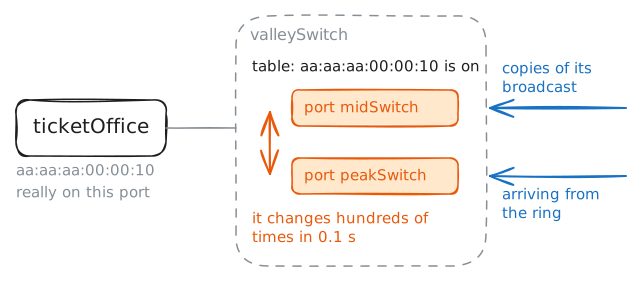
A storm wastes capacity, and it does something worse. A switch builds its table by reading the sender's hardware address on every frame and noting which port it arrived on. That's the
learning-switcheslab in one line, and it only works because a machine normally sits in one place, so its frames always arrive from one direction.Every copy going round this ring carries
ticketOffice's address as its sender,aa:aa:aa:00:00:10, and the copies reachvalleySwitchfrom up the mountain. So ping the summit again, the same ping that worked a minute ago, and then read the table onvalleySwitch.The last command in this step watches the table change as it happens, for a tenth of a second.
ticketOffice:~# ping -c 5 -i 0.2 -W 1 10.0.1.30
valleySwitch:~# bridge fdb show dynamic
valleySwitch:~# timeout 0.1 bridge monitor fdb
-
Turn on spanning tree
Tomas could unplug the spare and go back to a chain, one avalanche away from a dead summit. The engineers selling the first Ethernet switches, then called bridges, faced that same choice in the early 1980s: customers wanted spare cables, and spare cables made loops.
Radia Perlman, an engineer at Digital Equipment Corporation, was handed the problem, and in 1985 she published the answer. Leave every cable plugged in, and have the switches work out among themselves which ports to stop using, so that exactly one path remains between any two of them. When a cable dies, they work it out again and a stopped port goes back into service.
The shape left over gives the idea its name. In maths, a tree is a set of lines with no way round in a circle, and a spanning tree is one that reaches every point. Perlman marked the occasion with a poem that opens "I think that I shall never see / A graph more lovely than a tree." The Spanning Tree Protocol, or STP, became the IEEE standard 802.1D in 1990, and the switches in nearly every building still run it or one of its descendants.
On these switches the setting is
stp_state 1, and all three have to turn it on, since the switches can't agree on anything until each of them is taking part. The storm is still running as you type.valleySwitch:~# ip link set dev br0 type bridge stp_state 1 midSwitch:~# ip link set dev br0 type bridge stp_state 1 peakSwitch:~# ip link set dev br0 type bridge stp_state 1 valleySwitch:~# bridge link show ticketOffice:~# ping -c 5 -i 0.2 -W 1 10.0.1.30 valleySwitch:~# bridge fdb show dynamic ticketOffice:~# arping -c 1 -w 1 -I eth0 10.0.1.99
-
Read the tree
There's no boss here. No machine hands out decisions, and the switches reach the same answer because they all run the same three rules on the same facts.
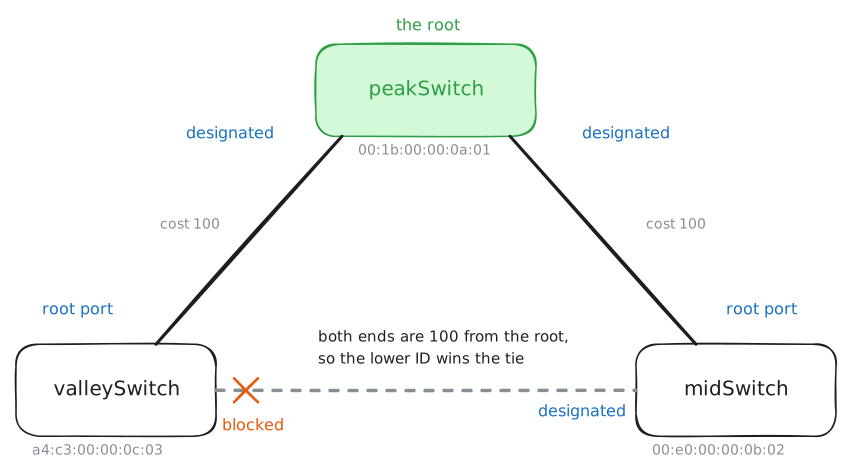
Rule one elects a root, one switch for the tree to grow from. Each switch has a bridge ID, made of a priority, 32768 by default, followed by its hardware address, and the lowest ID wins. Each switch starts out claiming to be the root, in a small message called a BPDU, a bridge protocol data unit, and gives up the claim as soon as it hears a lower ID.
Rule two gives every other switch a root port, its cheapest way to the root. Each port has a cost, the
cost 100inbridge link show, and a path's cost is the sum along it. On real switches a faster cable costs less, which steers the tree onto the better links, and a command likebridge link set dev midSwitch cost 200sets a cost by hand.Rule three settles each cable. The end nearer the root becomes the designated port, the one that serves that cable, and a tie goes to the switch with the lower bridge ID. Any port left with no job, neither root port nor designated port, blocks.
These three switches share the default priority, so their hardware addresses decide it:
a4:c3:00:00:0c:03forvalleySwitch, bought new last year,00:e0:00:00:0b:02formidSwitch, and00:1b:00:00:0a:01forpeakSwitch, the oldest box on the mountain. Read each switch's view of the tree, then listen on the blocked port. Last, ping from the office to the patrol hut, one cable apart, and the lab listens up at the summit.valleySwitch:~# ip -d link show br0 midSwitch:~# ip -d link show br0 peakSwitch:~# ip -d link show br0 valleySwitch:~# tcpdump -n -e -v -c 1 -i midSwitch stp ticketOffice:~# ping -c 1 -W 2 10.0.1.20
-
Move the root to the valley
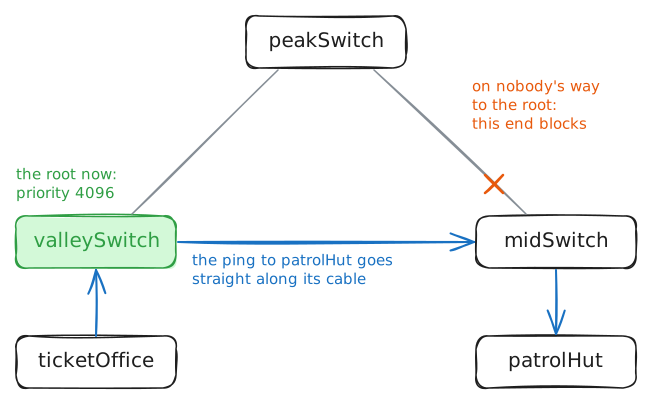
What happened on this mountain happens in real buildings all the time: a forgotten old switch in a closet wins the election, and the whole network's traffic bends towards it. The bridge ID's order is the way out. Priority comes first and the hardware address second, so a low priority beats any address, and the root stops being an accident.
The valley is where nearly all this resort's traffic meets, so
valleySwitchshould be the root. Set its priority to 4096, a low number that real switches accept because they move priority in steps of 4096. It's the sameip link setyou used for spanning tree, with a different setting.The switches will hear a better claim and work the tree out again. That takes a few seconds in this lab, with the affected ports passing nothing in the meantime, so on a real network this is a change for a quiet hour.
valleySwitch:~# ip link set dev br0 type bridge priority 4096
midSwitch:~# ip -d link show br0
midSwitch:~# bridge link show
ticketOffice:~# ping -c 1 -W 2 10.0.1.20
-
Cut a cable
This whole lab has been for this moment. The avalanche comes back and takes out the cable from the valley to the summit, the one carrying all of
summitCafe's traffic.The lab cuts the cable at the valley's end, the kind of fault that leaves the far end's light on, like a dead box halfway along a long fibre. So
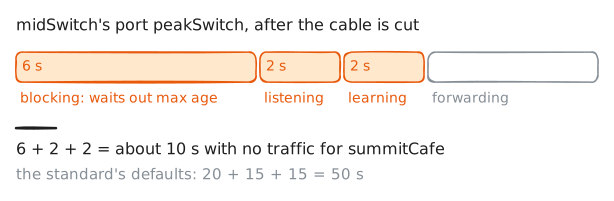
peakSwitchgets no warning and only notices that the root's messages have stopped, andmidSwitchnotices at the same moment, since its blocked port was hearing those messages by way of the summit.How long they wait is a timer called max age: how long a switch trusts its last message before deciding the news is out of date. In this lab that's 6 seconds, after one message a second.
A blocked port can't then start passing traffic at once, since other switches may not have heard the news yet, and a port opened too early could close a loop for a moment. You've seen what a loop does, so spanning tree moves through two waiting states. For one forward delay, 2 seconds here, the port is
listening, hearing the new tree take shape, and for another it'slearning, filling its table so that it doesn't start by flooding. Then it'sforwarding.The lab shortens all these timers so that you aren't waiting.
summitCafepingsticketOfficefive times a second for 20 seconds, and partway through, the lab cuts the cable onvalleySwitch, so it's not one for you to type.summitCafe:~# ping -i 0.2 -c 100 -W 1 10.0.1.10 valleySwitch:~# ip link set dev peakSwitch down midSwitch:~# bridge link show summitCafe:~# ping -c 1 -W 2 10.0.1.10
Run these steps on real machines