 Hack the Route Start learning Open app
The idea
Two cables between two buildings ought to mean twice the speed. Bond them with link aggregation, measure it, and find out what the bond really does with each packet. Then lose a fibre that no card can see, and watch LACP catch what a plain bond's link check never will.
Steps
-
Turn on the second cable
Nadia looks after the network at a daily newspaper in a harbour town. Editors finish pages in the
newsroom, and the pages cross a yard toprintWorks, where the press starts at midnight. Since the paper added a colour supplement that's nearly 30 gigabytes a night, and the one cable across the yard takes 40 minutes over it, which eats the last chance to change the front page.The usual cure for a slow cable is a faster one, along with a faster network card at each end. In the early 1990s that step cost a fortune, so makers of switches came up with a cheaper trick: run several ordinary cables side by side and make them act as one.
A small company called Kalpana did it first, and Cisco bought it in 1994 and sold it as EtherChannel. Other makers' versions wouldn't work with Cisco's until the IEEE, the body that writes Ethernet's standards, published a shared one in 2000, called 802.3ad. The plain name is link aggregation, and Linux calls the result a bond.
The cables do have to be joined, not only plugged in. Left as two separate cards they'd each need an IP address of their own, and a connection would stick to one of them. A bond counts as one card to everything on the machine, so there's one address, and both cables can carry its traffic. Between switches it does a second job: spanning tree would treat two plain cables as a loop and shut one down, as the
stp-loopslab shows, and a bond counts as one cable.Nadia has had a second cable laid. Each machine now has one card called
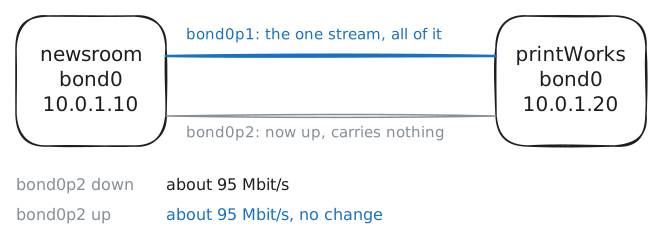
bond0, which holds its address, built from two real cards,bond0p1andbond0p2. Each of those drives one cable, sobond0p2and "the second cable" mean the same thing in this lab. It's still off, so read the bond, measure what one cable gives you, turn the second on, and measure again.newsroom:~# cat /proc/net/bonding/bond0 newsroom:~# iperf3 -c 10.0.1.20 -t 5 -i 0 newsroom:~# ip link set dev bond0p2 up newsroom:~# iperf3 -c 10.0.1.20 -t 5 -i 0
-
Count what each cable carried
The second cable is lit and the number hasn't moved, so ask each cable what it's been doing.
The obvious way to share two cables is to take turns, one packet down each. Linux has a bond mode that does exactly that, and it's rarely used, because of what it does to TCP. A card hands arriving packets to the machine in batches, first one cable's and then the other's, so packets overtake each other even on identical cables. TCP reads a packet arriving out of order as the first sign that one was lost, so it resends and slows down, and the extra cable buys far less than it should.
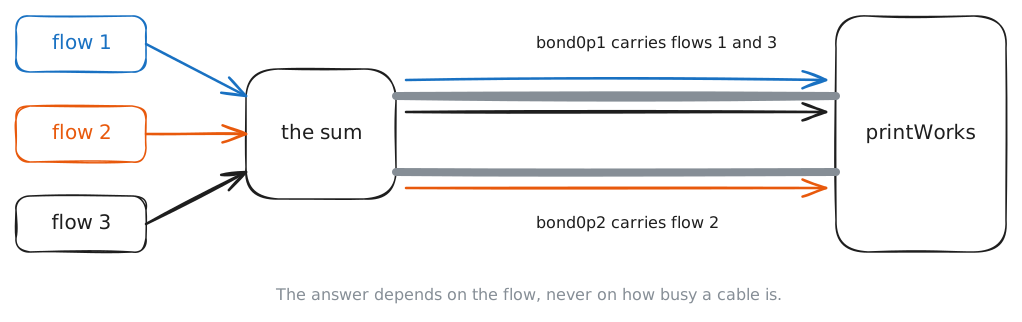
So the standard asks for the opposite: every packet of a conversation stays on one cable, and arrives in order. The word for one conversation is a flow, and each
iperf3connection is one.To choose the cable, the bond does a sum called a hash. It takes a few numbers out of a packet's headers, mixes them, divides by the number of cables and keeps the remainder. Packets from one flow carry the same numbers, so they get the same answer, every one of them, for as long as the bond's cables stay the same.
That sum never looks at how busy a cable is. Read the counters, run one flow, read them again.
newsroom:~# ip -s link show master bond0
newsroom:~# iperf3 -c 10.0.1.20 -t 5 -i 0
newsroom:~# ip -s link show master bond0
-
Send eight flows at once
A night's pages are thousands of files, so nothing forces them down one flow. Nadia's transfer tool can open eight connections at once, and eight flows ought to scatter over two cables.
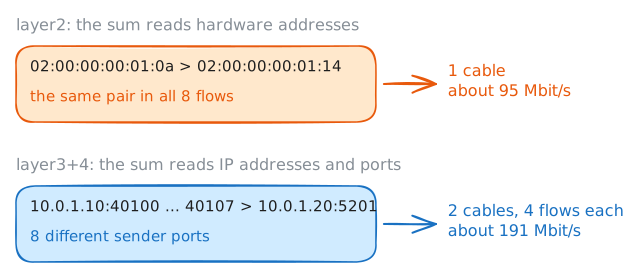
iperf3can do the same with-P 8. Each flow gets its own port number, so eight flows look different in their headers. The machine normally picks those numbers for itself, and--cport 40100sets them by hand, 40100 up to 40107, so this step sends the very same eight flows both times.Whether the sum sees that difference is another matter. The page you read in the first step had a line about it:
Transmit Hash Policy: layer2. The policy says which numbers go into the sum, andlayer2means little more than the hardware addresses.newsroom:~# iperf3 -c 10.0.1.20 -t 5 -i 0 -P 8 --cport 40100 newsroom:~# ip link set dev bond0 type bond xmit_hash_policy layer3+4 newsroom:~# iperf3 -c 10.0.1.20 -t 5 -i 0 -P 8 --cport 40100
-
Move two flows by a port number
That's Nadia's problem solved, and a good moment to see how much luck was in it.
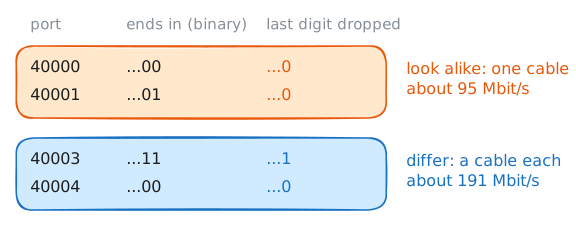
The sum knows nothing about load. It can put two flows on one cable with the other sitting idle, and it never changes its mind while they run. Eight flows with ports in a row split evenly, and eight numbered by the machine get away with it because eight coin tosses rarely all land the same way.
--cportlets you pick two flows the sum treats differently.--cport 40000with-P 2gives ports 40000 and 40001, and--cport 40003gives 40003 and 40004.newsroom:~# iperf3 -c 10.0.1.20 -t 5 -i 0 -P 2 --cport 40000 newsroom:~# iperf3 -c 10.0.1.20 -t 5 -i 0 -P 2 --cport 40003
-
Lose a fibre nobody can see
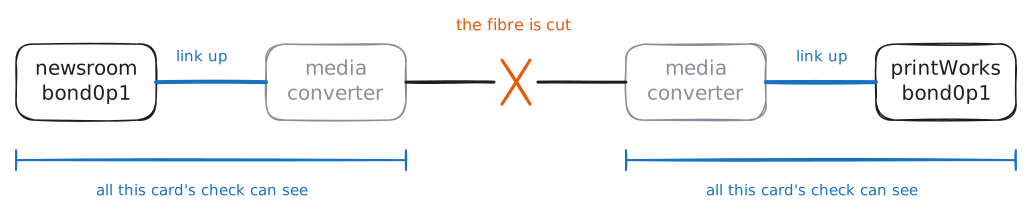
An ordinary copper network cable only reaches 100 metres, so these two cross the yard as fibre, with a small box at each end called a media converter that turns the card's signal into light and back. Cheap converters keep reporting a good link to the card, whatever the fibre is doing.
The bond watches its cables, and the page you read says how:
MII Polling Interval (ms): 100. Ten times a second it asks each card whether its link is up. Linux sends traffic only down cables that pass that check, so a cut cable should drop out by itself.But a card's link only reaches as far as the first box.
Start a loss meter on
newsroom, a steady stream of pings toprintWorks. Pings have no port numbers, but each run ofpinghas an ID number that the sum reads in their place, and this meter's ID lands on the first cable. The lab then puts a digger through that cable's fibre, and you look at what the cards think.newsroom:~# ping -i 0.2 -c 60 -W 1 -e 2 10.0.1.20 newsroom:~# ip -br link newsroom:~# cat /proc/net/bonding/bond0
-
Read LACP's messages
What the bond needs is a way to hear from the other end, over each cable, all the time.
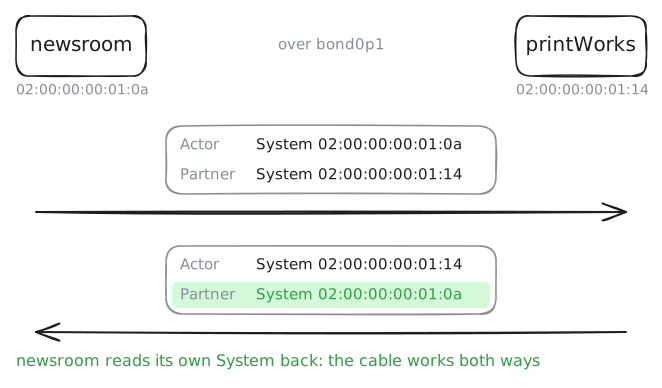
That's LACP, the Link Aggregation Control Protocol, which came with 802.3ad in 2000. With LACP on, each end sends a short message down every cable. The traffic is untouched and the same sum still picks the cable, but now each cable carries those messages as well.
A plain bond like Nadia's has another weakness that LACP deals with. Both ends are set up by hand, each sure of what's at the other end. Plug one of those cables into the wrong machine, and the bond sends traffic down it without a murmur.
A bond's mode can only change with its cards taken out of it, which is a dozen commands, so the lab has rebuilt both ends with
mode 802.3ad lacp_rate fast. Read the bond's page, then catch two of those messages on the first cable.newsroom:~# cat /proc/net/bonding/bond0 newsroom:~# tcpdump -n -e -v -c 2 -i bond0p1 ether proto 0x8809
-
Lose the fibre again
Same digger, same fibre, with LACP's messages running on the cable this time.
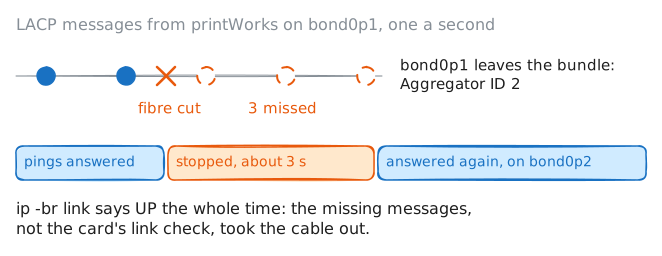
LACP rate: fastmeans each end has asked the other for one message a second. A cable that goes three messages without one is declared dead, whatever its card says about the link.Start the loss meter, and the lab cuts the fibre. Then look at the cards, and at the page, once the meter has finished.
newsroom:~# ping -i 0.2 -c 60 -W 1 -e 2 10.0.1.20 newsroom:~# ip -br link newsroom:~# cat /proc/net/bonding/bond0 newsroom:~# iperf3 -c 10.0.1.20 -t 5 -i 0 -P 8 --cport 40100
Run these steps on real machines