 Hack the Route Start learning Open app
The idea
Copperbeech Tool Library lends drills and ladders to its neighbourhood, and on Monday its loan desk moves from a paper book to Lendbook, a program one of the volunteers wrote. Thandi, who chairs the library, has one question for Mirela, who looks after its computers: is it safe? Answer her the way software teams do before a release: draw how the data moves, then ask what can go wrong wherever it changes hands.
Steps
-
Is it safe?
Mirela can't answer Thandi with a scan for known flaws. A scan finds published flaws in the parts Lendbook is built from. It can't find a safeguard that its design never had.
Software teams have a method for this moment, called threat modelling: a review of a design before it goes into use. It rests on four questions.
- "What are we working on?"
- "What can go wrong?"
- "What are we going to do about it?"
- "Did we do a good enough job?"
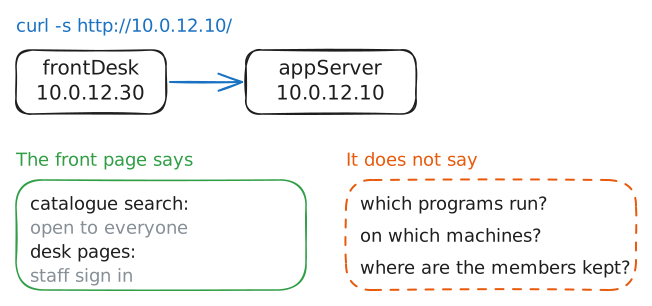
Open Lendbook's front page from
frontDesk, the machine at the loan desk.frontDesk:~# curl -s http://10.0.12.10/
-
Question 1: draw what is running
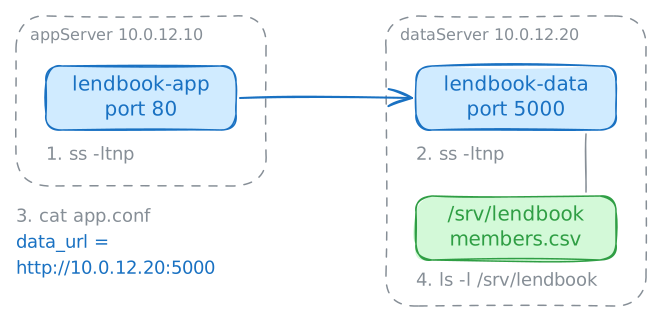
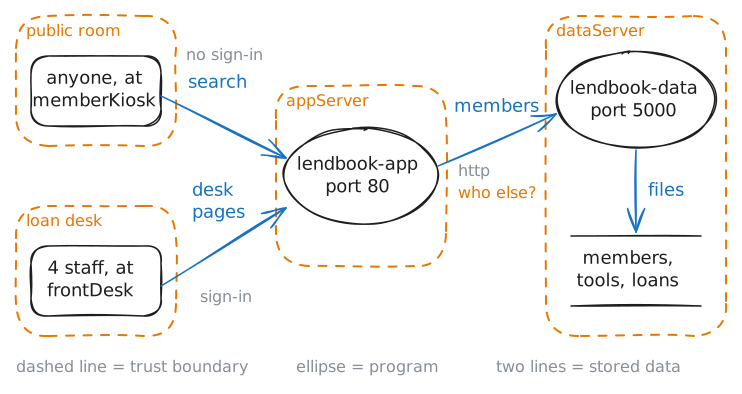
The honest answer to "what are we working on?" comes from the running machines, not from what anyone remembers building. Four things go into the picture: the programs that run, the places data is kept, the people who use it, and every path data takes between them.
A program that other machines talk to waits on a port, so a list of waiting ports is a list of the programs that take calls. The lab Ports and sockets: one address, many programs teaches that list.
Joost, the volunteer who wrote Lendbook, set it up on two machines. List the waiting ports on both. Then read the app's settings, and look in the folder where the data is kept.
appServer:~# ss -ltnp
dataServer:~# ss -ltnp
appServer:~# cat /etc/lendbook/app.conf
dataServer:~# ls -l /srv/lendbook
-
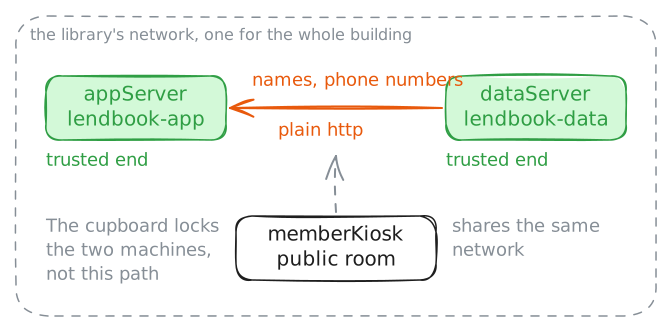
Mark where trust changes
One more kind of line gives the picture its value. Not everyone who touches Lendbook is trusted alike. Four members of staff have their own passwords, and the screen in the public room is used by whoever walks in.
A trust boundary is a line in the picture with differently trusted people or programs on its two sides. Data that crosses one leaves somebody's control, so every crossing is a place to stop and ask questions.
Lendbook's file of roles says who is trusted with what. Read it. Then stand where the least trusted user stands: on
memberKiosk, search the catalogue, and ask for the members page.appServer:~# cat /etc/lendbook/roles.conf memberKiosk:~# curl -s "http://10.0.12.10/catalogue?q=drill" memberKiosk:~# curl -s http://10.0.12.10/members
-
Question 2: six questions at every crossing
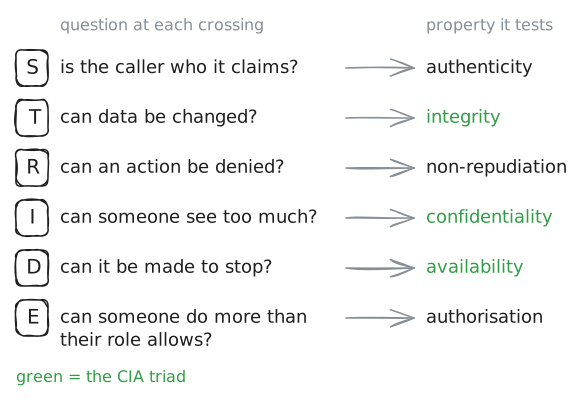
"What can go wrong?" is too wide a question. Reviewers narrow it to six, asked at each crossing. Their first letters spell STRIDE.
- Spoofing: is the caller who it claims to be, and does anything check? Someone at the desk types a colleague's name.
- Tampering: can data be changed on the way, or where it is kept? A due date is altered.
- Repudiation: can somebody deny an action because nothing recorded it? "I never closed that loan."
- Information disclosure: can somebody see what they shouldn't? A visitor reads members' phone numbers.
- Denial of service: can it be made to stop? The desk can't lend.
- Elevation of privilege: can somebody do more than their role allows? The kiosk closes a loan.
Ask the first at the quiet crossing. The data service expects one caller, the app. Call its status page from
memberKiosk.memberKiosk:~# curl -sS -m 3 http://10.0.12.20:5000/
-
The path between the two programs
The same crossing, a different question: can the data be read or changed on the way?
Every time someone at the desk opens the members page, names and phone numbers travel from
dataServertoappServer. On that path the data is outside both programs. Whether another machine on the network could read it or change it there depends on whether the two programs encrypt what they say to each other.A web address that starts with
httpsmeans the conversation is encrypted with TLS, and the caller can check who answers. One that starts withhttpmeans plain text. The lab HTTPS and TLS: lock a site and prove who it is teaches how.The owner doesn't have to listen on the network to find out. The app's settings say which. Print the line.
appServer:~# grep data_url /etc/lendbook/app.conf
-
An action nobody could prove
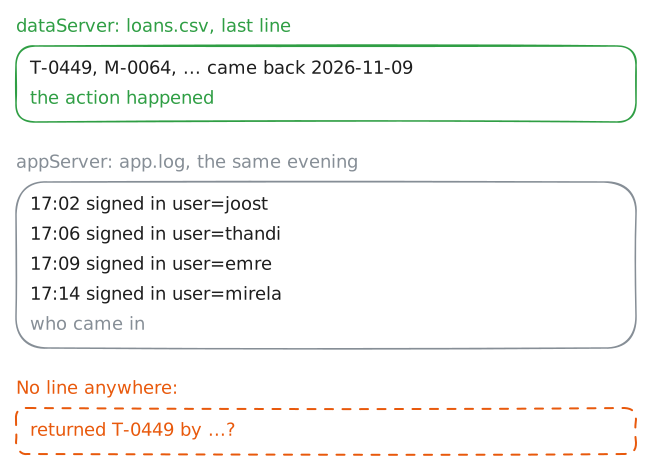
The R of STRIDE is the question that gets skipped, because nothing looks broken. Repudiation asks: after an action, does a record say who did it?
Lendbook had a trial run yesterday evening, with the paper book typed in. Somebody at the desk closed the loan of a cordless drill,
T-0449.Say the drill is missing. Without a record, every member of staff can say "not me".
The check needs no new action: the data holds the return, and the log holds what the app wrote that evening.
On
dataServer, print the last line of the loans file. Then read the app's log onappServer.dataServer:~# tail -n 1 /srv/lendbook/loans.csv appServer:~# cat /var/log/lendbook/app.log
-
Questions 3 and 4: decide, then check
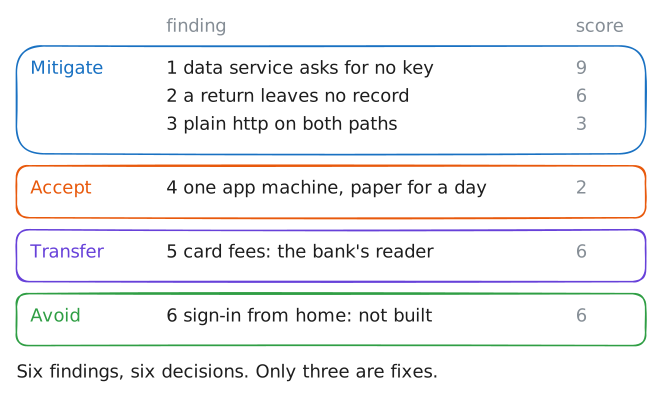
A finding isn't finished until somebody decides what happens to it. A decision is one of four.
- Mitigate: add a safeguard, so it is less likely or does less harm.
- Avoid: drop the feature or the part that carries the risk.
- Transfer: hand the cost to somebody else, by contract or insurance.
- Accept: live with it on purpose, with the reason written down.
Which finding comes first is a ranking. Mirela scored each one by how likely it is and how bad, as in the lab Risk scoring: turn a pile of findings into a ranked queue. Read her list.
frontDesk:~# cat /srv/review/register.txt
Run these steps on real machines
Keep reading
- Threat Modeling Manifesto: the four questions, and what fifteen practitioners agree makes a review worth doing, on one page article
- Adam Shostack: a beginner's guide to threat modelling, with the four questions and STRIDE in plain words article
- OWASP: the threat modelling cheat sheet, from the data-flow diagram to the four ways to answer a threat article