 Hack the Route Start learning Open app
The idea
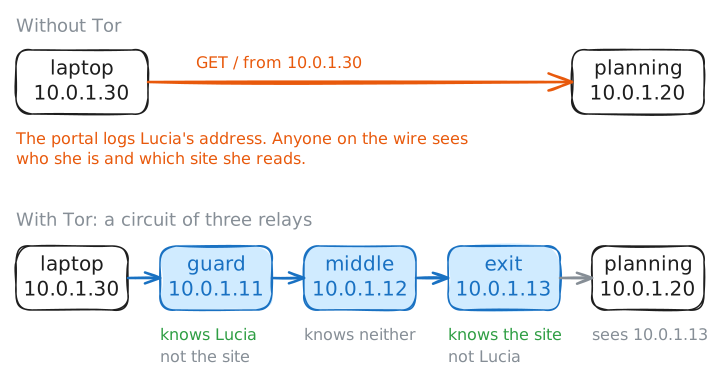
Lucía is a reporter in Valencia, reading the city's planning portal about a hotel deal. She would rather the city's web server did not log her laptop's address next to every page she opens, so she uses Tor.
A small but real Tor network runs in the lab. You record on each machine in the path to see who learns what.
Steps
-
Tor hides you behind three relays, picked from a list
Every packet Lucía's laptop sends carries its address,
10.0.1.30. The planning portal logs that address next to each page she opens, and anyone on the wire, her internet provider included, sees which site she visits.Tor's goal is narrow: no single machine should know both who Lucía is and what she reads. Tor gets there with a circuit, a path through three volunteer machines called relays. The first relay is the guard, the second the middle, and the third the exit, which fetches the page for her.
The laptop seals the request three times, like a letter inside three envelopes. Each envelope is locked with a key that only one relay holds, so each relay opens its own envelope and finds the name of the next stop. With three relays, the one that knows Lucía and the one that knows the site never meet.
To pick relays, the laptop needs a list of them with their public keys. A few trusted machines called directory authorities publish it: about nine on the live network, one here,
auth. Fetching that list and building a first circuit is called bootstrapping, and the Tor client logs each stage of it.laptop:~# grep Bootstrapped /var/log/tor/notices.log
-
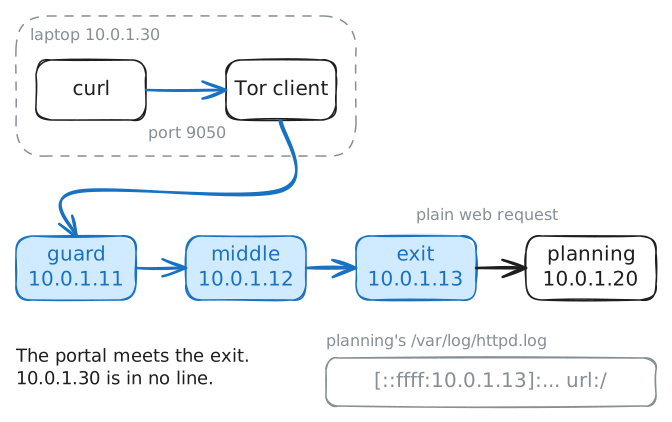
The website sees the exit relay, never Lucía
Programs on the laptop reach Tor through a local door. The Tor client listens on port
9050and speaks SOCKS, a small protocol that lets a program ask a go-between, called a proxy, to connect it somewhere. Pointcurlat that door, and the Tor client seals the request, sends it into the circuit and hands the reply back tocurl.Then look from the website's side. The planning portal logs the address of every machine that asks it for a page. Fetch the page, then read the portal's log.
laptop:~# curl --socks5-hostname 127.0.0.1:9050 http://10.0.1.20/
planning:~# cat /var/log/httpd.log
-
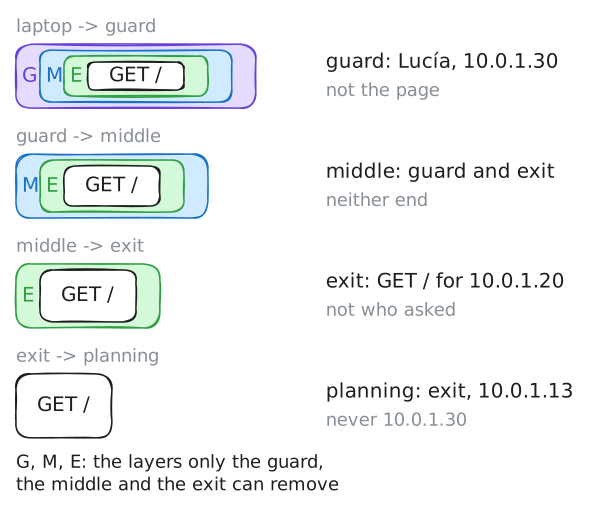
The guard knows Lucía but cannot read her request
The guard is the one relay that sees Lucía's real address, because her laptop connects straight to it. So what stops the guard from reading where she is going?
The envelopes do. While building the circuit, the laptop agrees a separate secret key with each relay.
The laptop locks the request with the exit's key, locks that with the middle's key, then locks the whole thing with the guard's key. Each relay holds one key, so it can open one layer and no more.
The guard opens its layer and finds another locked layer, plus a note: pass this to the middle relay. Layers around a core, peeled one per hop, are why this is called onion routing and where Tor gets its name. On top of that, each link between two relays runs inside TLS, the encryption HTTPS uses, so someone watching the wire sees only scrambled bytes.
Record every packet on the guard while Lucía fetches the page again.
laptop:~# curl --socks5-hostname 127.0.0.1:9050 http://10.0.1.20/
-
The exit reads the request but not who sent it
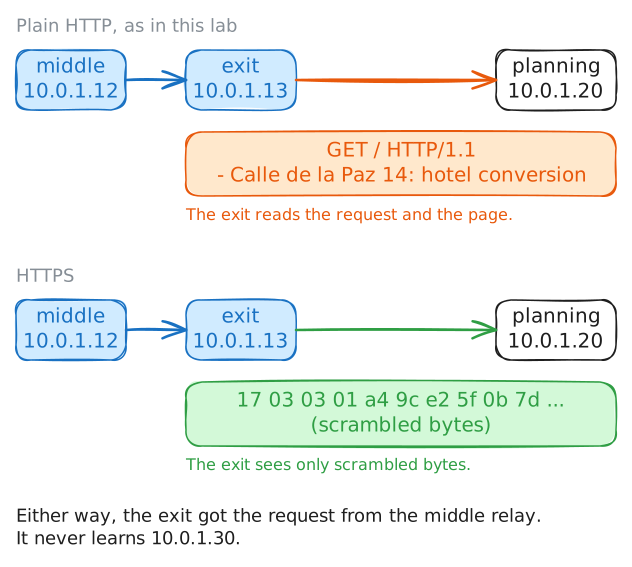
The exit opens the last envelope, and under it is Lucía's real request. The exit has to read that request: it is the relay that connects to the website and sends the request on. Tor's layers end at the exit.
Past the exit, the request is only as private as the website's own protocol makes it. The planning portal speaks plain HTTP, which sends readable text. A site that speaks HTTPS sends scrambled bytes instead.
Record on the exit this time, on port 80 where the web request goes, and print the contents of each packet as text.
laptop:~# curl --socks5-hostname 127.0.0.1:9050 http://10.0.1.20/
-
Only Lucía's laptop knows the whole path
Put the last three steps together. The guard knows Lucía but not the site, and the exit knows the site but not Lucía. Only the laptop that chose the path knows both ends.
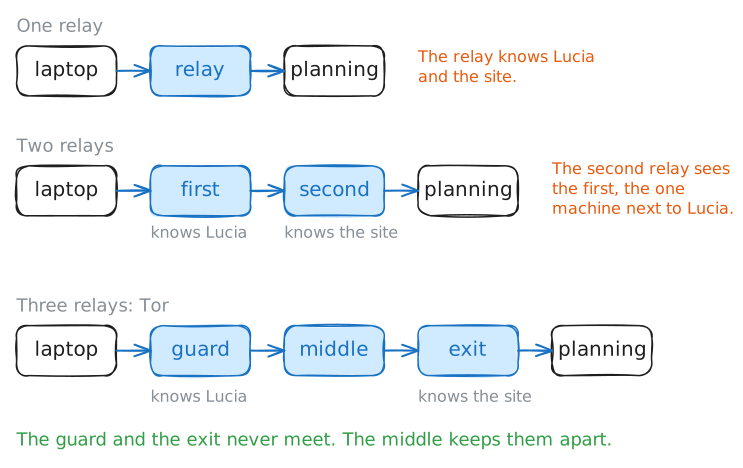
That split is why Tor uses three relays. With one relay, that relay knows both ends: one machine to hack, bribe or force to talk. With two, the second relay talks straight to the first, so it learns the one machine that sits next to Lucía, and whoever runs it knows where to look next.
The middle relay keeps the guard and the exit from ever meeting. More relays would add delay without much more safety.
The Tor client will show you the path it built. It answers questions on a second port,
9051, called the control port: you type a line of plain text, and Tor answers with lines that start with250when all went well. Ask it for its circuits.laptop:~# nc 127.0.0.1 9051
Run these steps on real machines