 Hack the Route Start learning Open app
The idea
Tendai lives in Harare and signs in to his trade union's members portal over Tor, so that his internet provider cannot list him as a member. A strike ballot opens this week, and he wants to know what Tor really hides.
Tor hides who talks to whom. It does not hide everything. You'll record at the name server, at the point where his traffic leaves Tor and at both ends of his connection, and find what each one still learns.
Steps
-
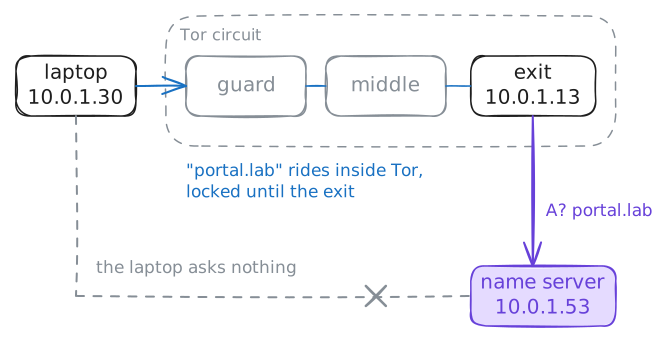
With Tor, the exit looks up the site's name, not Tendai's laptop
Every visit starts with a lookup. Before curl can connect to
portal.lab, someone must ask a name server, a DNS server, for the portal's IP address, the way you look up a number in a phone book before you call. On an ordinary laptop, the laptop asks, and anyone on its network can read the question.With Tor, the site's name rides inside Tor, and the exit looks it up at the far end. Tendai's traffic crosses three Tor relays, the guard, the middle and the exit, wrapped in three layers of encryption like a letter in three envelopes. The exit is the last relay, where traffic leaves Tor.
curl reaches Tor through a small door on the laptop called the SOCKS port,
127.0.0.1:9050. The flag--socks5-hostnametells curl to hand Tor the name as it is. Load the portal's front page through Tor while you record the questions that reach the lab's name server.laptop:~# curl --socks5-hostname 127.0.0.1:9050 http://portal.lab/
-
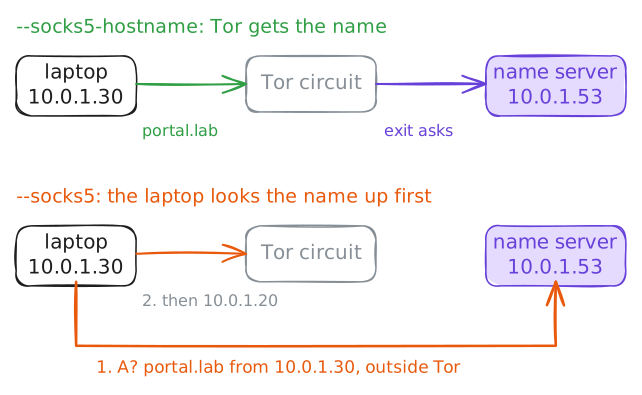
With plain --socks5, the laptop leaks the name it looks up
One flag decides who looks up the name, and the page loads either way. With
--socks5-hostname, curl hands Tor the name, as in the last step. With plain--socks5, curl first asks the name server itself, then hands Tor only the IP address it got back.Think of a taxi. Either you tell the driver "the union office" and let them find it, or you first phone the office from home for the street address and give the driver that. Either way you arrive, but the phone call is on your own line.
Nothing on Tendai's screen tells him which way happened. Load the same page with
--socks5and record at the name server again.laptop:~# curl --socks5 127.0.0.1:9050 http://portal.lab/
-
Tor's encryption ends at the exit, so plain HTTP is readable there
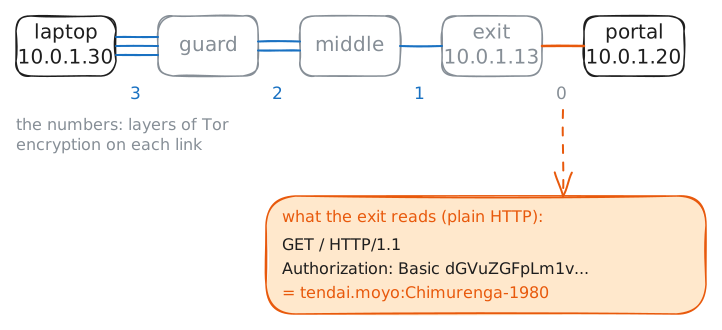
Tor's encryption ends at the exit. From there to the website, a request is only as private as the website's own protocol makes it. The exit has to remove the last layer, because the portal does not speak Tor and expects an ordinary web request.
Back to the envelopes: each relay opens one, and the exit opens the last. If the letter inside was never sealed, the exit can read it, and so can anyone on the link from the exit to the portal.
The portal asks members to sign in with a name and a password. curl sends them in a line of the request called the
Authorizationheader. Sign in over plain HTTP and record at the exit, on port 80, the port plain HTTP uses.laptop:~# curl --socks5-hostname 127.0.0.1:9050 -u tendai.moyo:Chimurenga-1980 http://portal.lab/
-
HTTPS hides the sign-in from the exit, but not the site's name
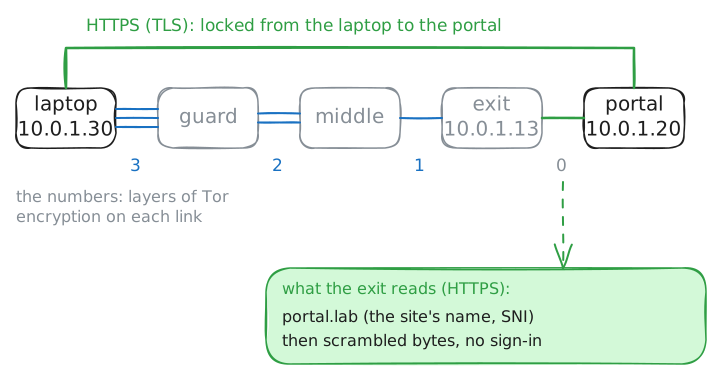
HTTPS adds a second lock that runs from the laptop all the way to the portal, so the exit cannot read what Tendai sends. That lock is TLS, the encryption behind the padlock in a browser. curl locks the request with TLS first, and then Tor wraps the locked request in its three layers.
When the exit removes Tor's last layer, it finds another lock it has no key for. Only the portal can open it. Think of a sealed letter inside the envelopes: the last courier holds the letter, but cannot read it.
Sign in again, this time over HTTPS, and record at the exit on port 443, the port HTTPS uses.
laptop:~# curl --socks5-hostname 127.0.0.1:9050 -u tendai.moyo:Chimurenga-1980 https://portal.lab/
-
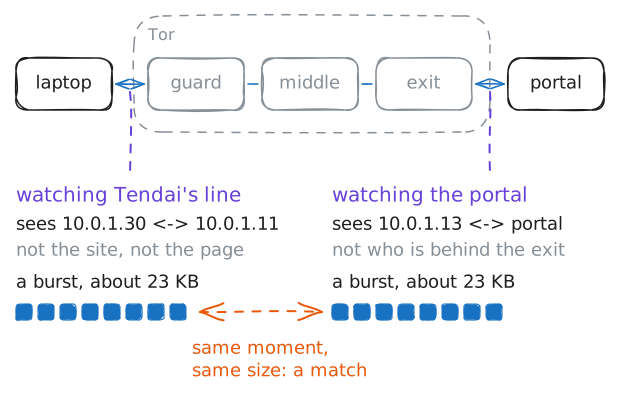
Someone watching both ends can match them by timing
Encryption hides what the data says, not when it moves or how much of it there is. Each relay removes a layer, so the bytes change at every hop, and no single relay sees both Tendai and the portal. But a download still looks like a download: a burst of packets that starts, runs and stops.
Picture two people watching two doors of one building. One sees Tendai hand in a parcel, the other sees a parcel leave by the far door. Neither sees the hallways, but if both write down the time and the size, their notes match.
Download the members list, about 23 kilobytes, while you record at both ends. On Tendai's laptop, record the link to the guard on port 9001, the port the lab's relays listen on. On the portal, record its HTTPS port, 443.
laptop:~# curl --socks5-hostname 127.0.0.1:9050 -o members.csv https://portal.lab/members.csv
Run these steps on real machines