 Hack the Route Start learning Open app
The idea
Somebody at Copperline Trams deleted a route a moment ago, and nobody's owning up. Find out what the router can tell you, then move every login to one AAA RADIUS server that knows each person by name.
Steps
-
Ask the router who did it
Copperline's trams at the terminus have stopped reporting where they are, because
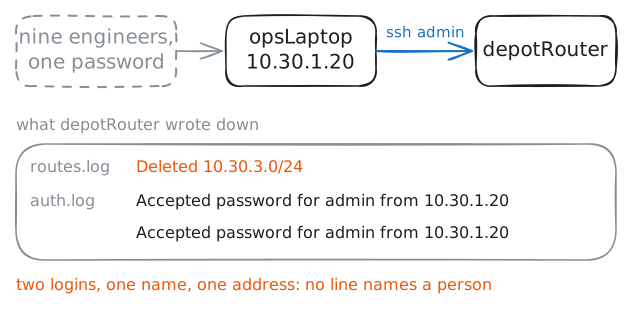
depotRouterhas lost its route to the terminus network. Routes don't wander off, so somebody logged in and deleted it. The obvious first move is to ask the router who.Every router here has one login,
admin, and its password has beenTram-2019since, well, 2019. Nine engineers know it, plus two contractors who left, and they all work from one shared laptop,opsLaptop. Shared logins are how most small networks start, because they take one line of setup and work on day one.Two logs on the router matter here:
routes.logrecords each change to the routing table with its time, andauth.logrecords each SSH login.depotRouter:~# cat /var/log/routes.log depotRouter:~# grep Accepted /var/log/auth.log
-
Ask the AAA server yourself
A personal account on each router works with two routers. With 200, each leaver means 200 deletions, and one missed router is a door left open. So the accounts move to one server, and the routers ask it.
AAA names the three jobs that server does:
- Authentication: who are you?
- Authorization: what may you do?
- Accounting: what did you do, and when?
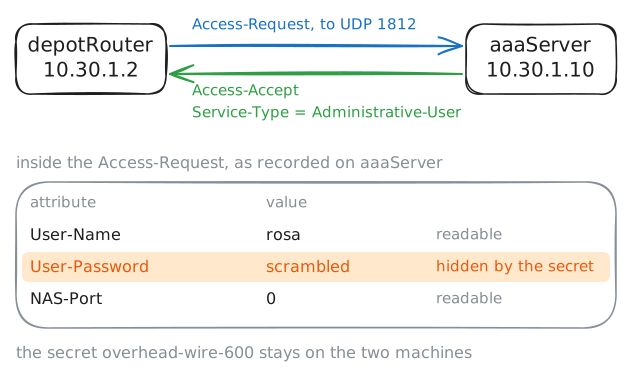
RADIUS is the usual way for a router to ask, written around 1991 for dial-up modems. The router asks, so it's the RADIUS client, which RADIUS calls the NAS: the network access server a person connects through.
aaaServerruns FreeRADIUS, with accounts for Rosa, for Idris who's on call, and for a contractor, Theo. It answers only the routers on its list, and shares a secret with each.A RADIUS packet is a list of attributes, labelled fields such as the user's name. The secret never crosses the wire. It signs each answer, scrambles the password attribute in each question, and, with the Message-Authenticator this server insists on, signs the question too.
Send the server one question by hand from
depotRouter, the way the router will.depotRouter:~# radtest rosa tram-blue-71 aaaServer.lab 0 overhead-wire-600 depotRouter:~# radtest rosa tram-red-71 aaaServer.lab 0 overhead-wire-600
-
Send the logins to the server
Now make the router ask by itself.
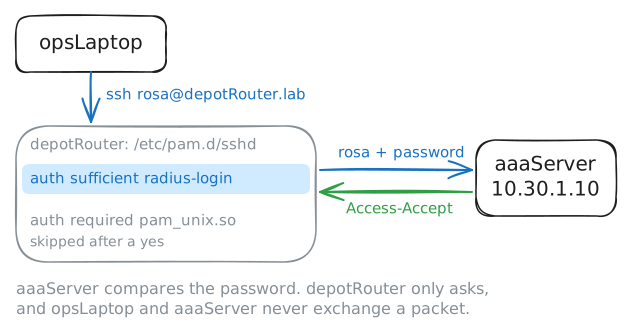
depotRouteris Linux running FRR, so its logins go through PAM, a stack of checks in/etc/pam.d/sshdthat runs top to bottom for each login. Rosa has an account on the router so her session has a name to run under, but it has no password there.Each
authline has a word saying what its answer means:required: must say yes.sufficient: a yes lets the person straight in, and a no moves on to the next line.
So a
sufficientline that asks the server goes above therequiredline that checks the router's own password file. The line you'll add runsradius-login, a script that sends the name and password to the server and turns the answer into a yes or a no. Read the stack, try Rosa, change it, and try her again.depotRouter:~# cat /etc/pam.d/sshd opsLaptop:~# sshpass -p tram-blue-71 ssh rosa@depotRouter.lab hostname opsLaptop:~# sshpass -p tram-blue-71 ssh rosa@depotRouter.lab hostname aaaServer:~# grep Login /var/log/radius/radius.log
-
Let the server decide what a login may do
Getting in was authentication. Look again at what
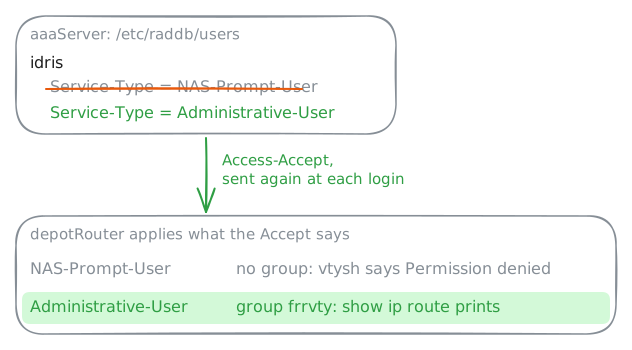
radtestgot back besides the yes:Service-Type = Administrative-User. That's authorization, riding in the same reply, because RADIUS gives one answer per login.On a router,
Administrative-Usermeans the full command line, andNAS-Prompt-Usermeans a basic prompt and no more. The router only enforces what it's told. Here the login script adds anAdministrative-Userto the groupfrrvty, and only that group may openvtysh, the router's routing shell, where routes are read and changed.The decision lives in
/etc/raddb/userson the server, where each person has a line that checks them and an indented line that goes back in the Accept:idris Cleartext-Password := "night-shift-8" Service-Type = NAS-Prompt-UserIdris is on call tonight and needs that command line. See the refusal, then change one word on the server and send FreeRADIUS a
kill -HUP, which makes it read its users file again, though not its list of routers.opsLaptop:~# sshpass -p night-shift-8 ssh idris@depotRouter.lab 'vtysh -c "show ip route"' opsLaptop:~# sshpass -p night-shift-8 ssh idris@depotRouter.lab 'vtysh -c "show ip route"'
-
Keep a record of every session
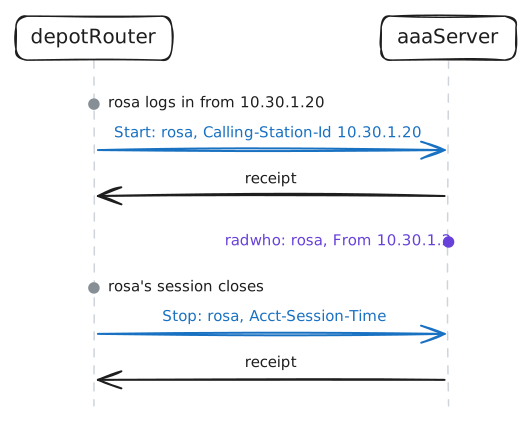
The third A is the one that would have answered this morning's question, and it works differently. The router isn't asking, it's telling: as a session opens it sends an Accounting-Request marked
Startto UDP port 1813, and as it closes, one markedStopwith how long it lasted. The server writes each down and sends back a receipt.This goes in PAM's
sessiongroup, whose lines run as a session opens and again as it closes, rather than once to decide. The line isoptional, so a record that can't be sent stops nobody logging in. The strict choice, no record and no login, sounds safer, and it locks everyone out the day the server is down.The server has two views:
radwholists who's logged in now, from Starts with no Stop yet, and/var/log/radius/radacct/detailkeeps every record. Add the line, then log Rosa in and leave her there.opsLaptop:~# sshpass -p tram-blue-71 ssh rosa@depotRouter.lab sleep 900 aaaServer:~# radwho aaaServer:~# cat /var/log/radius/radacct/detail
-
Pull the plug on the server
Every login now hangs on one server, so what happens the night it dies? A broken link can cut the routers off from it at the very moment an engineer most needs to log in, and people have driven to every router with a laptop and a cable after exactly that.
So a router keeps one local account for that day, the
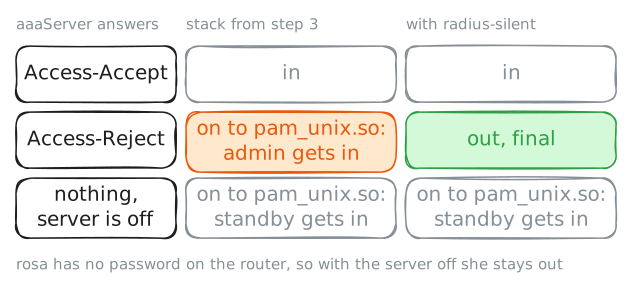
localin Cisco'saaa authentication login default group radius local. Here it'sstandby, whose long password,glass-hammer-9, lives in a sealed envelope in Rosa's safe. Accounts like this are called break-glass accounts, after the little hammer by a fire alarm.The lab turns the server off for you: see who can still get in. Then it comes back, and you try the old shared
admin, which is still in the router's password file.opsLaptop:~# sshpass -p tram-blue-71 ssh rosa@depotRouter.lab hostname opsLaptop:~# sshpass -p glass-hammer-9 ssh standby@depotRouter.lab hostname opsLaptop:~# sshpass -p Tram-2019 ssh admin@depotRouter.lab hostname opsLaptop:~# sshpass -p Tram-2019 ssh admin@depotRouter.lab hostname opsLaptop:~# sshpass -p glass-hammer-9 ssh standby@depotRouter.lab hostname
Run these steps on real machines