 Hack the Route Start learning Open app
The idea
Anyone can walk into the Halden Courier's lobby, plug a laptop into the wall, and read tomorrow's front page. Lock the jacks, then give them a login with 802.1X.
Steps
-
Plug in at the lobby
The Halden Courier's newsroom runs on one switch,
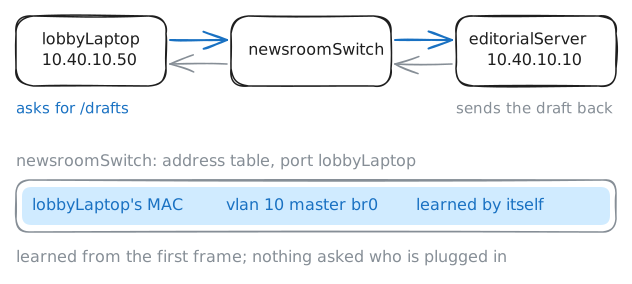
newsroomSwitch. Each jack in the wall is a cable to one of its ports, and each port here is named after the device plugged into it. Reporters' laptops share VLAN 10 witheditorialServer, where tomorrow's stories wait, and the printer sits in VLAN 30.There's a jack in the lobby too, and nobody remembers why. Mira, who runs IT at the Courier, wants to know what a stranger with a laptop could do there.
lobbyLaptopis the stranger. It's plugged in, it has an address, and it knows nothing else. Everything it sends leaves as frames, each carrying its MAC address.lobbyLaptop:~# curl -sS -m 3 http://10.40.10.10/drafts newsroomSwitch:~# bridge fdb show dev lobbyLaptop
-
Lock the lobby jack
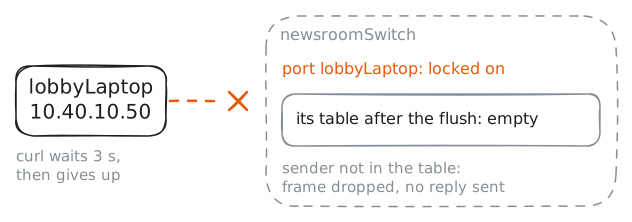
The Linux switch can lock a port. A locked port passes frames only from addresses someone has put in its table. It's half of what you're building: a door that stays shut until something says who may come in.
Two commands on
newsroomSwitchlock the lobby jack. The first sets the lock. The second clears what the port learned before the lock, because a locked port still trusts its table, and right now the table says the lobby laptop belongs there.newsroomSwitch:~# bridge link set dev lobbyLaptop locked on newsroomSwitch:~# bridge fdb flush dev lobbyLaptop master dynamic lobbyLaptop:~# curl -sS -m 3 http://10.40.10.10/drafts
-
Log in to the jack
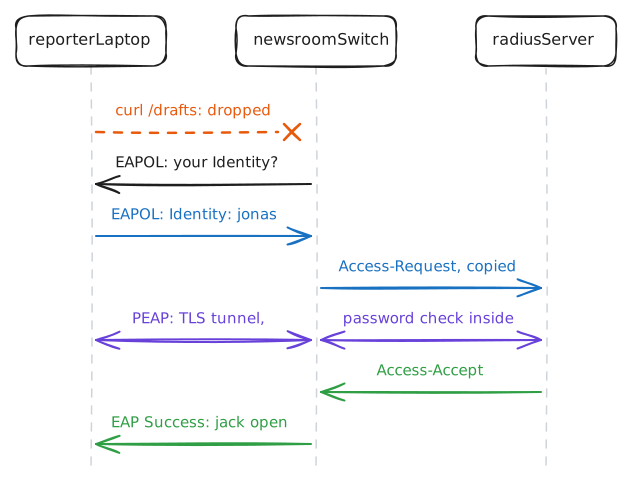
802.1X turns a locked jack into a login. Three parties take part:
- The supplicant is software on the laptop. Here it's
wpa_supplicant, the same program that joins Wi-Fi on Linux. - The authenticator is the switch. It keeps the jack shut and passes messages on.
- The authentication server decides. Here that's
radiusServer, a RADIUS server running FreeRADIUS.
The login travels in EAP, an envelope for login conversations that can carry one of several login methods. On a cable, EAP rides in Ethernet frames called EAPOL, EAP over LAN. The switch reads only the name on the outside, and copies each envelope into a RADIUS question to the server, an Access-Request, then copies the answers back.
The Courier's method is PEAP: the laptop sets up TLS with the server first, checking the server's certificate. Only inside that tunnel does it prove the password, with MSCHAPv2, a challenge-response that never sends the password itself.
reporterLaptop:~# curl -sS -m 3 http://10.40.10.10/drafts
reporterLaptop:~# wpa_cli -i eth0 status
reporterLaptop:~# curl -sS -m 3 http://10.40.10.10/drafts
- The supplicant is software on the laptop. Here it's
-
Log off, and the jack closes
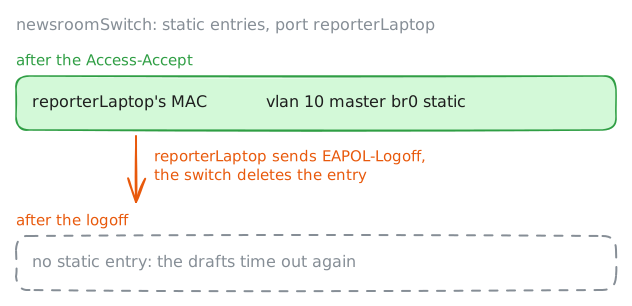
The server said yes, but the server doesn't hold the jack open: the switch does. It adds the address that logged in to the port's table as a static entry, the kind the switch was told rather than learned, which never ages out.
Look at the port's static entries, then log Jonas off and look again. Logging off is one more EAPOL frame, EAPOL-Logoff, which a laptop sends as its user signs out. Unplugging the cable has the same effect, since the switch sees the link go down.
newsroomSwitch:~# bridge fdb show dev reporterLaptop state static
reporterLaptop:~# wpa_cli -i eth0 logoff
newsroomSwitch:~# bridge fdb show dev reporterLaptop state static
reporterLaptop:~# curl -sS -m 3 http://10.40.10.10/drafts
-
Let the printer in by its address
Since Mira locked the desk jacks,
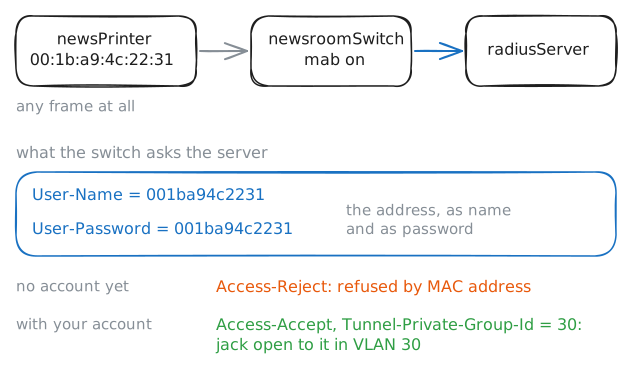
newsPrinterhas been off the network, and Jonas's page proof is stuck in the queue onprintServer. The printer can't log in: like most printers, cameras and badge readers, it has no supplicant.For devices like it, switches have MAC authentication bypass, or MAB: MAC filtering, with the list kept on the RADIUS server. When a locked jack hears an address it doesn't know, the switch asks the RADIUS server about it, with the address as both the name and the password. The server answers as for any login, and its yes can name the VLAN to put the device in.
On this switch,
mab onmakes a locked port note each unknown address, and the switch asks the server about each one a few seconds later. It writes each decision to/var/log/jacks.log.newsroomSwitch:~# bridge link set dev newsPrinter mab on newsroomSwitch:~# cat /var/log/jacks.log newsroomSwitch:~# cat /var/log/jacks.log
-
Borrow the printer's address
Facilities liked MAB so much that they turned it on for the lobby jack too, so a printer can go there for events. The lobby laptop is a stranger again, and the switch refuses it by its own address.
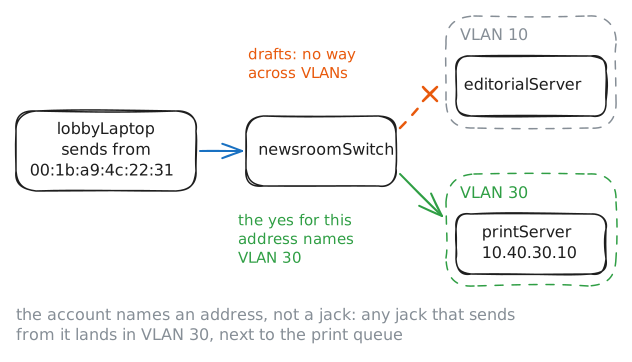
A MAC address comes from the card, but the card's software can change it, and on Linux one command does. The printer's address is on a sticker on its back, and in every frame it sends. Play the stranger: give
lobbyLaptopthe printer's address, and see where the switch puts it.lobbyLaptop:~# ip link set dev eth0 address 00:1b:a9:4c:22:31 newsroomSwitch:~# tail -2 /var/log/jacks.log lobbyLaptop:~# curl -sS -m 3 http://10.40.10.10/drafts lobbyLaptop:~# ip addr replace 10.40.30.77/24 dev eth0 lobbyLaptop:~# curl -sS -m 3 http://10.40.30.10/queue
Run these steps on real machines