 Hack the Route Start learning Open app
The idea
Pinecone Games, a small game studio, keeps every account in one LDAP directory. Look people up in it, log in to it, point a server at it, and on someone's last day, close every door with one change.
Steps
-
Look someone up
Pinecone's directory runs on
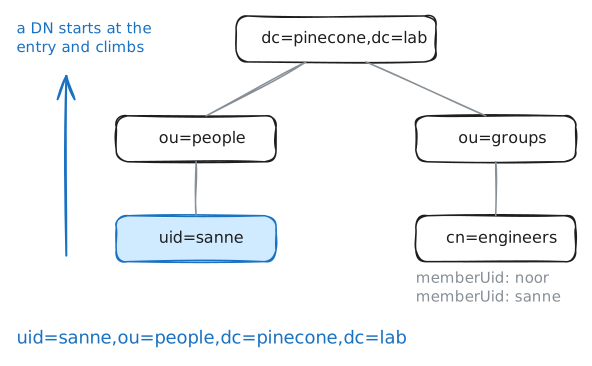
directory, with OpenLDAP's server,slapd. A directory is a database of people and groups, built to be read far more often than it's written.Everything in it is an entry, and each entry has a DN, a distinguished name, that spells out where it sits in the tree. Read
uid=sanne,ou=people,dc=pinecone,dc=labfrom the right: the studio (dc=pinecone,dc=lab, its domain name a domain component at a time), its people (ou=people, an organizational unit), and Sanne (uid=sanne, her user ID). Each piece is one step down the tree.An entry holds attributes:
cn(common name) for the full name,title,mail. ItsobjectClasslines say which attributes it may have:inetOrgPersonfor someone at a company,posixAccountfor someone who can log in to a Linux machine.To read the directory you search: from a base DN, for the entries that match a filter in brackets, like
(uid=sanne). Sanne, the studio's build engineer, leaves on Friday, so start with her, and then with the groups she's in. They live underou=groups.laptop:~# ldapsearch -x -H ldap://directory.lab -b dc=pinecone,dc=lab "(uid=sanne)" laptop:~# ldapsearch -x -LLL -H ldap://directory.lab -b dc=pinecone,dc=lab "(&(objectClass=posixGroup)(memberUid=sanne))" cn
-
Log in to the directory
Logging in to a directory is called a bind. A simple bind sends a DN and a password, and the directory checks the password against that entry's
userPassword, which holds only a salted hash of it. The search that follows runs as that person, with what they may read.-Dnames the DN to bind as, and-wthe password. Noor, an engine programmer, lends you hers:green-kiln-4.The address says how it all travels.
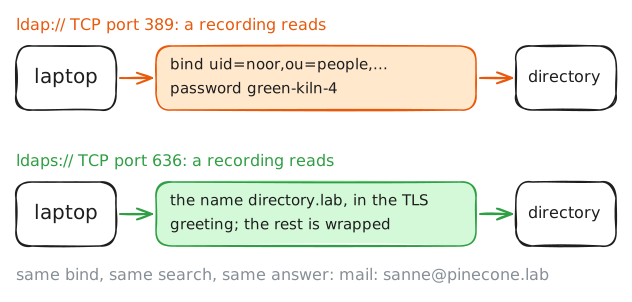
ldap://is plain LDAP, on TCP port 389.ldaps://is port 636, and wraps the connection in TLS before LDAP says a word, checking the server's certificate on the way in.You'll search twice, once each way, while
directoryrecords the traffic.laptop:~# ldapsearch -x -LLL -H ldap://directory.lab -D uid=noor,ou=people,dc=pinecone,dc=lab -w green-kiln-4 -b dc=pinecone,dc=lab "(uid=sanne)" mail laptop:~# ldapsearch -x -LLL -H ldaps://directory.lab -D uid=noor,ou=people,dc=pinecone,dc=lab -w green-kiln-4 -b dc=pinecone,dc=lab "(uid=sanne)" mail
-
Let the build server check passwords with the directory
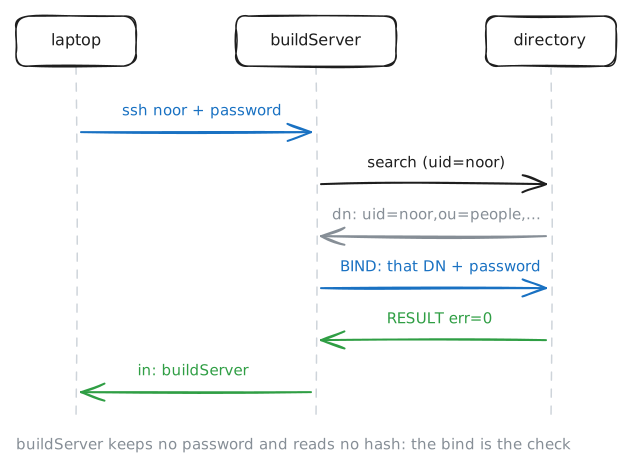
buildServerhas a line in/etc/passwdfor each person, but no passwords. An SSH login there goes through PAM, the Linux library that runs each login past a stack of modules, in two phases: auth, is the password right, and account, may this person log in now.Here both phases go to
pam_ldap, which hands the question to nslcd, a small program that asks the directory: ssh, then PAM, thenpam_ldap, then nslcd, thendirectory.nslcd's file,
/etc/nslcd.conf, still has the package's settings: a directory on the server itself, for a company called example. It needs two lines changed and one added:uri: where the directory is,ldaps://directory.lab, so passwords travel inside TLS.base: where in the tree to look for accounts,dc=pinecone,dc=lab.tls_cacertfile: who vouches for the directory's certificate. That's the studio's certificate authority, in/usr/local/share/ca-certificates/lab-ca.crt.
wikiServerwas set up this way last year, and its logins already work.laptop:~# sshpass -p green-kiln-4 ssh noor@buildServer.lab hostname directory:~# grep -A1 'BIND dn="uid=noor' /var/log/slapd.log
-
Only engineers on the build server
Any account in the directory gets onto
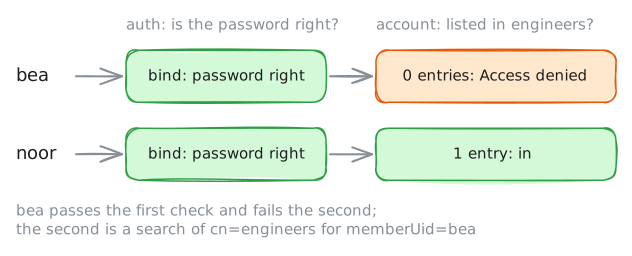
buildServernow, Bea's included. She's a character artist, and the build server holds the keys the studio signs its games with.Checking Bea's password is authentication: is this Bea? Deciding whether Bea may use this server is authorization, a separate question with its own answer. That's two checks, not one.
nslcd asks the second one with
pam_authz_search: a search that must find at least one entry for the login to go on. In its filter,$usernamestands for the name being logged in. Pinecone's filter finds theengineersgroup, if it lists that person:(&(objectClass=posixGroup)(cn=engineers)(memberUid=$username))laptop:~# sshpass -p ochre-fox-17 ssh bea@buildServer.lab hostname laptop:~# sshpass -p ochre-fox-17 ssh bea@buildServer.lab hostname buildServer:~# tail -n 3 /var/log/auth.log laptop:~# sshpass -p green-kiln-4 ssh noor@buildServer.lab hostname
-
Sanne's last day
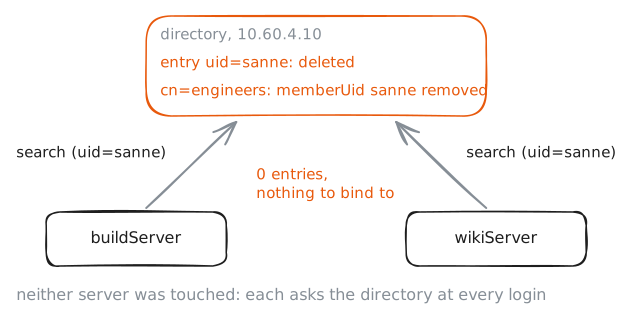
It's Friday, Sanne's last day. With an account on each server, someone would have to remember every one. Here it's one change, in one place.
Changes to a directory are written in LDIF too, as one file of changes: a block for each entry, its
dn:line first, then achangetypeline that says what to do, and a blank line between blocks. Sanne needs two:- Delete her entry,
uid=sanne,ou=people,dc=pinecone,dc=lab, withchangetype: delete. - Take her out of the engineers group:
changetype: modify, thendelete: memberUidandmemberUid: sanne. With that value line, only her name goes. Without it, everymemberUidwould go, and the group with them.
Changes are made bound as the directory's administrator,
cn=admin,dc=pinecone,dc=lab, whose password istidy-desk-31. Write them in/root/sanne-leaves.ldifonlaptop, then send them withldapmodify.laptop:~# ldapmodify -x -H ldaps://directory.lab -D cn=admin,dc=pinecone,dc=lab -w tidy-desk-31 -f /root/sanne-leaves.ldif laptop:~# sshpass -p late-train-6 ssh sanne@buildServer.lab hostname laptop:~# sshpass -p late-train-6 ssh sanne@wikiServer.lab hostname
- Delete her entry,
Run these steps on real machines