 Hack the Route Start learning Open app
The idea
A warehouse has three access points with one name. Walk a handheld scanner between them, push it off one, cut one under it, and fix two that share a channel.
Steps
-
Three access points, one name
Tomás runs the floor at Northgate Freight: a dock door, six long aisles and an office upstairs. Every picker carries a handheld scanner, which gets its picks from the warehouse system,
wms, over Wi-Fi.The Wi-Fi is three access points (APs), all named
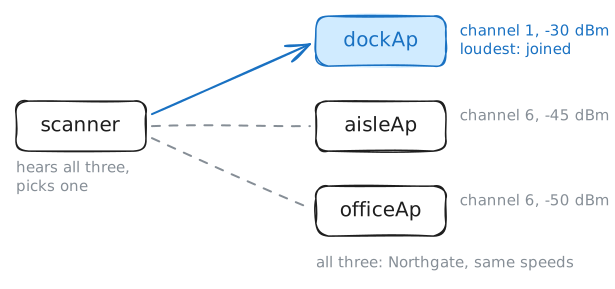
Northgate:dockApat the dock door,aisleAphalfway down aisle 4, andofficeApin the office. APs that share one name (SSID) make one network, an ESS. Each still has its own BSSID and its own channel. All three are the same model, so they offer the same speeds.All three are bridged to one cable, so the scanner keeps its address,
10.61.6.40, whichever AP it's on. There's no real distance in this lab's air: when Tomás walks away from an AP, that AP turns its power down.Tomás starts the shift at the dock door. Ask the scanner what it hears, then which AP it joined.
scanner:~# wpa_cli scan_results
scanner:~# wpa_cli status
scanner:~# curl -s http://10.61.6.20/picks/next
-
Into aisle 4
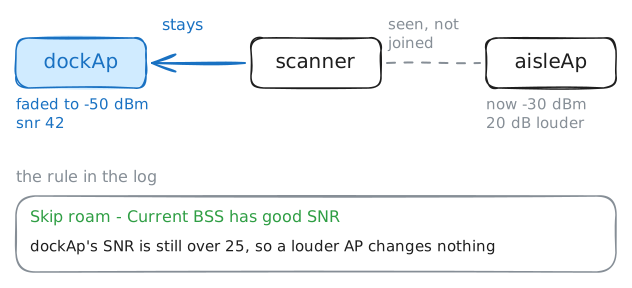
Tomás heads into aisle 4 with a pallet jack. Moving from one AP to another without leaving the network is roaming, and the scanner decides when.
While it's joined, wpa_supplicant only looks around when something asks it to scan: its own background scan (
bgscan, not set up on this scanner), the device's software, or you. After each scan it asks one question: is another AP worth moving to? Its normal log doesn't say, so turn on its debug log withwpa_cli log_level debugfirst.Then Tomás walks. Ask the scanner to scan the three channels the warehouse uses, read the results and the status again, and find wpa_supplicant's reasoning in its log,
/var/log/wpa_supplicant.log: it starts atConsidering within-ESS reassociation. The lab empties the log right before your scan, so it holds that one decision. Debug logs are loud, so the log goes back toinfoat the end.scanner:~# wpa_cli log_level debug scanner:~# wpa_cli scan freq=2412,2437,2462 scanner:~# wpa_cli scan_results scanner:~# wpa_cli status scanner:~# grep -A 4 within-ESS /var/log/wpa_supplicant.log scanner:~# wpa_cli log_level info
-
The controller steps in
Big Wi-Fi networks don't leave all of it to the clients. A wireless controller (WLC) runs every AP from one place: their configs, their channels and power, and a view of every client on every AP.
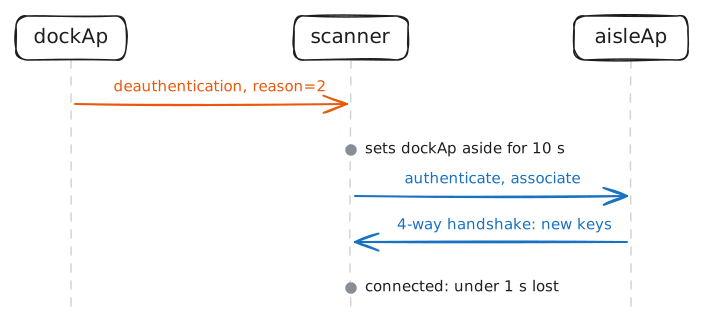
When a client clings to a far AP, the controller can have that AP send it away with a deauthentication frame. The client has to pick again.
On
dockAp, list the stations it serves withhostapd_cli. Then a loss meter onwmspings the scanner ten times a second, while the controller has the dock AP send the scanner away by the MAC addresslist_staprinted. Once the meter is done, see where the scanner went.dockAp:~# hostapd_cli -i wlan0 list_sta wms:~# ping -i 0.1 -c 60 -W 1 10.61.6.40 scanner:~# wpa_cli status scanner:~# cat /var/log/wpa_supplicant.log
-
The aisle AP dies
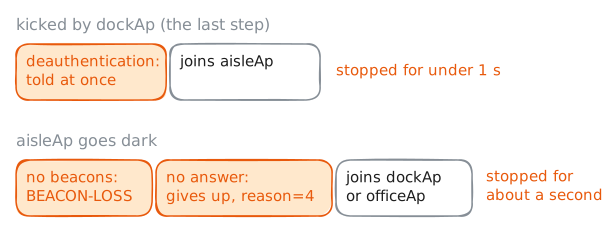
At 10:40 a forklift clips the cable that powers the aisle AP, and it goes dark mid-sentence. Nothing tells the scanner: no frame sends it away, the AP goes silent.
An AP sends a beacon about ten times a second. A client that stops hearing them waits a little, checks whether the AP still answers, and only then gives up and looks for another.
The loss meter on
wmspings the scanner again while it happens. Once the meter is done, print the scanner's log. The lab empties it right before, so it holds this failure alone.wms:~# ping -i 0.1 -c 100 -W 1 10.61.6.40 scanner:~# cat /var/log/wpa_supplicant.log scanner:~# wpa_cli status
-
Two APs, one channel
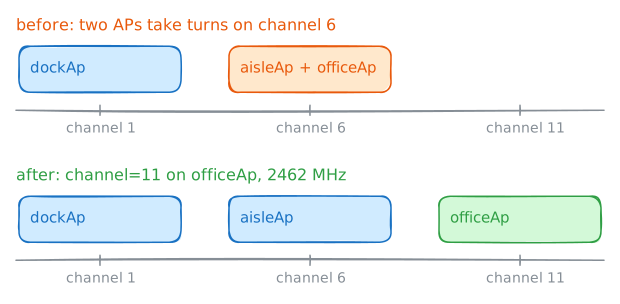
Back to the first scan: the aisle AP and the office AP are both on channel 6. Radios on one channel take turns: each listens, and talks only when the air is quiet. Two APs that hear each other on one channel share its airtime, and their clients wait for both: co-channel interference.
2.4 GHz has 11 to 14 channels, depending on the country, but they're 5 MHz apart and each is 20 MHz wide, so neighbors overlap. In most countries only 1, 6 and 11 stay clear of each other. APs on overlapping channels, like 1 and 3, are worse off than sharing one: to each other they're noise.
For three APs the plan writes itself: dock 1, aisle 6, office 11. Change
channel=6tochannel=11in the office AP's config, then scan from the scanner again.scanner:~# wpa_cli scan_results scanner:~# wpa_cli scan_results
Run these steps on real machines