 Hack the Route Start learning Open app
The idea
A bakery has two Wi-Fi boxes with the same name, a new one by the counter and an old one in the back office. Scan the air from the till's laptop, read how an access point is set up, join, and find out which box the laptop picks, and why.
Steps
-
What the air holds
Noor runs Crumb, a bakery with two Wi-Fi boxes, both named
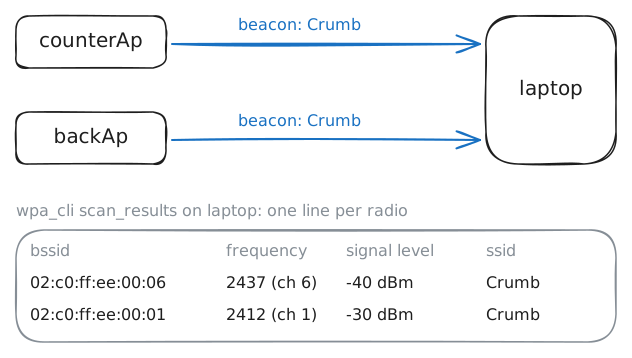
Crumb: a new access point (AP) by the counter, and an old home Router in the back office. The old router works only as an access point now, with its DHCP switched off: the shop's own router hands out the addresses. The till's laptop joins one of the two every morning, and nobody has ever checked which, or why.Wi-Fi is radio. An access point announces its network about ten times a second, in a short message called a beacon: the network's name, the AP's own address, and what it can do. A laptop going through the channels, catching beacons and calling out probe requests ("who's here?") that APs answer, is scanning.
The laptop's Wi-Fi card is
wlan0.iwis Linux's tool for wireless cards:iw dev wlan0 infosays what the card is and how it's set.The laptop also runs wpa_supplicant, the program that finds and joins networks on Linux.
wpa_clitalks to it:wpa_cli scanasks for a scan, andwpa_cli scan_resultslists what it heard.This lab's radios are virtual, all inside one machine. There's no distance and no walls, so what makes an AP loud or quiet is how strongly it sends.
laptop:~# iw dev wlan0 info
laptop:~# wpa_cli scan
laptop:~# wpa_cli scan_results
-
Two radios, one name
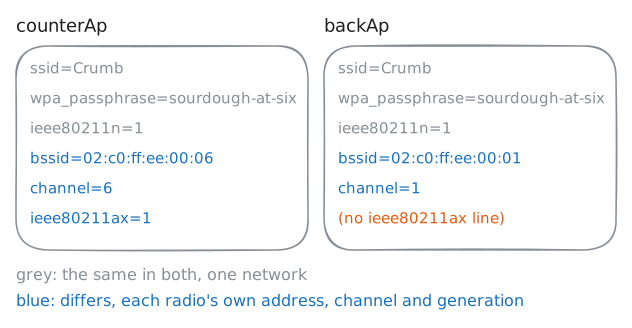
Both boxes run hostapd, the program that turns a Linux Wi-Fi card into an access point. Everything an AP announces comes from its config file,
/etc/hostapd/hostapd.conf. Read the counter AP's, then the back router's, and compare.The lines that matter:
interface=wlan0is the radio to run on.bridge=br0joins it to the shop's cable, which step 4 looks at.ssid=Crumbis the name in every beacon.bssid=sets the radio's address: normally it's the card's own, and here it's fixed so the addresses stay the same every time.hw_mode=gandchannel=pick the band and the channel.gmeans 2.4 GHz, andawould mean 5 or 6 GHz.ieee80211n=1andieee80211ax=1turn on generations of Wi-Fi, by their standard names. 802.11n is Wi-Fi 4, and 802.11ax is Wi-Fi 6.- The
wpalines put a passphrase on the network, with WPA2.
Then look at the counter AP's own card with
iw.counterAp:~# cat /etc/hostapd/hostapd.conf backAp:~# cat /etc/hostapd/hostapd.conf counterAp:~# iw dev wlan0 info
-
Join Crumb
Time to join. wpa_supplicant joins only networks its config file lists, and the laptop's lists none:
/etc/wpa_supplicant/wpa_supplicant.confholds one line.ctrl_interfaceis the folder wherewpa_clifinds wpa_supplicant to talk to it.A network goes in a
network={ … }block. Two lines are enough for one with a password:ssid="Crumb"is the name to join. Names are case-sensitive, socrumbis another network.psk="sourdough-at-six"is the passphrase. PSK means pre-shared key: everyone who joins knows it.
Saving runs
wpa_cli reconfigure, which makes wpa_supplicant read its file again. It scans, finds the name, picks an AP, and joins.Joining has stages, and wpa_supplicant's log names each one. Authenticate is a hello that checks nothing: the passphrase comes later. Associate asks the AP for a place.
Then comes the key negotiation, where both sides prove they know the passphrase. Last, ask what wpa_supplicant thought of each AP:
wpa_cli bssand a BSSID prints all it knows about that radio.laptop:~# cat /var/log/wpa_supplicant.log laptop:~# wpa_cli bss 02:c0:ff:ee:00:06 laptop:~# wpa_cli bss 02:c0:ff:ee:00:01
-
From the air to the cable
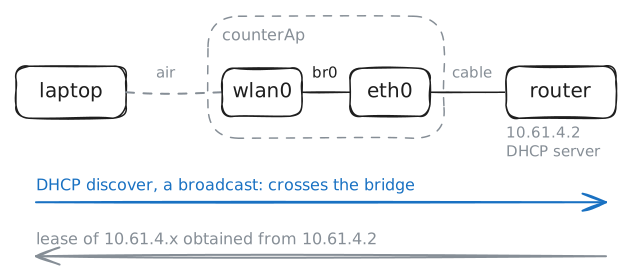
The laptop has joined, but it has no IP address yet. Joining Wi-Fi is like plugging in a cable: the address comes next, from the shop's router,
10.61.4.2, which hands them out with DHCP.The laptop has no cable, so its request goes over the air to the AP. Remember
bridge=br0in the AP's config: hostapd put the radio in a bridge calledbr0, with the AP's wired card,eth0.Ask for an address with
udhcpc, a small DHCP client:-i wlan0names the card,-ngives up if no answer comes, and-qquits once it has one. Ping the router. Then on the counter AP, list the bridge's cards withbridge link, and the stations on its radio withiw dev wlan0 station dump.laptop:~# udhcpc -i wlan0 -n -q laptop:~# ping -c 3 10.61.4.2 counterAp:~# bridge link counterAp:~# iw dev wlan0 station dump
-
Hold it to the old router
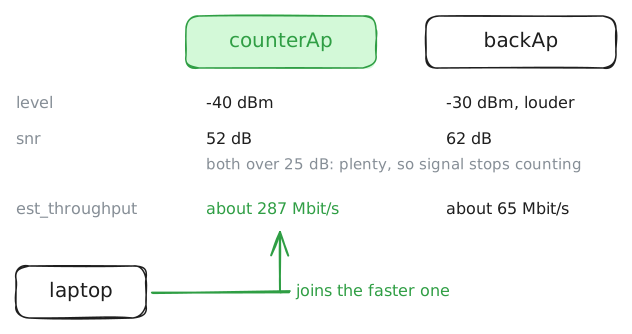
Noor asks: if the back router is louder, what would the till lose on it? Find out by sending the laptop there.
A
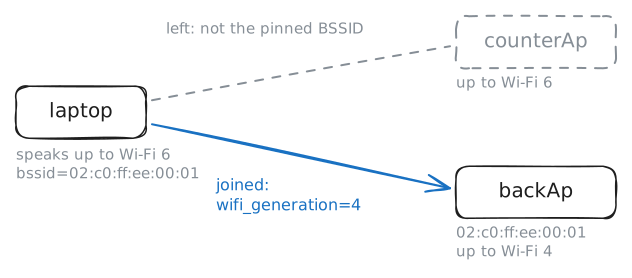
bssid=line in a network block holds wpa_supplicant to that one radio, whatever else shares the name. Add the back router's,02:c0:ff:ee:00:01, to the laptop's block. On saving, wpa_supplicant reads the file again, leaves the counter AP and joins the back router.What changes from one generation to the next is mostly how the air gets shared:
- Wi-Fi 4 (802.11n, 2009) sends several streams at once from several antennas (MIMO), on channels up to 40 MHz wide.
- Wi-Fi 5 (802.11ac, 2013) runs on 5 GHz only, with channels up to 160 MHz.
- Wi-Fi 6 (802.11ax, 2019) slices a channel up so several stations send at once (OFDMA), and lets phones sleep until an agreed time. Wi-Fi 6E is the same on the 6 GHz band.
- Wi-Fi 7 (802.11be, 2024) adds 320 MHz channels, and lets one device use several bands at once (multi-link operation).
laptop:~# ping -c 3 10.61.4.2
Run these steps on real machines
Keep reading
- Cisco: what a wireless access point is, and how it differs from a router article
- FS: the Wi-Fi standards side by side, from 802.11b to Wi-Fi 7 article
- hostapd's example config: every line an access point can set, explained article
- wpa_supplicant's example config: network blocks, bssid and the rest article