 Hack the Route Start learning Open app
The idea
A library's Wi-Fi has no passphrase, and a patron asks who can see what she looks up. Record the air with a card that keeps everything it hears, lock the network with WPA2, take its 4-way handshake apart, then move to WPA3, where even the passphrase doesn't open a recording.
Steps
-
Anyone can listen
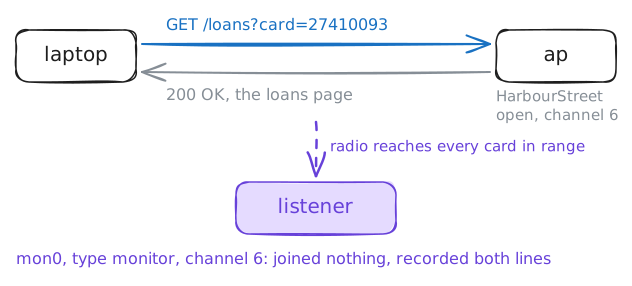
Priya looks after the Wi-Fi at Harbour Street Library. Its one access point (AP),
ap, runsHarbourStreetas an open network: no passphrase, anyone can join. One Saturday a patron asks her: can the person at the next table see what I look up?Priya sets up a spare machine,
listener, to find out. A Wi-Fi card normally keeps only the frames sent to it. In monitor mode it keeps every frame on its channel, whoever it's for, without joining anything. Priya gave the listener's card a second interface for that,mon0.Look at
listener's card withiw dev, which lists the machine's wireless interfaces. Then start a recording onmon0withtcpdump.While it runs, the reading-room
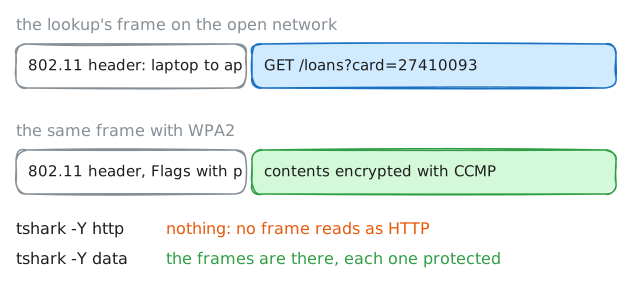
laptoplooks up a patron's loans on the catalogue server,10.61.5.20. Last, read the recording back withtshark:-rreads a file, and-Y httpis a display filter that keeps only web traffic, HTTP.listener:~# iw dev listener:~# tcpdump -i mon0 -U -w /tmp/open.pcap laptop:~# curl -s "http://10.61.5.20/loans?card=27410093" listener:~# tshark -r /tmp/open.pcap -Y http
-
Lock it with a passphrase
Priya puts a passphrase on the network, with WPA2-Personal. Everything is in hostapd's config,
/etc/hostapd/hostapd.conf.The top lines name the radio, the bridge to the library's cable, the network's name and address, and the channel. Add four lines at the end:
wpa=2turns on RSN, the security that WPA2 and WPA3 share.1would be the first WPA, retired long ago. The next line picks WPA2.wpa_key_mgmt=WPA-PSKmeans everyone joins with one shared passphrase, a pre-shared key (PSK).rsn_pairwise=CCMPencrypts the data with AES, in a mode called CCMP.wpa_passphrase=reading-room-42is the passphrase, 8 to 63 characters.
Saving restarts hostapd, and the laptop falls off: its config still says
key_mgmt=NONE, for an open network. Then record again, while the laptop joins with the passphrase and looks up the same loans. Read the recording with-Y http, then with-Y data, which keeps the frames whose contents tshark can't take apart.listener:~# tcpdump -i mon0 -U -w /tmp/wpa2.pcap laptop:~# curl -s "http://10.61.5.20/loans?card=27410093" listener:~# tshark -r /tmp/wpa2.pcap -Y http listener:~# tshark -r /tmp/wpa2.pcap -Y data
-
Four messages, one passphrase
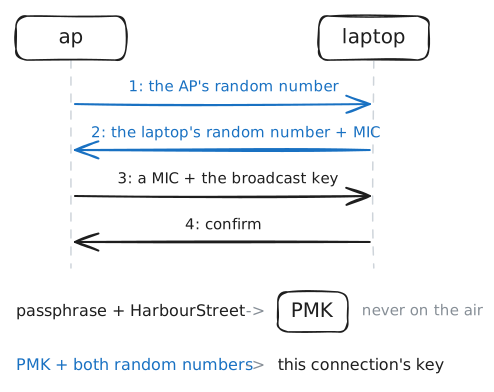
Joining a WPA2 network ends with the 4-way handshake: four messages called EAPOL frames, the format Wi-Fi uses to exchange keys.
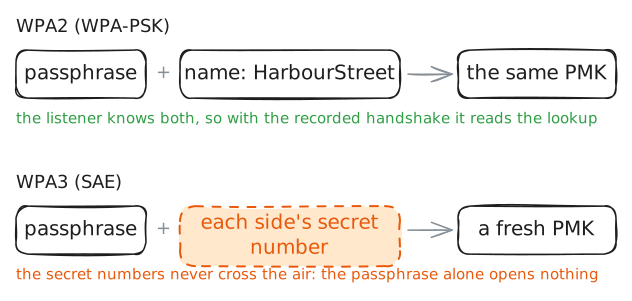
Both sides start with the same secret, made from the passphrase and the network's name: the pairwise master key (PMK). The handshake proves each side has it, without sending it:
- Message 1: the AP sends a random number.
- Message 2: the laptop now has both random numbers. It mixes them with the PMK and both addresses into a fresh key for this connection, then sends its own random number, signed with that key: a checksum, the MIC, that only someone with the PMK could make. The AP makes the same key from the same parts, and checks the MIC.
- Message 3: the AP proves it has the key too, and hands over the key for broadcasts.
- Message 4: the laptop confirms.
Read them with
-Y eapol. Then make the PMK yourself withwpa_passphrase, and give tshark the passphrase in its keys file,/usr/share/wireshark/80211_keys.listener:~# tshark -r /tmp/wpa2.pcap -Y eapol listener:~# wpa_passphrase HarbourStreet reading-room-42 listener:~# tshark -r /tmp/wpa2.pcap -Y http
-
A tablet that won't join
A volunteer brings her own tablet,
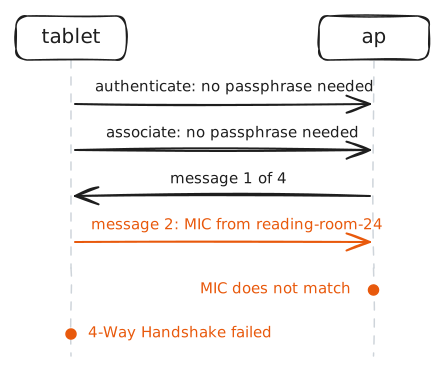
tablet, and types the passphrase from the sign. It won't join. She's sure she typed it right.A wrong passphrase makes a wrong PMK. The question is where along the way that shows.
Ask the tablet where it is with
wpa_cli status, then read what wpa_supplicant wrote in its log,/var/log/wpa_supplicant.log. The AP keeps a log too,/var/log/hostapd.log: read its last lines withtail. Last, fix the passphrase in the tablet's config.tablet:~# wpa_cli status tablet:~# cat /var/log/wpa_supplicant.log ap:~# tail /var/log/hostapd.log
-
Move to WPA3
WPA3-Personal keeps the passphrase and changes how it's used. In place of the PSK comes SAE, Simultaneous Authentication of Equals.
Before associating, each side sends a Commit: numbers built from the passphrase and fresh randomness, in a way that reveals neither. Then each sends a Confirm, proving it used the same passphrase. From that comes a PMK that's new for every SAE exchange, and the 4-way handshake follows, as before.
Two edits on the AP:
wpa_key_mgmt=SAE, andieee80211w=2, which makes protected management frames (PMF) a must. Management frames run the connection rather than carry data: join, leave, disconnect. WPA3 demands PMF: those frames get signed, so nobody can forge a "disconnect" to knock a device off.wpa=2stays as it is: WPA3 runs on RSN too, and only the key management changes.The laptop needs the same two in its network block. Then record the laptop joining and looking up the loans again. tshark still has the passphrase in its keys file.
listener:~# tcpdump -i mon0 -U -w /tmp/wpa3.pcap
laptop:~# curl -s "http://10.61.5.20/loans?card=27410093"
listener:~# tshark -r /tmp/wpa3.pcap -Y data
listener:~# tshark -r /tmp/wpa3.pcap -Y "wlan.fixed.auth.alg == 3 || eapol || http"
-
Old devices, new security
The volunteer's tablet has dropped off again: its config still says
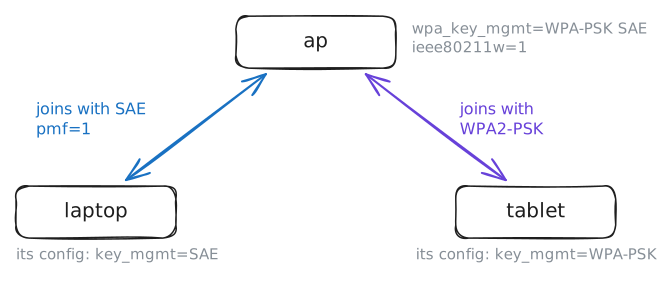
key_mgmt=WPA-PSK, and the AP now takes SAE only. Plenty of real devices can't do WPA3 at all: older printers, scanners, a card reader.hostapd can offer both at once, called WPA3 transition mode. Each device picks the best it supports. In the AP's config:
wpa_key_mgmt=WPA-PSK SAEoffers both, side by side.ieee80211w=1makes protected management frames optional: used with devices that support them, skipped with the rest.
Check the tablet with
wpa_cli statusand see what its scan found. Then change those two lines on the AP, and ask each device how it joined.tablet:~# wpa_cli status tablet:~# wpa_cli scan_results tablet:~# wpa_cli status laptop:~# wpa_cli status
Run these steps on real machines