 Hack the Route Start learning Open app
The idea
Odile works the night shift in Thornbury Logistics' security team. Everyone who manages a server reaches it
through one jump host, so every remote login in the company lands on that one box first, and sshd writes down each
one, success or failure, in /var/log/auth.log.
This morning the log is longer than it should be. Somewhere in it a login worked that should never have: a password that was guessed, not known. Odile has to find that login, prove it, and tell it apart from Freya, the duty engineer, signing in to do her job.
Steps
-
Every login attempt leaves a line
A jump host is the one door into the servers: staff log in to it, then hop onward. That makes it the one place every login is recorded, so it is the first place a defender reads.
The program that answers SSH,
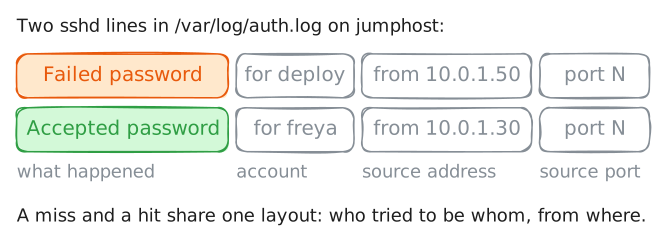
sshd, writes a line for each attempt to/var/log/auth.log(the path on Debian and Ubuntu; Red Hat hosts write the same lines to/var/log/secure). Two lines matter here. An attempt with the wrong password isFailed password; an attempt that got in isAccepted password. Each line carries the account, the source address, and the port, so one line tells you who tried to be whom, from where.Read the two kinds of line together. Everything else in the lab is about telling an ordinary login from a stolen one, and both look like an
Accepted passwordline at first glance.jumphost:~# grep -E 'Failed password|Accepted password' /var/log/auth.log
-
A wall of failures, then one success
Guessing a password online means trying one after another against the live service. Every wrong guess is a
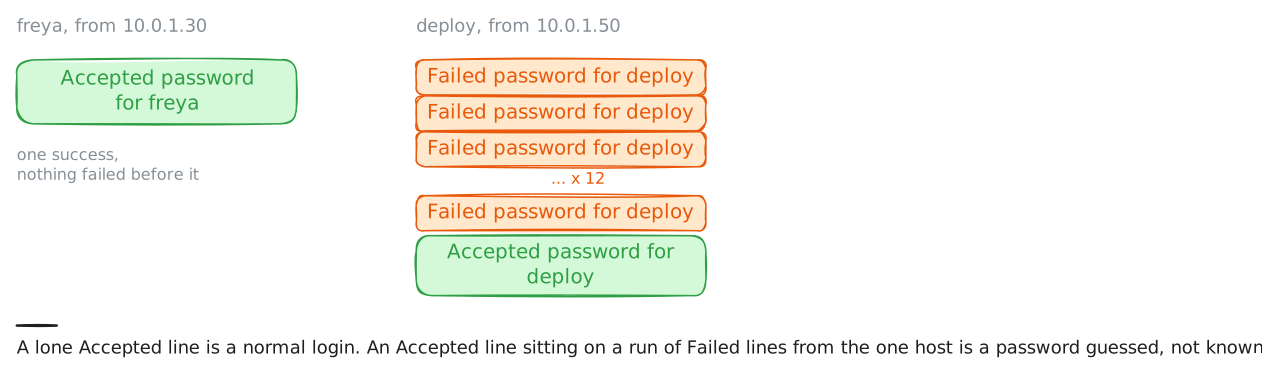
Failed passwordline; the moment one works, the next line isAccepted password, from the same source for the same account. That shape, many failures then a success from one host, is the signature of a password guessed in, and it is what MITRE ATT&CK files under Brute Force.A normal login has no such run in front of it. Freya typed her password right the first time, so her
Acceptedline stands alone. A stray failure or two before a success is usually someone mistyping their own password; what marks a break-in is the volume from one source (a dozen here), all aimed at the one account.Count the failures aimed at
deployfrom that one address.grep -cprints how many lines match instead of the lines themselves.jumphost:~# grep -c 'Failed password for deploy from 10.0.1.50' /var/log/auth.log
-
Forward the log to the SIEM
Reading
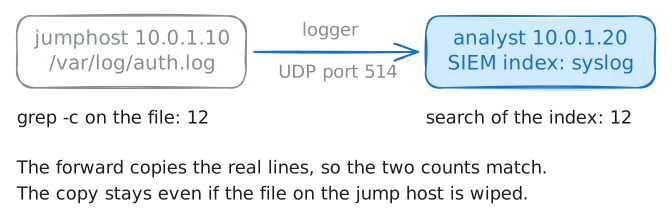
auth.logon one box worked because you knew which box. A real company has hundreds, and an intruder who lands on one copies its log or wipes it. So hosts forward their logs to a SIEM (security information and event management): one place that holds every machine's records and answers questions across all of them at once. That way the evidence outlives the host, and a search covers every machine.Forward this jump host's auth log to the analyst box, then ask the SIEM the same question you asked the file a moment ago.
loggersends log lines over the network with syslog, the standard way a machine hands log lines to a collector:--udpsends each line as a UDP datagram to--serverand--port(514is syslog's port),--rfc3164writes them in the classic syslog format the collector expects,--filereads the lines from a file instead of waiting for you to type them, and--tag sshdlabels them so they stand out later. UDP is fire-and-forget. It is fast, but a datagram can be dropped, so for evidence that must not go missing a real site would forward over TCP or TLS.The SIEM answers in PPL (Piped Processing Language), a query language that reads left to right like a pipeline: start at an index (
syslog, where forwarded host logs land), filter, then count. The filter here,like(message, "%Failed password%"), keeps the lines whose message holds that text. The%on each side matches any characters around it.jumphost:~# logger --udp --server 10.0.1.20 --port 514 --tag sshd --rfc3164 --file /var/log/auth.log analyst:~# curl -s 'localhost:9200/_plugins/_ppl?format=csv' -H 'content-type: application/json' -d '{"query":"source=syslog | where like(message, \"%Failed password%\") | stats count()"}' -
Find the guessing host by its connections
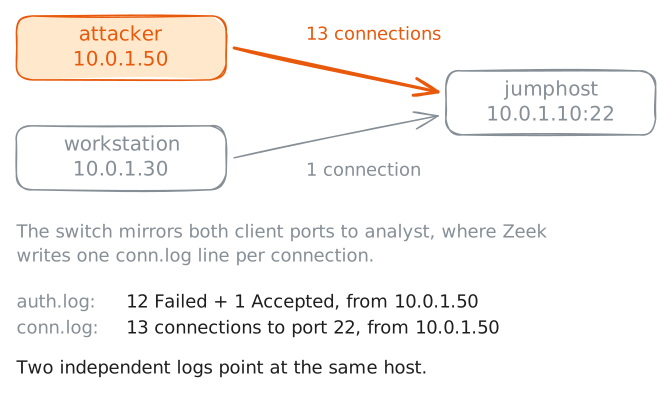
The auth log names the account, but its source address sits in free text, hard to total up. The network sensor is tidier. Zeek watches a mirrored copy of the office traffic and writes one line per connection to its
conn.log, each with clean fields: who connected (id.orig_h), to whom, and to which port (id.resp_p). SSH is port 22.A guessing run is loud on the wire. In this run each guess opened its own SSH connection, so a dozen guesses are a dozen connections to port 22 from one host, and the login that worked is one more. One connection can in principle carry a few attempts: sshd allows up to
MaxAuthTries, six by default. So a connection count is a lower bound on attempts; the auth log, one line per attempt, is the exact tally. Here the two line up.A real user makes a single connection. Ask the SIEM to count SSH connections per source, busiest first. The leading
-insort - attemptsmeans descending. It is the same question the auth log answered, now from a second, independent log.analyst:~# curl -s 'localhost:9200/_plugins/_ppl?format=csv' -H 'content-type: application/json' -d '{"query":"source=zeek-conn | where id.resp_p = 22 | stats count() as attempts by id.orig_h | sort - attempts"}' -
The verdict, and shutting the door
Put it together.
deploywas guessed in from10.0.1.50: twelve failures then a success, and the same host connecting thirteen times.freyafrom10.0.1.30is the duty engineer: one login, no failures. One line is a break-in; the other is routine work.Finding the break-in is half the job; closing the door is the other half. Blocking
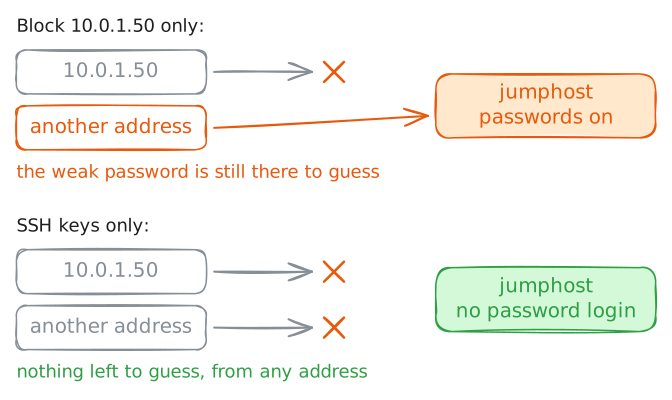
10.0.1.50stops this host, but the attacker can move to another address and the weak password is still there to guess. The fix that lasts is to take passwords off the door: with SSH keys only, there is nothing to guess. Read back the one line that is the moment of the break-in.This was one host guessing one account, the loudest shape. A single common password tried across many accounts, or guesses spread over many addresses at once, slip past a per-source count; correlating across accounts and sources comes later on this road. And a confirmed success is where the response starts, not ends: next you would hunt what
deploydid once it was inside.jumphost:~# grep 'Accepted password for deploy from 10.0.1.50' /var/log/auth.log
Run these steps on real machines