 Hack the Route Start learning Open app
The idea
Mateusz has an authorised engagement against Harbourline Parking, whose residents sign in to view their parking permit. The sign-in works perfectly: a wrong password is refused, a right one gives you a session. That is authentication: proving who you are.
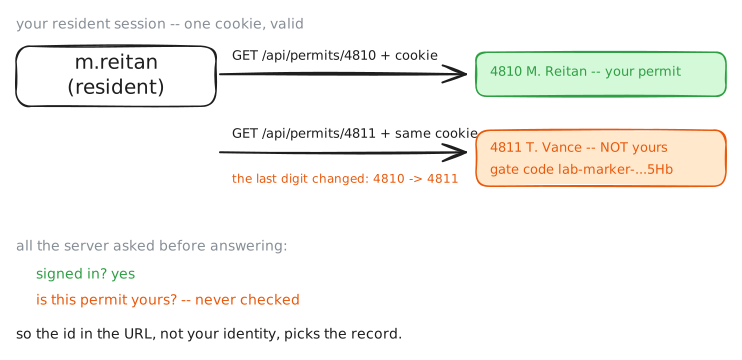
The portal then makes the mistake that fills the top of every breach list. Once it knows who you are, it never checks what you are allowed to touch. It will hand you any permit if you ask for it by number, and it will run its staff-only admin view for any resident who calls the URL. That second question (may this user touch this thing, or call this function?) is authorisation, and when a server leaves it to the client (hiding a menu item, trusting the id in the URL) it has no real access control at all.
Mateusz will exploit both halves: reading a neighbour's permit by its id (an object-level failure, IDOR), and reaching the staff view as an ordinary resident (a function-level failure).
Steps
-
Your permit, your number
You are on Mateusz's box,
kali, with the portal at10.0.1.20. Open it in the Viewer, then sign in as the resident you have credentials for and read your own permit. Keep the session cookie in a jar; you will reuse it. Look at your permit number: it is small and tidy.kali:~# curl -s -c /tmp/jar -H "Content-Type: application/json" -d '{"username":"m.reitan","password":"reitan-resident-pw"}' http://10.0.1.20/api/login kali:~# curl -s -b /tmp/jar http://10.0.1.20/api/permit -
Change one digit
Your permit is 4810. Ask the portal for the next one, 4811, with the same session. If the endpoint checks that a permit belongs to you before answering, this is refused. If it only checks that you are signed in, it will hand you a stranger's permit.
kali:~# curl -s -b /tmp/jar http://10.0.1.20/api/permits/4811
-
The staff page the menu hid
The resident app shows no admin link: the staff view over every permit is not in your menu. But a missing menu item is a client-side decision. The endpoint behind it,
/api/admin/holders, is a URL you can request directly. Try it with your resident session and see whether the server enforces what the menu implied.kali:~# curl -s -b /tmp/jar http://10.0.1.20/api/admin/holders
-
Swap seats: check the owner and the role
Switch sides and run Harbourline. The fix is not better-hidden ids or a tidier menu; it is to make the server answer two questions on every request: does this object belong to the caller, and may this caller call this function? The safe endpoints do exactly that. Send them the same requests that worked a moment ago.
kali:~# curl -s -o /dev/null -w "%{http_code}" -b /tmp/jar http://10.0.1.20/api/permits-safe/4811
kali:~# curl -s -o /dev/null -w "%{http_code}" -b /tmp/jar http://10.0.1.20/api/admin-safe/holders
kali:~# curl -s -b /tmp/jar http://10.0.1.20/api/permits-safe/4810
Run these steps on real machines