 Hack the Route Start learning Open app
The idea
Lumen Books keeps its order system in a private subnet, where nothing on the internet can reach it. Give it a way out for its updates, see why the way out lets nothing in, and join a partner's VPC.
Steps
-
A private server with no way out
Priya runs Lumen Books, an online bookshop, in a VPC at a cloud provider. The shop's web server,
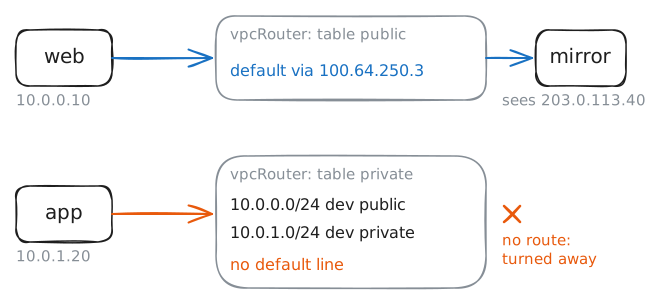
web, sits in the public subnet,10.0.0.0/24, with an elastic IP,203.0.113.40.The order system,
app, holds every customer's address, so it sits in the private subnet,10.0.1.0/24. Each subnet reads its own route table, and the private one has no route to the internet. Nobody out there can reachapp.That's the point of a private subnet, but
appstill needs its security updates. They come frommirror, a package mirror on the internet whose page names the address each request came from.Ask
mirrorfor its page fromweband fromapp. Then read the private subnet's table onvpcRouter, the Router that plays the provider's.web:~# curl -sS -m 3 http://198.51.100.10/ app:~# curl -sS -m 3 http://198.51.100.10/ vpcRouter:~# ip route show table private
-
Build a NAT gateway
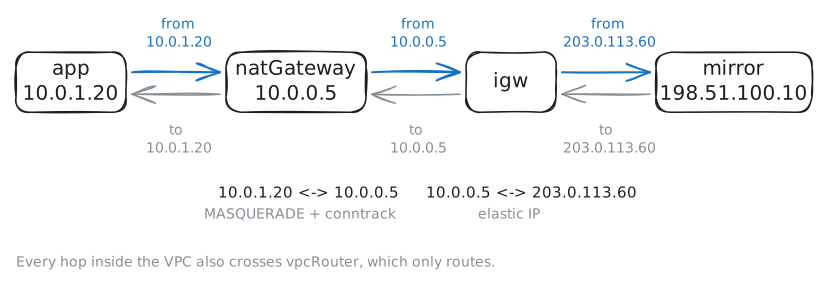
A NAT gateway is the cloud's answer: a machine in the public subnet that lends its own address to the private subnet's requests. Here it's
natGateway, at10.0.0.5, with an elastic IP of its own,203.0.113.60.On AWS, you press "Create NAT gateway" and add one line to the private subnet's route table:
0.0.0.0/0to the NAT gateway. Here you build what the button builds, in two commands.First, the NAT rule on
natGateway.MASQUERADEgives every packet from10.0.1.0/24the gateway's own address on the way out, and conntrack, the kernel's list of conversations, turns each answer back intoapp's address.Second, the route on
vpcRouter: the private table's default route, through10.0.0.5.Then fetch the updates from
appagain, while the lab records onigw, the internet gateway, where the VPC meets the provider.natGateway:~# iptables -v -t nat -A POSTROUTING -s 10.0.1.0/24 -j MASQUERADE vpcRouter:~# ip route add default via 10.0.0.5 table private app:~# curl -sS -m 3 http://198.51.100.10/
-
A door that opens one way
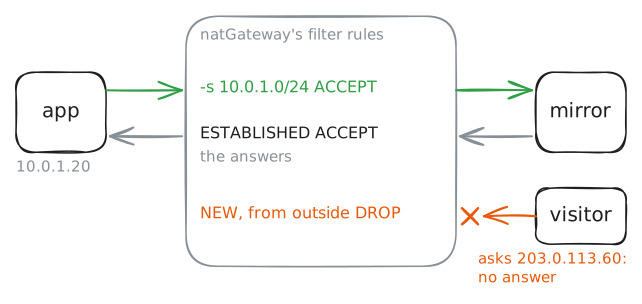
appcan start conversations with the internet now. Can the internet start one withapp?Two doors look open.
natGatewayhas a public address,203.0.113.60, and it forwards packets forapp. Andapp's own address,10.0.1.20, is right there in the gateway's rules.Try both from
visitor, a machine out on the internet. Then read the filter rules onnatGatewaywithiptables -S, which lists each rule as the command that would add it.visitor:~# curl -sS -m 3 http://203.0.113.60/ visitor:~# curl -sS -m 3 http://10.0.1.20/ natGateway:~# iptables -S
-
A route to the partner's VPC
Lumen Books' accountants, Tally & Co, run their reports in a VPC of their own,
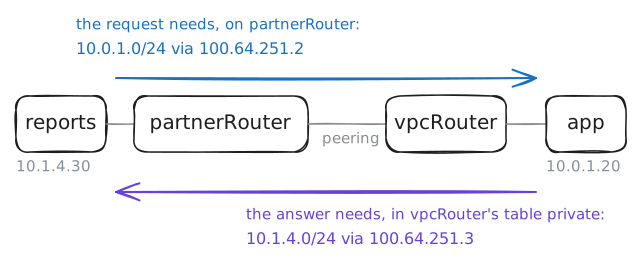
10.1.4.0/24, and needapp's orders every night. The internet is the wrong road:apphas no public address, and orders don't belong on the internet anyway.The two VPCs are joined by VPC peering, a private link between two VPCs that the provider runs for you. Here it's the network
peering, betweenvpcRouterandpartnerRouter, Tally's VPC router.A peering link carries nothing until a route points at it, in both VPCs. Tally's table needs a route to
10.0.1.0/24, and Lumen's private table needs a route back to10.1.4.0/24: the answer starts in the private subnet, so it reads that table.Ask
appfor its orders fromreports, Tally's report server, and readpartnerRouter's routes. Then add a route on each side and ask again.reports:~# curl -sS -m 3 http://10.0.1.20/ partnerRouter:~# ip route partnerRouter:~# ip route add 10.0.1.0/24 via 100.64.251.2 vpcRouter:~# ip route add 10.1.4.0/24 via 100.64.251.3 table private reports:~# curl -sS -m 3 http://10.0.1.20/
Run these steps on real machines