 Hack the Route Start learning Open app
The idea
Juniper Bakery runs its shop and its blog in two containers on one server, and both serve port 80. Find out how they share it, then open the shop to customers.
Steps
-
Two web servers on one port
Ines builds the website of Juniper Bakery, a small bakery that sells bread online. She rents one server,
box, and runs two web programs on it: the shop, where people order, and the blog, where the bakers write.Each program runs in its own container. A container is a program packed with everything it needs and started so that it seems to have a machine to itself. Docker is the tool most people use to start one.
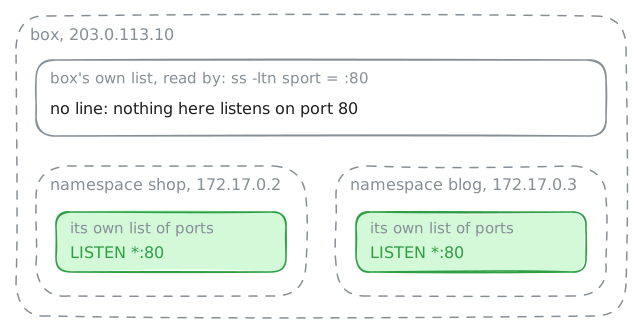
Both programs serve web pages on port 80, the usual port for the web. That should clash: a port on a machine belongs to one program at a time, and a second program that asks for it gets an error.
The shop answers at
172.17.0.2and the blog at172.17.0.3. Fetch both pages fromboxwithcurl, a program that asks a web server for a page. Then askboxwhich of its programs listen on port 80.box:~# curl -sS -m 3 http://172.17.0.2/ box:~# curl -sS -m 3 http://172.17.0.3/ box:~# ss -ltn sport = :80
-
Step inside a container
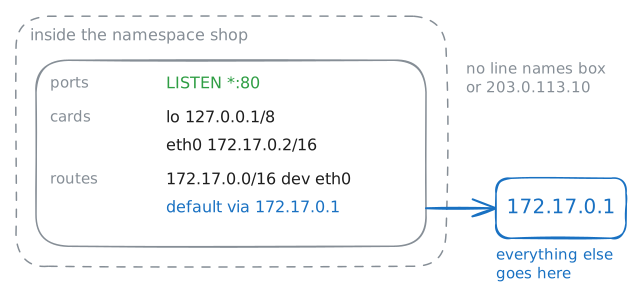
A new network namespace is nearly empty. It has
lo, the loopback card a machine uses to talk to itself, and nothing else. Every card, address and route beyond that, someone added.ip netnsis the Linux tool for namespaces.ip netns listnames the ones a machine has, andip netns execruns a command inside one, so the command sees that namespace's network instead of the machine's.Docker's own
docker execworks the same way: the program you start runs on the host, but it sees the container's network.List the namespaces on
box. Then runss -ltninside the shop's namespace, and ask it for its addresses and its routes.box:~# ip netns list box:~# ip netns exec shop ss -ltn box:~# ip netns exec shop ip -4 -br addr box:~# ip netns exec shop ip route
-
Follow the cable to the bridge
A namespace with only
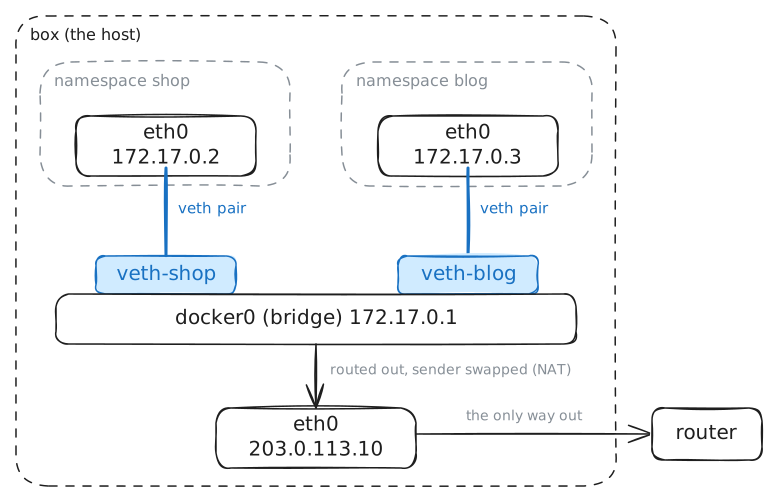
locan't reach anything, so a container needs a cable out. Linux makes one in software: a veth pair, two virtual cards joined like the two ends of a cable. A packet sent into one end comes out of the other.Docker makes one veth pair per container. It moves one end into the container's namespace and calls it
eth0, and it keeps the other end on the host.On the host, those ends meet at
docker0, a bridge. A bridge is a switch made in software: it learns which card leads to which machine and passes frames between them.docker0has an address too,172.17.0.1, the gateway in the shop's routes.Look at the host's end of the shop's cable,
veth-shop, then at the shop's end. List every card plugged intodocker0. Then fetch the shop's page from insideblog, while the lab records ondocker0.box:~# ip link show veth-shop box:~# ip netns exec shop ip link show eth0 box:~# ip -br link show master docker0 box:~# ip netns exec blog curl -sS -m 3 http://172.17.0.2/
-
Leave with the host's address
Inside
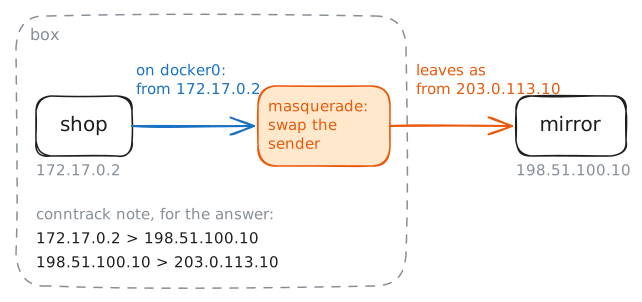
box, the containers talk acrossdocker0. The shop needs the internet, though: it checksmirror, a package mirror at198.51.100.10, for software updates.172.17.0.0/16is a private block, and the internet's routers keep no route to it. A request that left with172.17.0.2on it would get an answer that never finds its way back.So the shop's request goes to its gateway,
172.17.0.1ondocker0, andboxroutes it on through its own card. On the way out,boxdoes NAT: it swaps the container's address for its own,203.0.113.10. Docker sets this up with one masquerade rule on the host, for anything from172.17.0.0/16that leaves by a card other thandocker0.Fetch the mirror's page from inside
shopwhile the lab records ondocker0. The mirror's page says which address it saw. Then readbox's list of the conversations it translates.box:~# ip netns exec shop curl -sS -m 3 http://198.51.100.10/ box:~# conntrack -L -s 172.17.0.2
-
Publish the shop
Customers need the shop too, and they come from the internet, like
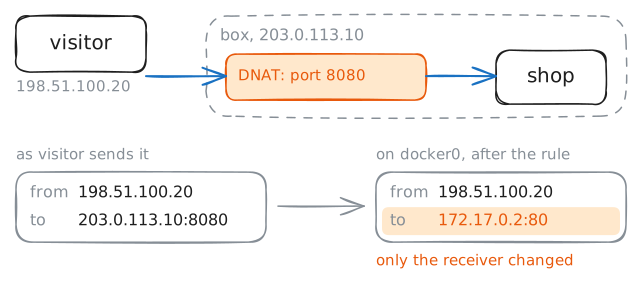
visitorat198.51.100.20. The masquerade rule only rewrites conversations that start inside, and a customer's request starts outside.From
visitor,172.17.0.2is a private address on a bridge insidebox. Customers can reachbox's own address,203.0.113.10, so the shop needs a door there.docker run -p 8080:80makes that door, and Docker calls it a published port: requests forbox's port 8080 go on to the container's port 80. Underneath, it's one rule that rewrites where a packet is going, called DNAT, the same rewrite as a port forward on a home router.Try the shop from
visitor, at the container's address and atbox's port 8080. Add the rule onbox. Then try port 8080 again while the lab records ondocker0.visitor:~# curl -sS -m 3 http://172.17.0.2/ visitor:~# curl -sS -m 3 http://203.0.113.10:8080/ box:~# iptables -v -t nat -A PREROUTING -p tcp --dport 8080 -j DNAT --to-destination 172.17.0.2:80 visitor:~# curl -sS -m 3 http://203.0.113.10:8080/
Run these steps on real machines