 Hack the Route Start learning Open app
The idea
Ferris Tickets runs in a cloud now: a private network of its own, two subnets, one gateway. Find out what makes a subnet public, and give a server a public address.
Steps
-
An address the server can't see
Tomas sells tickets for a small theatre through his site, Ferris Tickets. He moved it from a server in his office to a cloud provider, which rents him a VPC, a virtual private cloud: a private network of his own,
10.0.0.0/16, carved out of the provider's huge shared one.Renting machines and a network this way is called IaaS, infrastructure as a service. The provider runs the hardware and the network under it, and Tomas runs everything on his machines.
His web server,
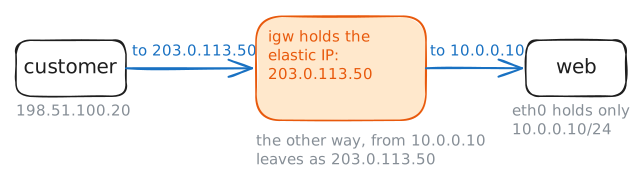
web, sits in the VPC at10.0.0.10. Customers reach it at203.0.113.50, a public address the provider lends him, which AWS calls an elastic IP.Show the addresses
webhas. Fetch a page frompayments, Tomas's card payment company out on the internet, whose page names the address a request came from. Then fetch the site fromcustomerat its public address, while the lab records onweb.web:~# ip -4 -br addr web:~# curl -sS -m 3 http://198.51.100.10/ customer:~# curl -sS -m 3 http://203.0.113.50/
-
A route table for each subnet
Tomas split his VPC into two subnets.
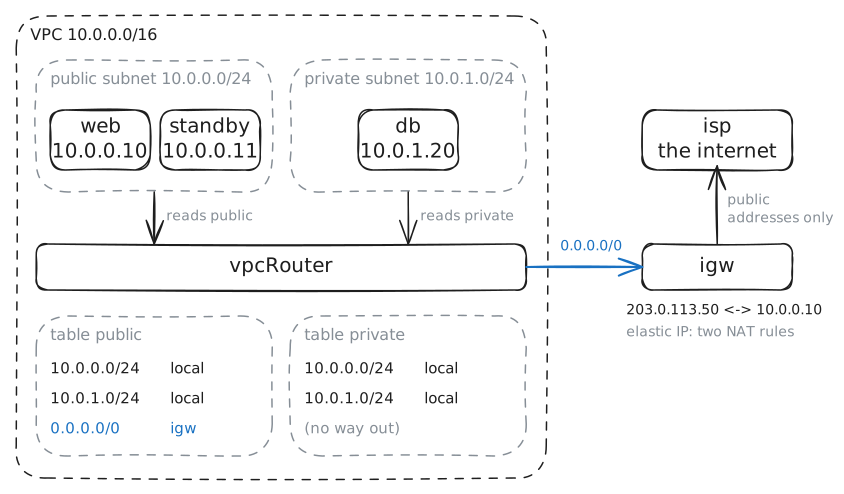
public,10.0.0.0/24, holdswebandstandby, a second copy of the site.private,10.0.1.0/24, holdsdb, the orders database, which nobody on the internet should reach.What makes a cloud subnet public or private is one thing: its route table. Every subnet is tied to one route table, and only a public subnet's table has a default route,
0.0.0.0/0, pointing at the internet gateway.At a provider, an unseen Router reads these tables, and you edit them on the provider's website. Here that router is
vpcRouter, a Linux router with one table per subnet. Linux'sip rulepicks the table by the packet's sender: packets from10.0.0.0/24readpublic, and packets from10.0.1.0/24readprivate.Read the rules on
vpcRouter, then both tables. Then askpaymentsfor its page fromdb.vpcRouter:~# ip rule vpcRouter:~# ip route show table public vpcRouter:~# ip route show table private db:~# curl -sS -m 3 http://198.51.100.10/
-
Reachable from inside only
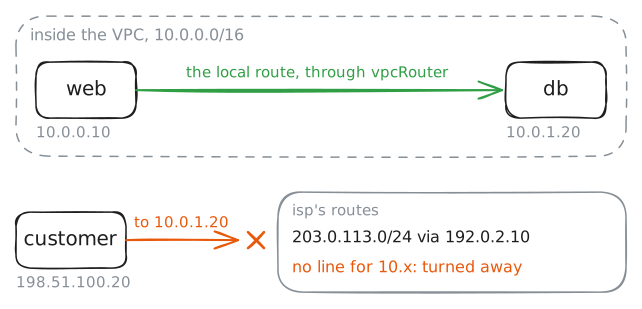
dbcan't go out, butwebhas to reach it: every ticket sold is an order written to the database.The local route takes care of that. Every table in the VPC knows both subnets, so
webreachesdbby its private address, and the answer comes back the same way. Nothing crossesigw, and nothing gets rewritten.From outside it's another story.
10.0.0.0/8is a private block: thousands of companies use it at once, so no router on the internet keeps a route to it.isp, the provider's link to the internet, knows only the block every elastic IP comes from.Fetch the orders page at
10.0.1.20fromweb. Then trydbandwebby their private addresses fromcustomer, and read the routes onisp.web:~# curl -sS -m 3 http://10.0.1.20/ customer:~# curl -sS -m 3 http://10.0.1.20/ customer:~# curl -sS -m 3 http://10.0.0.10/ isp:~# ip route
-
A public subnet isn't enough
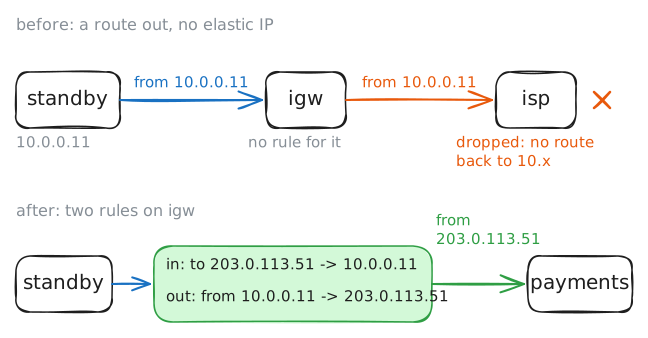
standby, at10.0.0.11, is the second copy of the site, in the public subnet next toweb. Tomas keeps it for the nightwebfails, and it has to reachpaymentsto take orders on its own.Its subnet's table has the default route to
igw, so its packets do head out. Whatstandbylacks is an elastic IP:igwholds rules forweband nobody else, so a request fromstandbyleaves with10.0.0.11on it.Try
paymentsfromstandbywhile the lab records onisp, where the provider meets the internet.Then give
standbythe elastic IP203.0.113.51. It takes the two ruleswebhas onigw: DNAT, which rewrites the receiver of what comes in, and SNAT, which rewrites the sender of what goes out. Trypaymentsagain, then fetch the new address fromcustomer.standby:~# curl -sS -m 3 http://198.51.100.10/ igw:~# iptables -v -t nat -A PREROUTING -d 203.0.113.51 -j DNAT --to-destination 10.0.0.11 igw:~# iptables -v -t nat -A POSTROUTING -s 10.0.0.11 -j SNAT --to-source 203.0.113.51 standby:~# curl -sS -m 3 http://198.51.100.10/ customer:~# curl -sS -m 3 http://203.0.113.51/
Run these steps on real machines
Keep reading
- How Amazon VPC works: subnets, route tables and gateways, in AWS's own words article
- Subnet route tables: the local route, the main table, and what makes a subnet public article
- Elastic IP addresses: a public address you move from one instance to another article
- Virtual Private Cloud (VPC) Explained video