 Hack the Route Start learning Open app
The idea
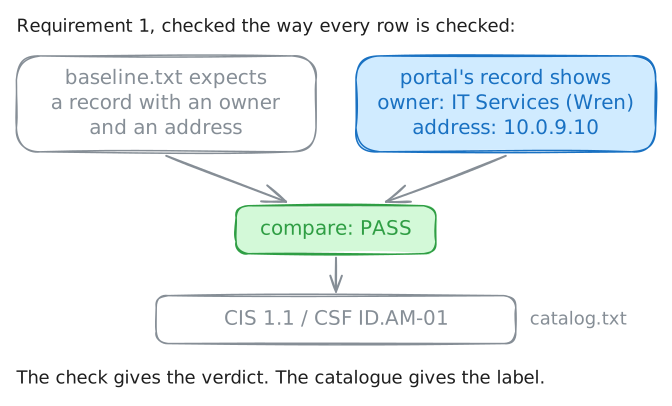
Wren keeps the servers running at Tidewater College, and an external review is a month away. Rather than guess what the reviewers will flag, Wren measures the course-registration host against the college's own written baseline: run each check, decide pass or fail, and tag every result with the control it belongs to. The point is a scorecard the reviewers and the college's management can both read. The fixing comes later.
Steps
-
A baseline is a yardstick
A baseline is a written statement of what a correctly configured host should look like: specific, checkable requirements, not impressions. An audit measures a real host against that baseline: run each check, compare, and record pass or fail. (Wren is measuring her own host before the external review, so this is a self-assessment; the outside reviewers will re-run every check themselves.)
What turns a pile of findings into something a reviewer can use is the mapping: tagging each result with a label from a shared catalogue, so the finding means the same thing on every host. Two catalogues are in play, and they are separate documents.
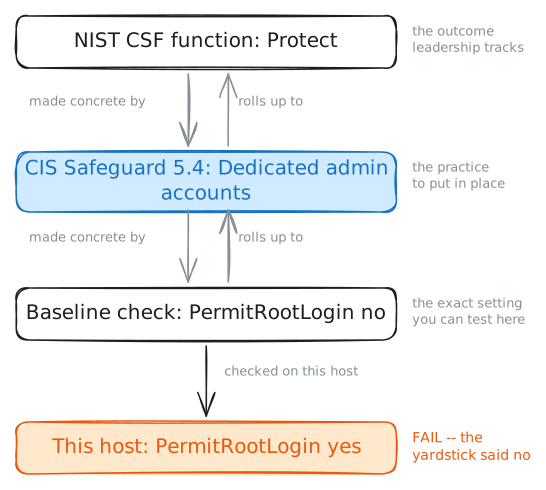
The Center for Internet Security (CIS) publishes the CIS Controls: 18 numbered Controls, each split into numbered Safeguards (for example 8.2, Collect Audit Logs). The National Institute of Standards and Technology (NIST) publishes the Cybersecurity Framework (CSF): six Functions (Govern, Identify, Protect, Detect, Respond, Recover), each split into Categories and Subcategories (for example PR.PS-04).
A finding is labelled at the safeguard and subcategory level; the Control and Function are the headings they sit under. A crosswalk lines the two catalogues up, because neither replaces the other. Read the baseline and the catalogue, then check the first requirement yourself.
portal:~# cat /root/audit/baseline.txt
portal:~# cat /root/audit/inventory-export.yaml
-
The keys to root: UID 0 accounts
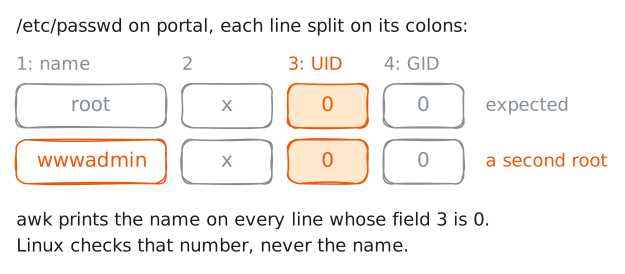
On Linux, power comes from UID 0 (a user id of zero), not from the name "root". Any account whose user id is 0 is root: the same total control, under a different login name. So requirement 2 is blunt: only
rootmay have UID 0.The check reads
/etc/passwdand prints the login name of every line whose third field (the UID) is 0. The baseline expects exactly one name back. More than one means someone created a second, hidden superuser (an account with root's full control).Run the check and map the result: which catalogue entries does a second UID-0 account fail against?
portal:~# awk -F: '$3 == 0 { print $1 }' /etc/passwd -
What the config really says: SSH root login
Requirement 3 is about configuration, not accounts: SSH should refuse a direct login as root. Letting root log in over the network hands an attacker a single, well-known username to aim every password guess at, and loses the per-person attribution that logging in as yourself and then using
sudoleaves: the auth log would show onlyroot.The setting lives in
sshd_configasPermitRootLogin. The baseline wantsno. The check pulls that line out of the file, so you read what the file says rather than assuming it.Run the check, then map it, and watch which catalogue the setting lands in.
portal:~# grep -i '^PermitRootLogin' /etc/ssh/sshd_config
-
Is anything recorded: audit logging
The last requirement is about keeping a record. If something goes wrong on
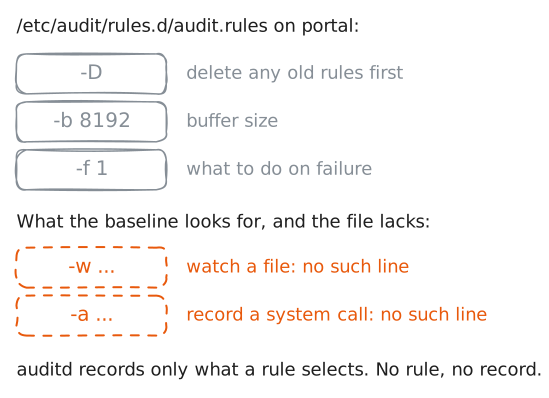
portal, could anyone reconstruct which commands ran and which files changed?On Linux that detailed record is the job of the audit system (
auditd), and what it records is set by rules: a-wrule watches a file, a-arule records a kind of system call. Requirement 4 wants at least one such rule.Where does generating that record sit in the frameworks? It is tempting to file logging under Detect, but NIST CSF 2.0 puts generating audit logs under Protect, subcategory PR.PS-04. Detecting an intruder is what you do with the logs afterward.
Read the audit rules file and decide: is anything being recorded?
portal:~# cat /etc/audit/rules.d/audit.rules
-
The scorecard, and what the map is for
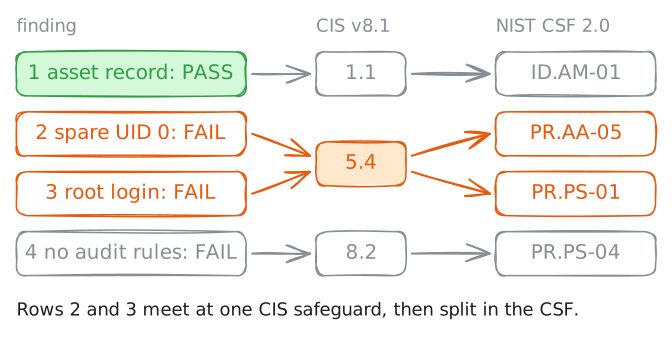
Four checks, four results: one pass and three fails. On its own that is a to-do list. Tagged with safeguards and subcategories, it becomes a scorecard that speaks the reviewers' language.
The scorecard template ships with the format worked once (row 1) and the rest blank: filling the verdict and the two labels for each row is the audit, your own judgement, not a handout. You have gathered every observation and mapped every finding in the last three steps, so read the template now and assemble the result.
Read the scorecard template, then compare it to the finished mapping below.
portal:~# cat /root/audit/mapping.txt
Run these steps on real machines
Keep reading
- CIS Controls v8.1: the 18 controls and their numbered safeguards (Center for Internet Security) article
- CIS Controls v8.1 Mapping to NIST CSF 2.0: the crosswalk that gives each safeguard a CSF subcategory article
- NIST Cybersecurity Framework 2.0 (NIST CSWP 29): the six functions and the subcategory wording article