 Hack the Route Start learning Open app
The idea
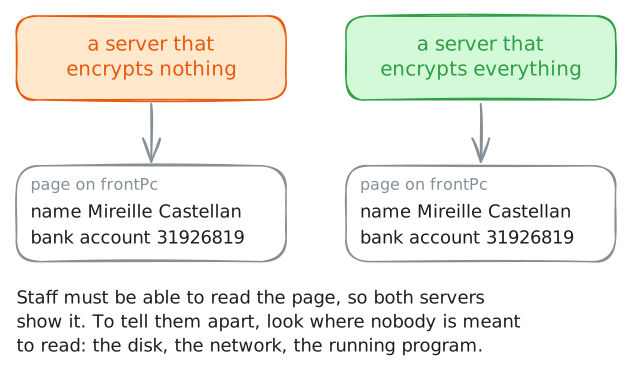
Wickham Row Physio has three treatment rooms, one server, and a form from its insurer that asks: is client data encrypted, yes or no? Bruno, who owns the practice, says to tick yes. Anwen, who looks after the computers, wants to see it first. Follow one client's record everywhere it goes, and find out how many questions that one tick box hides.
Steps
-
One tick, three questions
Bruno is sure: the supplier who set the system up said everything was encrypted. Encrypted means scrambled: only someone with the secret key can read it.
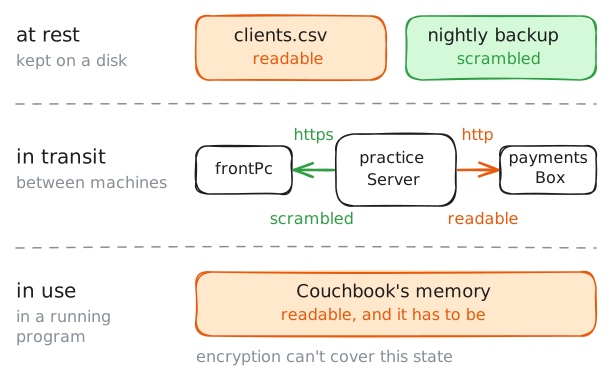
Anwen follows one client's record, Mireille Castellan's. A record is kept on a disk, it travels between machines, and a program holds it while it works. Those are the three states of data: at rest, in transit and in use.
Start where staff see it. On
frontPc, the front desk's PC, open Mireille's page in Couchbook, the practice's client book.frontPc:~# curl -s https://practiceServer/clients/C-0142
-
At rest: the file on the disk
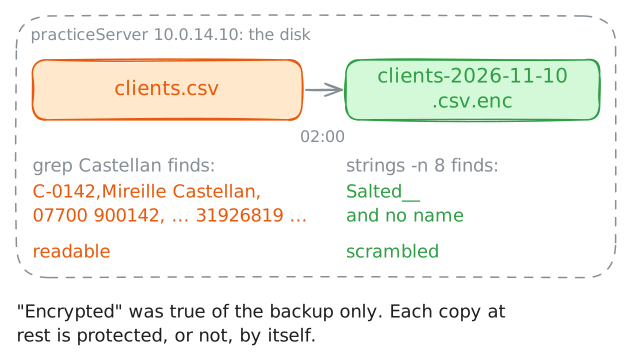
Data at rest is data kept somewhere: a file on a disk, a backup, a memory stick in a drawer. It is still there when the power goes off.
The risk at rest is a copy that walks away. A disk is stolen, or an old server is sold without being erased. Whoever holds the copy has all the time they want, and no sign-in page stands in their way.
Couchbook keeps its clients in one file on
practiceServer, and every night at 02:00 a job saves a copy of that file to a backup folder. Search both for Mireille's surname.grepprints the lines of a file that contain a word, andstringsprints whatever readable text a file of any kind holds.practiceServer:~# grep Castellan /srv/couchbook/clients.csv practiceServer:~# strings -n 8 /var/backups/couchbook/clients-2026-11-10.csv.enc
-
In transit: two hops
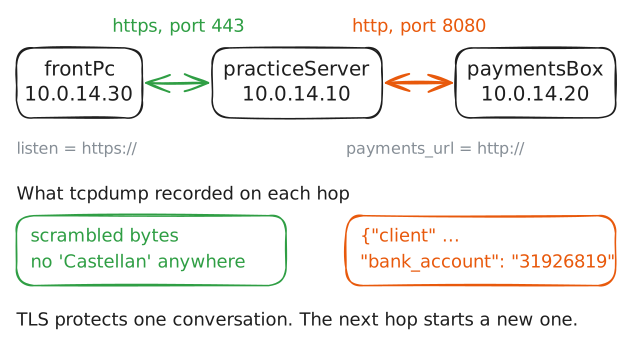
Data in transit is data on its way between two machines. On the way it crosses cables, switches and Wi-Fi that carry other traffic too, and anything on the path can keep a copy.
The protection is to encrypt the conversation. A web address that starts with
httpsuses TLS, which does that, and one that starts withhttpsends plain text. The lab HTTPS and TLS: lock a site and prove who it is teaches how.Mireille's record makes two trips, called hops. Couchbook sends her page to the desk. And to fill in that page's last line, Couchbook asks the payments program on
paymentsBoxabout her direct debit.Print the two web addresses in Couchbook's settings. Then open her page again. The lab records both trips with
tcpdump, which the lab Packet capture: read the traffic and settle the argument teaches.practiceServer:~# grep :// /etc/couchbook/couchbook.conf frontPc:~# curl -s https://practiceServer/clients/C-0142
-
In use: inside the program
Suppose both gaps were closed: the file encrypted on the disk, and TLS on every hop. One place is left where the record has to be readable.
Data in use is data a running program is working on. Couchbook can't find a client by name or show a phone number while those are scrambled. So when it starts, it reads the whole file into its memory, the working space of a running program, and keeps that readable copy while it runs. Other programs fetch only what a request needs, and still hold it readable while they work.
Couchbook has a debug page that shows what it is holding. The page answers only requests that come from
practiceServeritself, at127.0.0.1, the address a machine uses to reach itself. Ask for it.practiceServer:~# curl -s http://127.0.0.1:8081/debug
-
Encryption and hashing
Now the methods. Each changes a value into something safer to keep or to send, and each fits a different need. Anwen has saved Mireille's record in a scratch file to try them on.
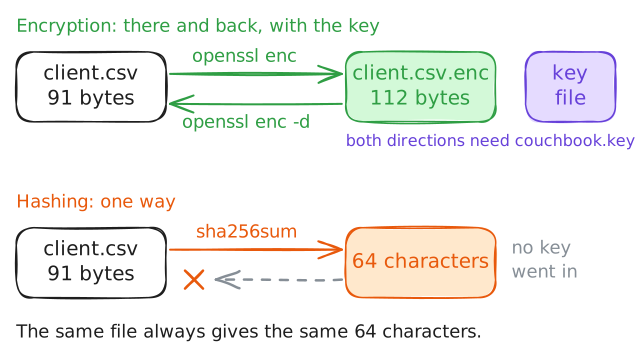
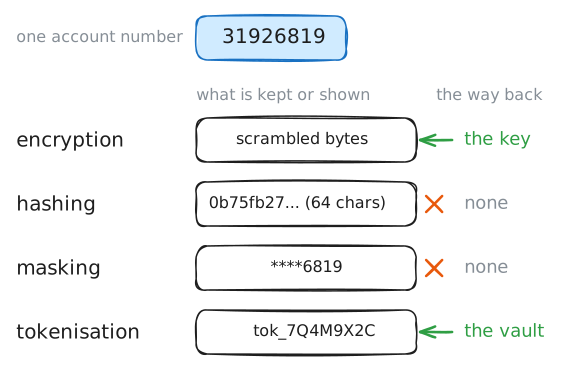
Encryption scrambles data with a key. Whoever has the key can turn it back, so it suits data you will need again. The lab Encryption basics: lock, fingerprint, sign teaches the kinds of key.
Hashing turns data into a short fingerprint. It suits data you only ever need to compare.
Encrypt the scratch file with
openssland the practice's key file, as the backup job does. Decrypt the result. Then hash the original withsha256sum.practiceServer:~# openssl enc -aes-256-cbc -pbkdf2 -v -in /srv/scratch/client.csv -out /srv/scratch/client.csv.enc -kfile /etc/couchbook/couchbook.key practiceServer:~# openssl enc -d -aes-256-cbc -pbkdf2 -in /srv/scratch/client.csv.enc -kfile /etc/couchbook/couchbook.key practiceServer:~# sha256sum /srv/scratch/client.csv
-
Masking and tokenisation
Two more methods help where a person needs only part of a value, or none of it.
Masking hides part of a value and shows the rest. The front desk has to confirm which account a payment comes from, and the last four digits do that.
Tokenisation swaps a value for a stand-in, called a token, that means nothing by itself. The real value is kept beside its token in one guarded place, the vault. Every other system stores the token and passes the token around.
sedprints a file with one piece of text swapped for another. Use it to mask the first four digits of Mireille's account number. Then find her token in the payments program's vault onpaymentsBox, and swap the whole number for it.practiceServer:~# sed 's/,3192/,****/' /srv/scratch/client.csv paymentsBox:~# grep C-0142 /srv/payments/vault.csv practiceServer:~# sed 's/31926819/tok_7Q4M9X2C/' /srv/scratch/client.csv
-
Who needs which form
Which field gets which method?
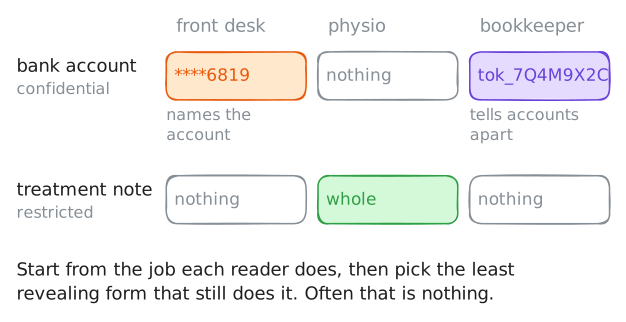
That is decided by data classification: sorting data into classes by how much harm it would do in the wrong hands, and writing down how each class is handled. The fields of one record are not equally sensitive. A phone number is private. A bank account number can cost somebody money. A treatment note is health data, which the law protects most strictly. The practice's opening hours are public.
One rule does the rest. Each person and each program gets the least they need for the job, in the least revealing form that still does it.
Anwen has written the practice's sheet. Read it.
practiceServer:~# cat /srv/practice/data-handling.txt
Run these steps on real machines
Keep reading
- OWASP: where to encrypt stored data, why the key lives apart from it, and why the safest data is data you never kept article
- Canonical: what full disk encryption protects (a lost or stolen disk) and what it can't (a running system), on one page article
- Wikipedia: data in use, the state that encryption on the disk and on the network leaves open, and what hardware can do about it article
- Wikipedia: tokenisation, how it differs from encryption, and why the vault has to be guarded hardest article