 Hack the Route Start learning Open app
The idea
Ingrid runs the one server at Pennington Foods, a family bakery supplier, and it still takes SSH logins by password. Any server like that gets guessed at from the moment it is reachable, because machines on the internet scan for SSH and try common passwords all day. Moving to keys is on her list; today she wants the guessing stopped.
Host intrusion prevention is the server defending itself. fail2ban watches the authentication log, and
when one address fails to log in too many times in too short a window, it bans that address in the host's own
firewall. Ingrid arms it on her victim server, lets the attacker guess until it is locked out, and checks
that a real user on staff still gets in.
Steps
-
A password login invites guessing
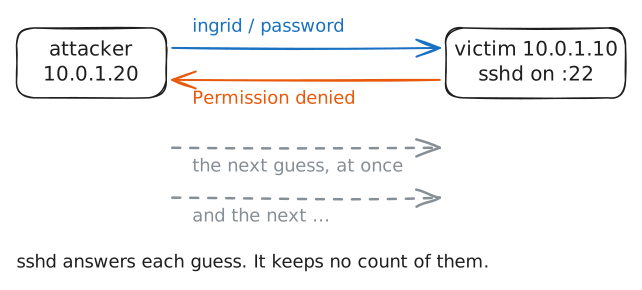
A password login is only as strong as the password, times the number of tries an attacker is allowed. Nothing in SSH itself limits those tries: an attacker can guess again the instant a guess fails, thousands of times an hour.
Ingrid's server has one account,
ingrid, with a weak password the firm never changed. Watch a single guess from theattackerto see what one failed login looks like, and to see that nothing yet stands in the way of the next one.attacker:~# sshpass -p password ssh -o StrictHostKeyChecking=no -o ConnectTimeout=5 -o PreferredAuthentications=password -o PubkeyAuthentication=no ingrid@10.0.1.10 true
-
fail2ban reads the log and arms
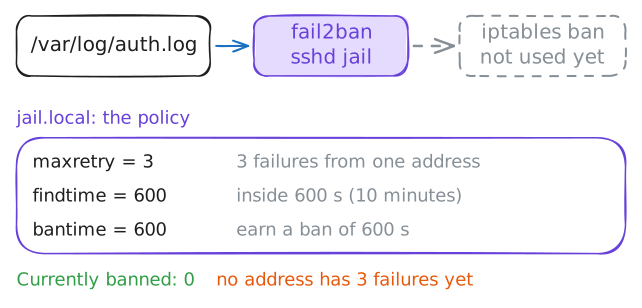
fail2ban is the host's own intrusion-prevention reflex. It follows a log file as it grows, matches lines against a filter (the built-in
sshdfilter recognisesFailed passwordlines), and counts failures per source address. When one address crosses a threshold, fail2ban runs a ban action.Its policy lives in
jail.local:maxretryfailures insidefindtimeseconds earns a ban ofbantimeseconds. Here the ban isbanaction = iptables-multiport: a rule in iptables, the Linux firewall, that rejects the address.Write the policy, then read fail2ban's own status.
victim:~# fail2ban-client status sshd
-
The ban trips
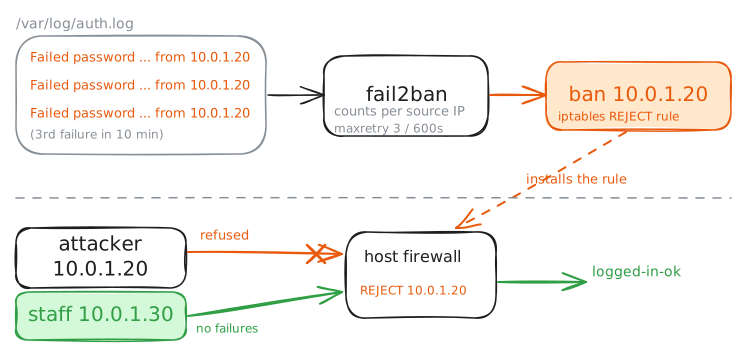
Let the attacker do what an attacker does: guess again, and again. Each failure writes a
Failed passwordline to the auth log with the source address. fail2ban counts them per address, and once theattackerreaches the threshold, the ban action fires.The guesses below are a few of the most common passwords, the start of the list a real guessing tool works through.
attacker:~# sshpass -p 123456 ssh -o StrictHostKeyChecking=no -o ConnectTimeout=5 -o PreferredAuthentications=password -o PubkeyAuthentication=no ingrid@10.0.1.10 true
attacker:~# sshpass -p letmein ssh -o StrictHostKeyChecking=no -o ConnectTimeout=5 -o PreferredAuthentications=password -o PubkeyAuthentication=no ingrid@10.0.1.10 true
attacker:~# sshpass -p admin ssh -o StrictHostKeyChecking=no -o ConnectTimeout=5 -o PreferredAuthentications=password -o PubkeyAuthentication=no ingrid@10.0.1.10 true
victim:~# fail2ban-client status sshd
victim:~# iptables -S f2b-sshd
-
Locked out, but only the attacker
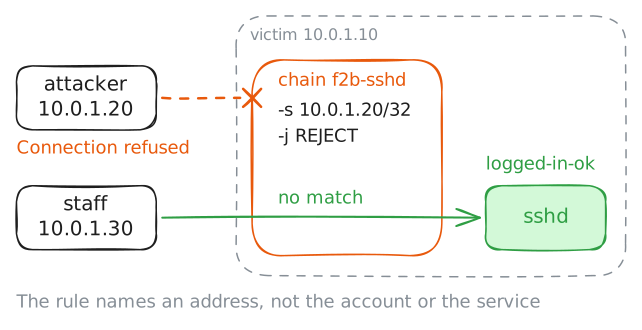
A ban is worth little if it also shuts out the people who belong. fail2ban banned an address, not the service and not the account.
So the
attackershould be refused at the door, while a real user onstaff, at a different address, logs in as normal. Try both.attacker:~# sshpass -p hunter2 ssh -o StrictHostKeyChecking=no -o ConnectTimeout=5 -o PreferredAuthentications=password -o PubkeyAuthentication=no ingrid@10.0.1.10 true staff:~# sshpass -p autumn2023 ssh -o StrictHostKeyChecking=no -o ConnectTimeout=5 -o PreferredAuthentications=password -o PubkeyAuthentication=no ingrid@10.0.1.10 'echo logged-in-ok'
-
What a ban buys, and what really fixes it
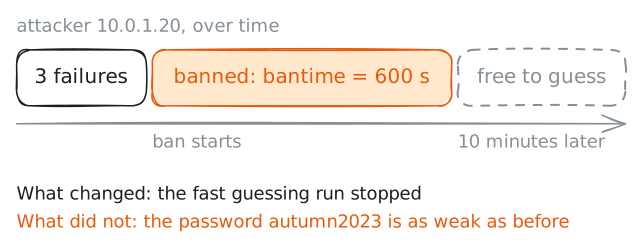
Look at what fail2ban did and did not do. Detection tells you an attack happened; prevention stops it while it is happening. fail2ban is prevention: it acts on the host itself without waiting for anyone to read an alert.
That is worth having. But the block it applied is a timed one, so before Ingrid calls the server safe, read how long the ban lasts.
victim:~# fail2ban-client get sshd bantime