 Hack the Route Start learning Open app
The idea
Maren looks after IT at Brontë & Sloane, a law firm. Every confidential case has a matter code, and one of them,
BS-7731, must never leave the network. Staff upload case notes to an outside file-sharing site every day.
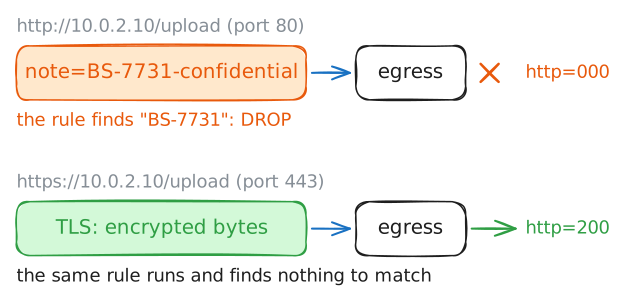
Data-leak prevention (DLP) watches traffic on its way out for sensitive content, then flags or blocks it. Maren puts a content match on the egress router, the one device every outgoing packet crosses. First an iptables rule only counts, then it drops, while ordinary notes still pass. The last step shows the limit: over HTTPS the border sees only encrypted bytes, and the same upload goes straight through.
Steps
-
A secret leaves in cleartext
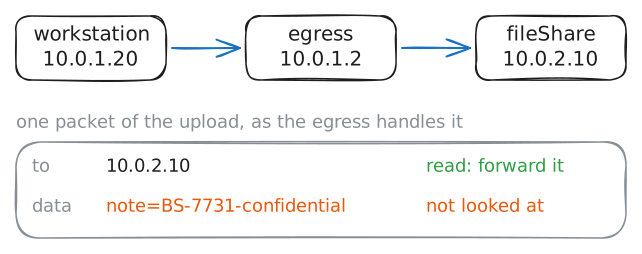
A paralegal uploads a case note to an outside file-sharing site, and the note carries the confidential matter code
BS-7731. Nothing at the border stops it by default. A router forwards what it is given.Record the traffic on the egress as the upload crosses. The site is plain HTTP, so the whole request, matter code included, travels in cleartext: unencrypted, readable by anyone on the path. That is what makes the leak possible, and its detection too.
workstation:~# curl -sS 'http://10.0.2.10/upload?note=BS-7731-confidential'
-
Monitor mode: count what is leaving
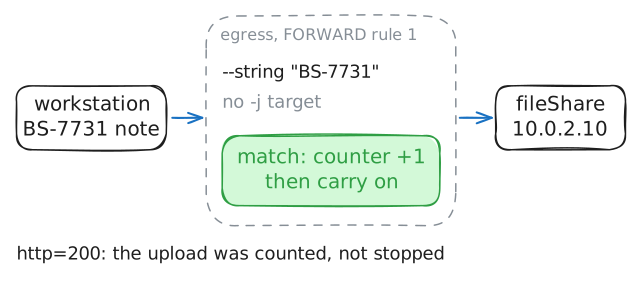
A DLP control first has to see. Add a rule to the egress's forwarding chain that matches the bytes of the matter code in any forwarded packet.
-m stringdoes the search, and--algo bmpicks Boyer-Moore, a fast way to find a string in a run of bytes.The rule has no target (
-j), so it only counts the packets it matches and lets them through. That is monitor mode: you learn how much is leaving before you break anything.egress:~# iptables -I FORWARD 1 -p tcp -m string --string "BS-7731" --algo bm workstation:~# curl -s -m6 -o /dev/null -w 'http=%{http_code}\n' 'http://10.0.2.10/upload?note=BS-7731-confidential' egress:~# iptables -L FORWARD 1 -n -v -
Enforce: drop the leak
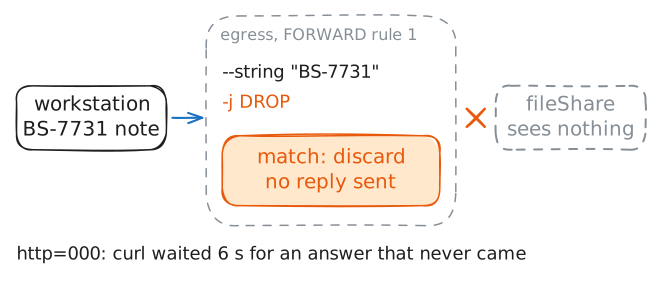
Monitor mode showed the leak. Now stop it. Give the same match a target,
-j DROP, and the border discards any forwarded packet carrying the matter code before it reaches the outside.-R FORWARD 1replaces the monitor rule in place with the enforcing one: the same match, with a target this time.egress:~# iptables -R FORWARD 1 -p tcp -m string --string "BS-7731" --algo bm -j DROP workstation:~# curl -s -m6 -o /dev/null -w 'http=%{http_code}\n' 'http://10.0.2.10/upload?note=BS-7731-confidential' -
Only the marked data
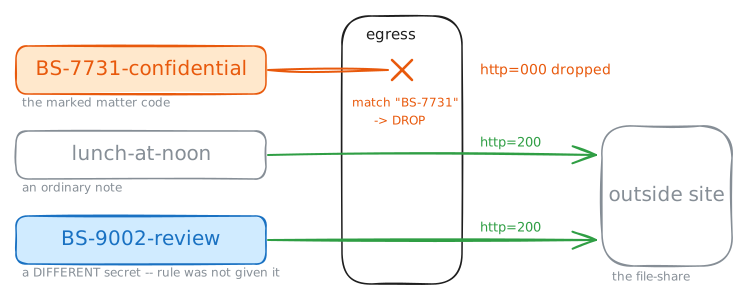
A content match stops exactly what it matches and nothing else. An ordinary note with no matter code uploads normally. So does a note about a different matter,
BS-9002, because the rule looks forBS-7731, not for every matter code. That precision is the point, and also the weakness.workstation:~# curl -s -m6 -o /dev/null -w 'http=%{http_code}\n' 'http://10.0.2.10/upload?note=lunch-at-noon' workstation:~# curl -s -m6 -o /dev/null -w 'http=%{http_code}\n' 'http://10.0.2.10/upload?note=BS-9002-review' workstation:~# curl -s -m6 -o /dev/null -w 'http=%{http_code}\n' 'http://10.0.2.10/upload?note=BS-7731-confidential' -
The blind spot: HTTPS hides it
The outside site also serves HTTPS. Upload the very same note over
https://and the matter code is inside the TLS session, encrypted from the workstation all the way to the site. The border still runs the content match on every TCP packet, but all it sees now is ciphertext (encrypted bytes), so the bytesBS-7731are nowhere to find.-ktells curl to skip the certificate check. The site's certificate is signed by the lab's own authority, and the point here is what the border can read, not whether the site is trusted.workstation:~# curl -sk -m6 -o /dev/null -w 'http=%{http_code}\n' 'https://10.0.2.10/upload?note=BS-7731-confidential' workstation:~# curl -s -m6 -o /dev/null -w 'http=%{http_code}\n' 'http://10.0.2.10/upload?note=BS-7731-confidential'