 Hack the Route Start learning Open app
The idea
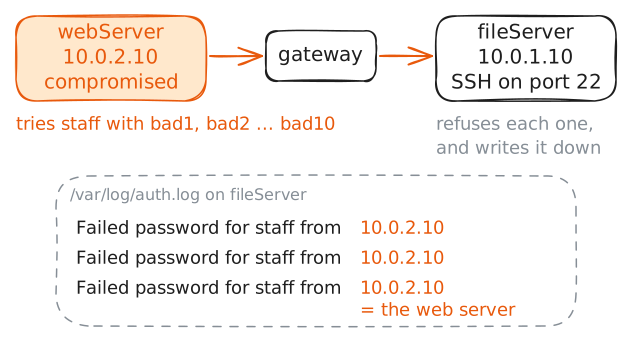
Tobias runs IT at Redgrave Textiles, a mill that sells its cloth online. The incident is already confirmed: the public web server in the DMZ (the exposed network that faces the internet, kept apart from the office network) was taken over, and it is now reaching into the office network, guessing at the internal file server that holds the order books.
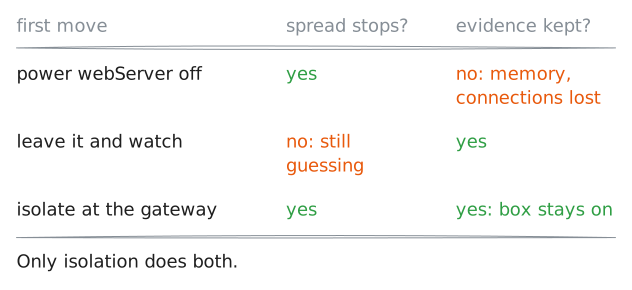
The phase before this one, identification, answered what happened. Containment answers a different question, under time pressure: how do you stop the spread right now without making things worse? The wrong move destroys the evidence you will need, or knocks the business offline for no reason.
Tobias's job in this phase is to cut the attacker's reach while keeping the compromised box intact for the investigation that follows.
Steps
-
See how far it has spread
Containment starts from what identification found: the web server at
10.0.2.10is compromised, and the concern is that the attacker is using it to move deeper. The place that shows movement is the target's own login record.Tobias reads the file server's auth log,
/var/log/auth.log, the file where the server writes down every login attempt. He looks for refused logins coming from the web server's address.fileServer:~# grep 'Failed password' /var/log/auth.log
-
The danger is live, so the choice is now
Before choosing a move, Tobias checks that the path the attacker is using is still open. From the web server, can the file server's SSH Port still be reached?
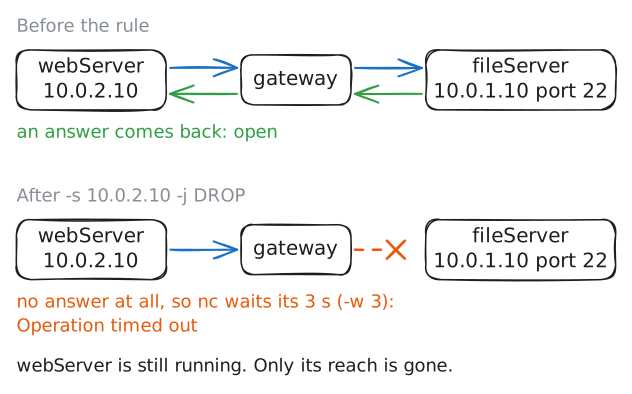
nc -zmakes a connection and reports only whether the port answered, with-vfor a readable line and-w 3to give up after three seconds.An open port here means the attacker can still reach the file server this second. That is what makes the next decision urgent, and it is also what rules out the move people reach for first.
webServer:~# nc -z -v -w 3 10.0.1.10 22
-
Cut it off at the boundary
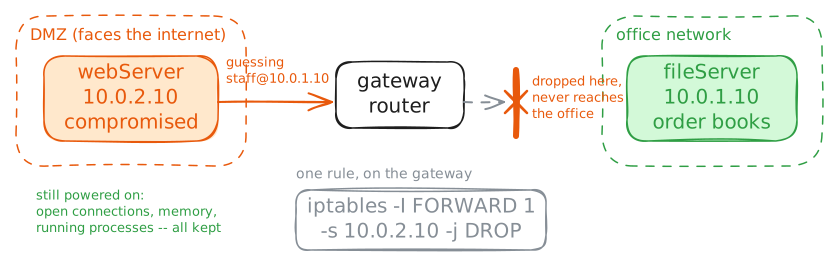
The gateway Router sits between the DMZ and the office, so every packet from the web server to the office passes through it. The gateway checks each packet it passes on against a list of Firewall rules called the
FORWARDchain. One rule there, dropping anything the web server sends onward, isolates the box from the whole office network without touching the box itself.Tobias adds the rule to the gateway's
FORWARDchain, matching the web server by its address. He works from the office side and never logs in to the compromised machine.gateway:~# iptables -I FORWARD 1 -s 10.0.2.10 -j DROP gateway:~# iptables -S FORWARD
-
Prove the spread has stopped
A containment action is not finished until it is checked. Tobias repeats the exact test from before: from the web server, try to reach the file server's SSH port again.
If the isolation holds, the connection that opened a moment ago should now go nowhere.
webServer:~# nc -z -v -w 3 10.0.1.10 22
Run these steps on real machines