 Hack the Route Start learning Open app
The idea
Astrid is the new IT lead at the Holloway Seed Bank. Nothing has ever gone wrong here, which is the problem: nobody has checked whether, if something did, they could do anything about it.
Responding to an incident runs through six phases: preparation, identification, containment, eradication, recovery, and lessons learned. The last five all happen in the heat of a real event. Preparation is the only one you do while the network is calm, and it decides whether the other five are even possible.
Preparation is less about tools than about answers. When an alarm goes off at 2 a.m., three questions decide how the night goes: what is on my network, what does normal look like, and was anything recorded? Astrid is going to answer all three now, while she has the time.
Steps
-
What is on the network?
You cannot protect, or even notice, a machine you do not know is there. The first preparation task is an asset inventory: a list of every host on the network and what it is for.
The fastest way to build one is to ask the network itself.
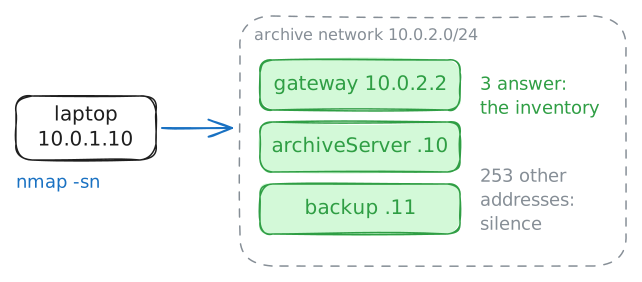
nmap -snruns a host-discovery sweep: it reports which addresses in a range answer, without probing their ports. Astrid points it at the archive network,10.0.2.0/24(the 256 addresses from10.0.2.0to10.0.2.255), from her laptop.Scanning a network is reconnaissance, the same first move an intruder makes. Running a scan like this against a system whose owner has not authorised you in writing is an offence under laws like the UK Computer Misuse Act and the United States' Computer Fraud and Abuse Act. Here the network is Holloway's own and Astrid runs IT, so mapping it is not an attack: it is exactly what preparation is for.
laptop:~# nmap -sn 10.0.2.0/24
-
What does normal look like?
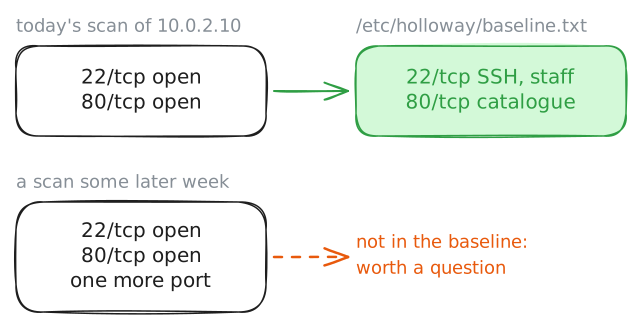
Knowing a host exists is not the same as knowing what it should be doing. The next task is a baseline: a record of normal, written down now, so that later a change stands out from the ordinary.
For a server, the plainest baseline is the set of ports it opens to the network. A port scan from the laptop lists them:
nmap -n 10.0.2.10tries the common ports and reports which answer, with-nto skip name lookups. Astrid reads the catalogue server's open ports, then writes the known-good set down where the team can find it.laptop:~# nmap -n 10.0.2.10
-
Would a break-in be recorded?
Inventory and baseline tell you what should be there. Neither tells you what happened. For that you need logs, and in an incident you only ever have the evidence you decided to collect beforehand.
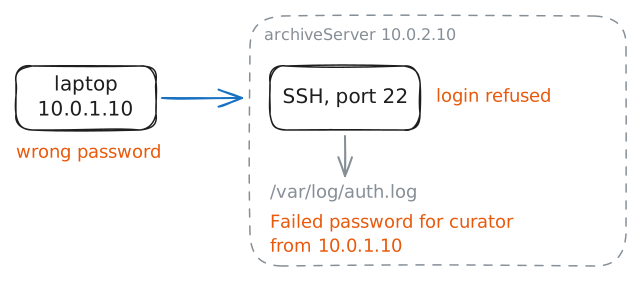
The clearest thing to check is the login record. The catalogue server takes SSH logins, and its record of them is
/var/log/auth.log. To prove it works, Astrid makes a login fail on purpose, from her laptop, with a wrong password, then looks for it in the log on the server.laptop:~# sshpass -p wrong-password ssh -o StrictHostKeyChecking=no -o ConnectTimeout=5 curator@10.0.2.10 true archiveServer:~# grep 'Failed password' /var/log/auth.log
-
The record holds the hits as well as the misses
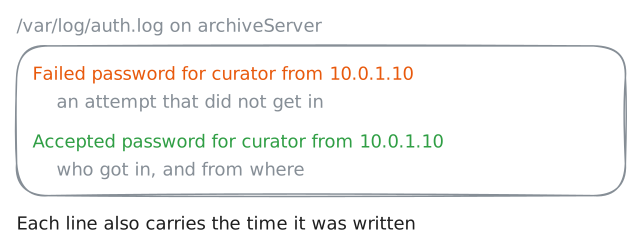
A record of failures alone would only ever show you the attempts that bounced off. The same log keeps the logins that worked, and in an incident those are the lines that matter most: they tell you who actually got in, and when.
Astrid logs in once with the real password, runs a harmless command, and then checks the log again, this time for the accepted login.
laptop:~# sshpass -p vault-keeper-2219 ssh -o StrictHostKeyChecking=no -o ConnectTimeout=5 curator@10.0.2.10 id
archiveServer:~# grep 'Accepted password' /var/log/auth.log
Run these steps on real machines