 Hack the Route Start learning Open app
The idea
Mira's radio station runs on private addresses, and a request from the news desk never gets an answer. Make the whole station share one public address.
Steps
-
Try the news wire
Mira looks after the computers at a small radio station. Every morning the news desk fetches a bulletin from a news wire, a service that sends news to stations. This morning the fetch fails.
The station's machines have private addresses, such as
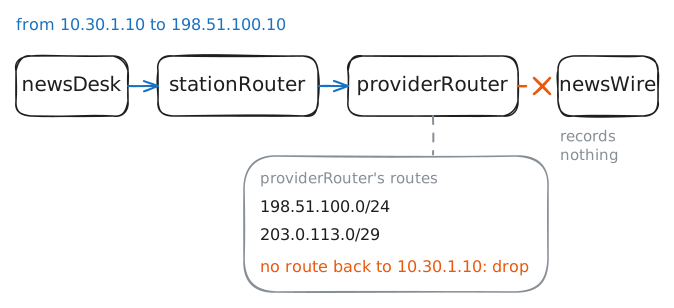
10.30.1.10. Anyone may use those numbers, so thousands of buildings use the same ones at once. The news wire's198.51.100.10is a public IP address, which belongs to one machine in the world.A request travels as a packet, a small piece of data that carries two addresses: the sender's and the receiver's.
Fetch the page from
newsDeskwithcurl, a program that asks a web server, the machine behind a website, for a page. The lab records what reachesnewsWirewhile you do.Fetch it a second time while the lab records at
providerRouter, the Router at the station's internet provider, one stop beforenewsWire. Then read that router's list of routes. A route is one line that says where to send a block of addresses.newsDesk:~# curl -sS -m 3 http://198.51.100.10/ newsDesk:~# curl -sS -m 3 http://198.51.100.10/ providerRouter:~# ip route
-
Share the router's address
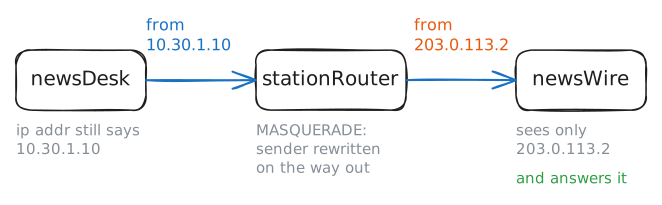
providerRouterwon't carry a packet from10.30.1.10, but it has a line for a public address, and the station has one:203.0.113.2, onstationRouter's network card toward the provider. A network card is the part of a machine that a cable plugs into, and each one has its own address.Network address translation (NAT) builds on this. As a packet leaves, the router rewrites the sender's address to its own public one, so
providerRoutersees a sender it can reach, and the rest of the internet sees only the router.It began as a short-term fix. By 1994 it was clear that the internet's addresses would run out.
RFC 1631 from May of that year, the first of the internet's technical papers to describe NAT, said it "may be a good short term solution" while bigger fixes were built. Over 30 years later, it's in nearly every home router.
stationRouterruns Linux, an operating system like Windows that's common on routers and servers. One rule in itsiptablestool turns NAT on. Add the rule, fetch the page again while the lab records atnewsWire, then asknewsDeskwhat address it thinks it has.stationRouter:~# iptables -v -t nat -A POSTROUTING -s 10.30.1.0/24 -j MASQUERADE newsDesk:~# curl -sS -m 3 http://198.51.100.10/ newsDesk:~# ip -br addr show dev studio
-
How the answer finds the desk
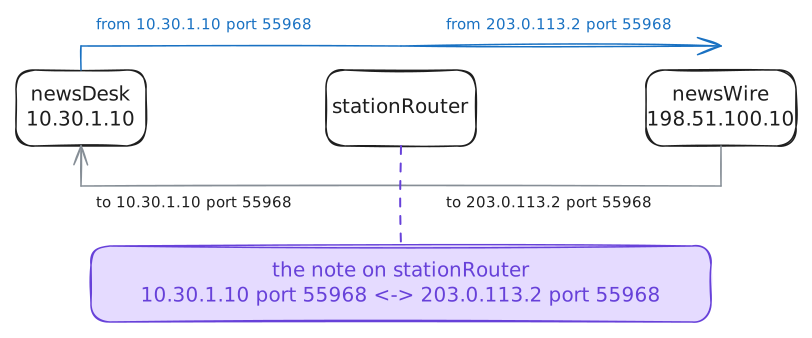
To tell conversations apart, the router needs one more number: the Port. An address gets a packet to a machine, and a port gets it to the right program there. A web server waits on port 80, and
curlpicks a free number for each fetch, such as55968.Every packet carries two ports, the source port and the destination port. An answer swaps them, as it swaps the addresses, so it names the same conversation from the other end.
conntrack, short for connection tracking, shows what a Linux router knows about the conversations through it. The lab clears what your failed tries left behind. Fetch the page once more, then list whatstationRouterholds.newsDesk:~# curl -sS -m 3 http://198.51.100.10/ stationRouter:~# conntrack -L
-
Two desks, one port
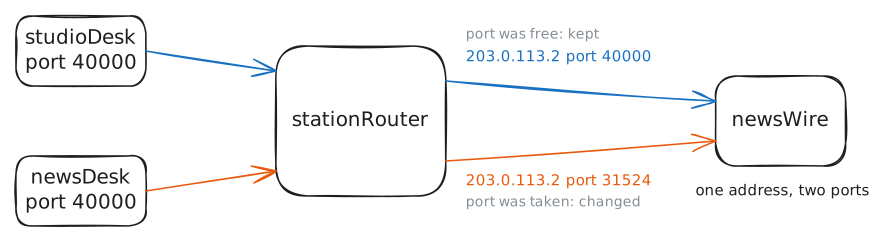
A note for each conversation works until two machines pick the same number. Each desk chooses its source port with no idea what the others chose, and they all share one public address.
If
studioDeskandnewsDeskboth talk tonewsWirefrom port 40000, the two conversations look the same from outside: same public address, same port, same server. An answer would fit both notes.The lab starts a long download on
studioDesk, sent from its port 40000, and leaves it running. Then fetch the page onnewsDeskfrom the same port, and list the notes.newsDesk:~# curl -sS -m 3 --local-port 40000 http://198.51.100.10/ stationRouter:~# conntrack -L
-
Knock from outside
Every conversation so far started inside the station. Now turn it around.
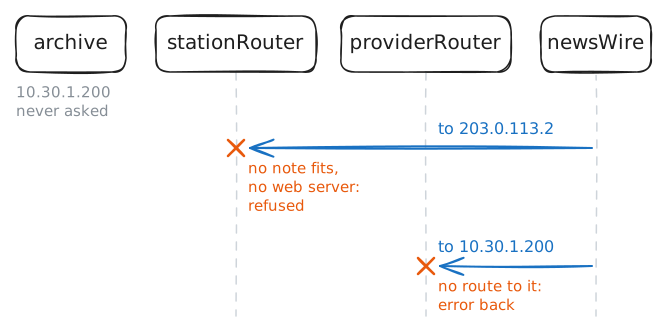
The news wire wants an old recording from
archive, the station's own web server at10.30.1.200.newsWirehas two addresses to try: the station's public one,203.0.113.2, andarchive's private one.Try both from
newsWire, and watch how each one fails.newsWire:~# curl -sS -m 3 http://203.0.113.2/ newsWire:~# curl -sS -m 3 http://10.30.1.200/
-
Test whether NAT keeps strangers out
Look again at why the second knock failed.
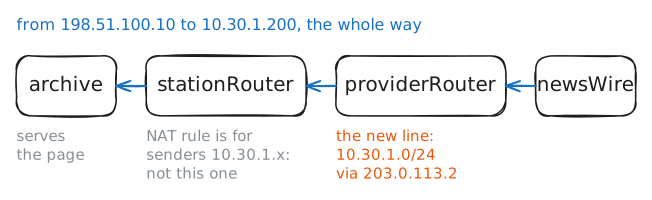
stationRouternever saw it. The request stopped atproviderRouter, because one line was missing, and NAT had nothing to do with that.A private address can't cross the internet, but it can cross one cable. Whoever controls the next router along can add a line to the station, and that's the provider, or an attacker who has broken into the provider's router.
Add that line on
providerRouter. Then tryarchivefromnewsWireonce more, and read the notes onstationRouter.providerRouter:~# ip -echo route add 10.30.1.0/24 via 203.0.113.2 newsWire:~# curl -sS -m 3 http://10.30.1.200/ stationRouter:~# conntrack -L
Run these steps on real machines