 Hack the Route Start learning Open app
The idea
Nadia's bike workshop takes bookings on a small server in the back room. It works from her desk and not from the internet. Open one way in on the Router so that customers can reach it.
Steps
-
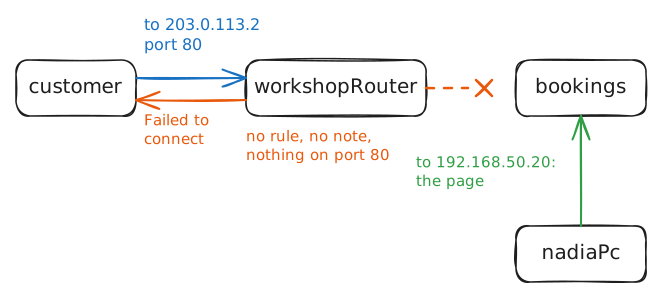
Try the booking page from outside
Nadia runs Spoke and Chain, a bike workshop. So that customers can book a repair online, she set up
bookings, a web server, which is a machine that hands out web pages. It sits in the back room at192.168.50.20.That's a private address. Anyone may use those numbers, so they mean nothing outside the building. The workshop's one public IP address,
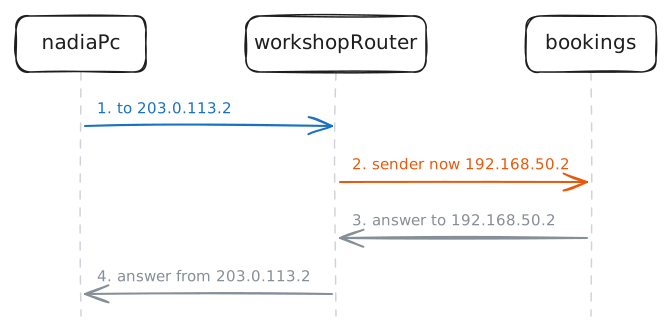
203.0.113.2, comes from its internet provider and belongs to its Router, the box that joins the building to the internet.Every machine in the workshop shares that public address through network address translation (NAT). As a request leaves, the router puts its own address on it as the sender and keeps a note, so that the answer can find its way back in.
Test both sides with
curl, a program that asks a web server for a page. First fetch the page fromnadiaPc, the machine on her desk. Then fetch it as a customer would, fromcustomer, a machine out on the internet, at the public address.nadiaPc:~# curl -sS -m 3 http://192.168.50.20/ customer:~# curl -sS -m 3 http://203.0.113.2/
-
Forward port 80 to the server
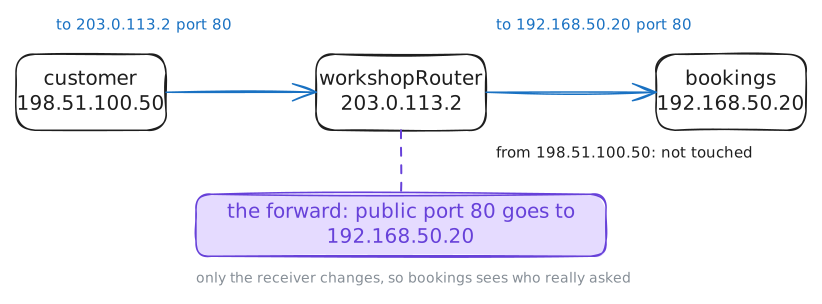
A port forward is a standing rule on the router: whatever arrives on this public port goes to that machine inside. NAT writes its notes as traffic leaves. A forward is written by hand, ahead of time, so that the first packet from a stranger already has somewhere to go.
On a home router, it's a settings page with four boxes.
workshopRouterruns Linux, an operating system that's common on routers and servers, and the same four facts go into a rule for itsiptablestool. A protocol is the set of rules a conversation follows, and web pages travel over one called TCP:protocol TCP -p tcp public port 80 --dport 80 inside machine 192.168.50.20 --to-destination 192.168.50.20 inside port 80 the same, unless you add oneThe rule rewrites the receiver, so it's called destination NAT (
DNAT). It goes in a list calledPREROUTING, which Linux reads whenever a packet arrives at the router, from either side, before it decides where to send it. The order matters: the new receiver has to be on the packet in time, or the router keeps the packet for itself.-d 203.0.113.2limits the rule to packets sent to the public address. Without it, the rule would also catch Nadia's own visits to websites, which use port 80 too.Add the rule. Everything here happens on the lab's own machines, so a wrong rule can't hurt anything. Then fetch the page from
customerwhile the lab records what reachesbookings.workshopRouter:~# iptables -v -t nat -A PREROUTING -d 203.0.113.2 -p tcp --dport 80 -j DNAT --to-destination 192.168.50.20 customer:~# curl -sS -m 3 http://203.0.113.2/
-
Give the camera its own port
Nadia also wants to check the door camera from home.
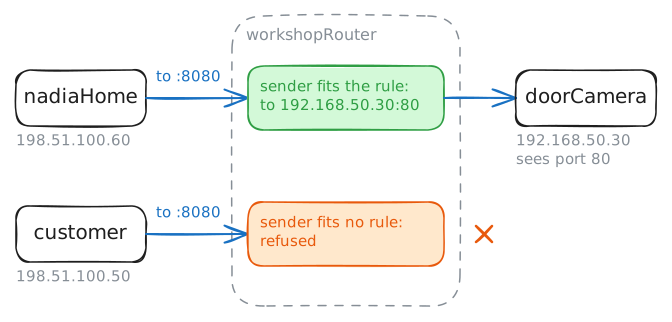
doorCamera, at192.168.50.30, has a small web server of its own, on port 80 likebookings.The workshop has one public address, so it has one port 80. The router reads its rules from the top, and the first match wins, so a second rule for port 80 would never be used. Every visitor would still get
bookings.The way out: the public port and the inside port don't have to match. Nadia can pick an unused public port, 8080, and have the router turn it into 80 on the way in.
--to-destinationtakes a port after the address:192.168.50.30:80.A forward also has a side effect that a booking page wants and a camera doesn't. It opens that port on the machine to the whole internet, and programs scan every public address for open ports all day. So this rule adds
-s, which limits it to one sender:198.51.100.60, the address ofnadiaHome, the machine at her house.Add the forward. An
http://address with no port means port 80, so:8080at the end names the other one. Fetch the camera page fromnadiaHomewhile the lab records atdoorCamera, then try the same address fromcustomer.workshopRouter:~# iptables -v -t nat -A PREROUTING -s 198.51.100.60 -d 203.0.113.2 -p tcp --dport 8080 -j DNAT --to-destination 192.168.50.30:80 nadiaHome:~# curl -sS -m 3 http://203.0.113.2:8080/ customer:~# curl -sS -m 3 http://203.0.113.2:8080/
-
Test the page from Nadia's desk
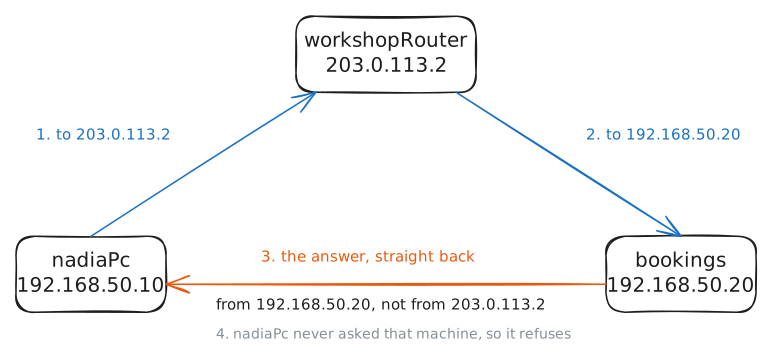
Nadia wants to see what her customers see, so she opens the public address from her desk. It's a sensible test.
Follow the first half of the trip. The request leaves
nadiaPcfor203.0.113.2, reaches the router, and fits the forward, so the receiver becomes192.168.50.20. So far it's the same as a customer's.Run the test from
nadiaPcwhile the lab records atbookings. This recording keeps each packet's flags, short codes that say what a packet is for.[S]asks to start a conversation,[S.]says yes to that, and[R]means reset: stop, I know nothing about this conversation.nadiaPc:~# curl -sS -m 3 http://203.0.113.2/
-
Send the answer back through the router
The answer skipped the router, so the fix has to bring it back. With both machines on one network, one way does that: the router changes the sender of Nadia's request to itself. Then
bookingsanswers the router, the router has its note, and it handsnadiaPcan answer from203.0.113.2.This trip is called hairpin NAT, or NAT loopback, because the packet goes into the router and turns back out the same side, like a bent hairpin.
The rewrite is the same one NAT uses on the way out,
MASQUERADE, in the list read right before a packet leaves,POSTROUTING. It takes the address of the network card the packet leaves through. A card is the part of a machine that joins it to a network, and a router has one for each network it's on.The rule covers packets with both sender and receiver inside the workshop:
192.168.50.0/24means every address that starts192.168.50.POSTROUTINGcomes after the forward, so the receiver of Nadia's request is already192.168.50.20by then, and it fits.Machines on one network talk straight to each other, so a packet like that only reaches the router on a hairpin trip.
Add it, and run Nadia's test again while the lab records at
bookings.workshopRouter:~# iptables -v -t nat -A POSTROUTING -s 192.168.50.0/24 -d 192.168.50.0/24 -j MASQUERADE nadiaPc:~# curl -sS -m 3 http://203.0.113.2/
-
Find out why the page disappeared
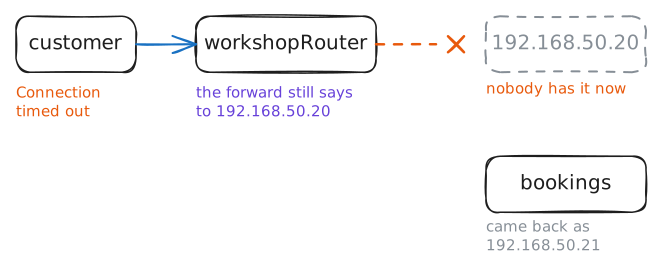
A power cut takes out the workshop overnight. In the morning everything comes back, and customers start calling: the booking page is gone.
The router's forwards are saved, so its rules are all still in place. That's the first thing Nadia checks, and it looks fine, so she's stuck.
The lab acts out the power cut. Fetch the page as a customer does, with a shorter wait. Then read the forward on
workshopRouter, and askbookingswhat address it has now.customer:~# curl -sS -m 2 http://203.0.113.2/ workshopRouter:~# iptables -t nat -S PREROUTING bookings:~# ip -br addr show dev workshop
-
Point the forward at the new address
Customers are waiting, so the first job is to get the page back.
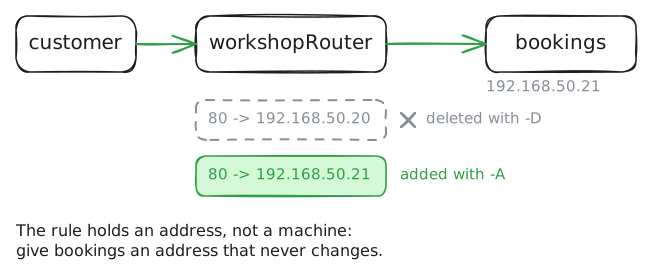
-Ddeletes a rule, and it takes the same words as the-Athat added it. Delete the old forward, add one with the new address, and test fromcustomer.That brings the page back for today, and the next power cut can break it again. So there's a second question.
workshopRouter:~# iptables -v -t nat -D PREROUTING -d 203.0.113.2 -p tcp --dport 80 -j DNAT --to-destination 192.168.50.20
workshopRouter:~# iptables -v -t nat -A PREROUTING -d 203.0.113.2 -p tcp --dport 80 -j DNAT --to-destination 192.168.50.21
customer:~# curl -sS -m 3 http://203.0.113.2/
Run these steps on real machines