 Hack the Route Start learning Open app
The idea
Lina and Omar play music together online, so their laptops have to talk straight to each other, and each sits behind NAT. Get packets through both routers with no port forward: that's NAT traversal.
Steps
-
Call Omar's laptop
Lina and Omar play music together from two homes, over the internet. Every extra stop between them adds delay, and musicians hear delay, so their app sends the sound straight from one laptop to the other.
Each laptop sits behind a home Router that does NAT.
linaLaptopis192.168.60.10behindlinaRouter, whose public address is198.51.100.11.omarLaptopis192.168.70.10behindomarRouter, whose public address is198.51.100.22.The app uses UDP, which sends each packet on its own, with no connection set up first. Omar's end uses Port 4200.
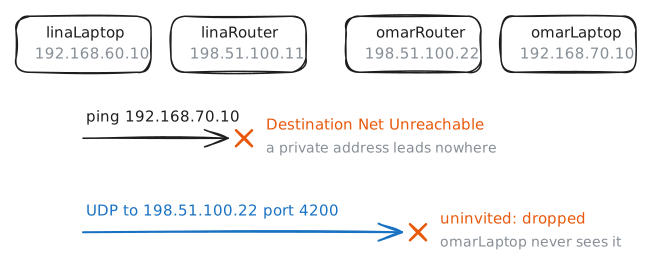
Try the two obvious calls from Lina's laptop.
pingOmar's private address. Then send one line to his public address withnc, while the lab records atomarRouter.linaLaptop:~# ping -c 1 -W 1 192.168.70.10 linaLaptop:~# nc -u -w 1 198.51.100.22 4200
-
Ask what the outside sees
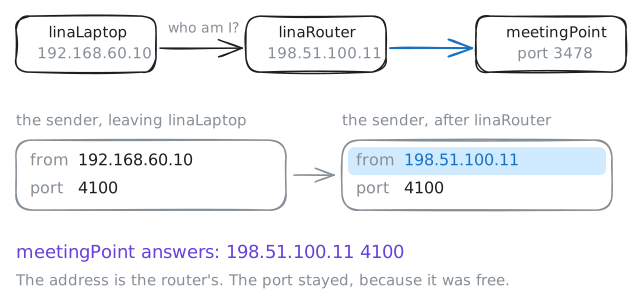
To aim at each other, the two apps need each other's public address and port. A laptop knows neither, because its router does the rewriting out of sight. Run
ip addronlinaLaptopand you'd see only192.168.60.10.So the app asks. A STUN server is a public machine that answers one question: what address and port do you see on my packet? It's the same job as the websites that tell you your IP address, done with single packets.
meetingPointplays that part here, on port 3478, the real STUN port. Real STUN sends short binary messages. The lab's copy prints plain text, to keep the answer readable.The app has to ask from the port it will use for music, because the router's record of the rewrite belongs to that inside port.
-psets that port: 4100 for Lina and 4200 for Omar.linaLaptop:~# nc -u -w 1 -p 4100 198.51.100.50 3478 omarLaptop:~# nc -u -w 1 -p 4200 198.51.100.50 3478
-
Let Omar's packets knock
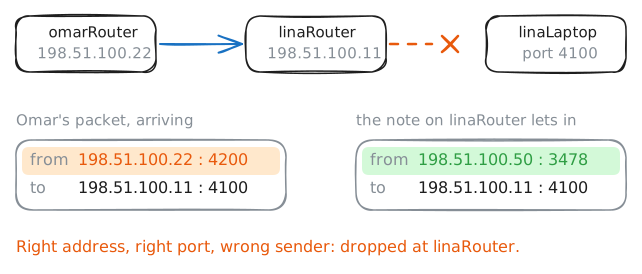
Omar's app has Lina's address, so it starts sending: one line every second to
198.51.100.11port 4100. Apps repeat like this because UDP gives no sign that a packet arrived, and the other side may not be ready yet.linaRouterholds a note for public port 4100, from the check in the last step. A note is the router's record of one conversation, and this lab reads notes withconntrack.Test whether that note is enough. The lab has Lina's app check in again, so that the note is fresh, and starts Omar's app. Listen on port 4100 for 3 seconds with
nc, while the lab records atlinaRouter. Then list the router's notes.linaLaptop:~# nc -u -l -w 3 -p 4100 linaRouter:~# conntrack -L -p udp
-
Send one packet the other way
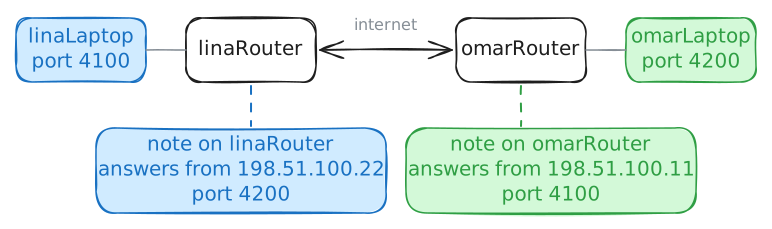
A router writes a note when a packet leaves, so the way to get a note that names Omar is to send him something. Lina sends one line from port 4100 to
198.51.100.22port 4200, the address and port thatmeetingPointsaw for him.ncstays open until 2 seconds pass with nothing arriving, in case anything comes back. Omar's app is still sending once a second. As soon as it hears Lina, it sends one answer and goes quiet.Then read one note on each router.
--dportkeeps only the notes sent to one port.linaLaptop:~# nc -u -w 2 -p 4100 198.51.100.22 4200 omarRouter:~# conntrack -L -p udp --dport 4100 linaRouter:~# conntrack -L -p udp --dport 4200
-
Keep the hole open
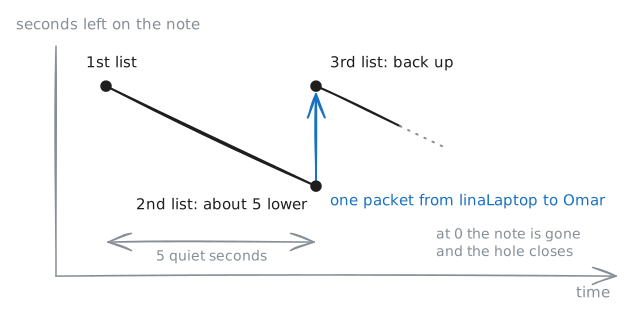
A note doesn't last. UDP has no goodbye, so a router can't tell when a conversation has ended. It gives each note a timer and forgets the note when the timer runs out.
conntrackprints that timer. A line startsudp, then17, the number that stands for UDP. The number after that is the seconds left.Omar's app has gone quiet, so nothing is keeping the line busy. Read Lina's note three times. The lab sends one more line before the first read, so that the note is there. It waits 5 seconds before the second read, and it sends one packet from
linaLaptopto Omar before the third.linaRouter:~# conntrack -L -p udp --dport 4200 linaRouter:~# conntrack -L -p udp --dport 4200 linaRouter:~# conntrack -L -p udp --dport 4200
-
Meet a router that changes the port
All of this rested on one thing:
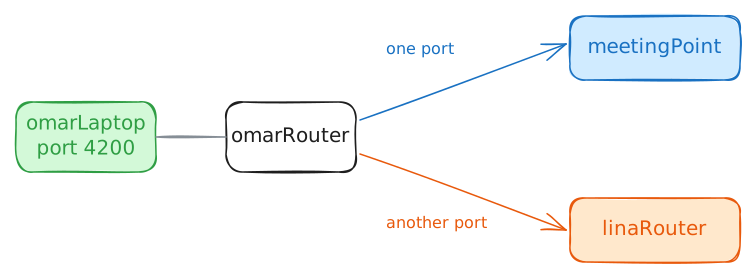
omarRoutergave Omar's app the same public port for every far end. It used port 4200 towardsmeetingPointand port 4200 towards Lina, so the answer frommeetingPointwas some use to her.Some NATs don't work like that. Certain office firewalls and NATs run by internet providers pick a new public port for each far end. That's symmetric NAT, and the port a STUN server reports then works for that server only.
Make
omarRouteract like one, which changes nothing outside the lab.MASQUERADE --randompicks a fresh port for each new conversation, and the rule goes in first place, above the router's own NAT rule.The lab then stops Omar's app and clears the router's notes. Omar asks
meetingPointtwice from inside port 4200: once on port 3478 and once on port 3479, which counts as a second far end.omarRouter:~# iptables -v -t nat -I POSTROUTING 1 -s 192.168.70.0/24 -j MASQUERADE --random omarLaptop:~# nc -u -w 1 -p 4200 198.51.100.50 3478 omarLaptop:~# nc -u -w 1 -p 4200 198.51.100.50 3479
-
Fall back to a relay
This step has two parts. First, try hole punching anyway. The lab restarts both apps, and each aims at what it knows: Omar's sends to
198.51.100.11port 4100, and Lina's sends to the last portmeetingPointsaw for Omar.List Lina's notes with
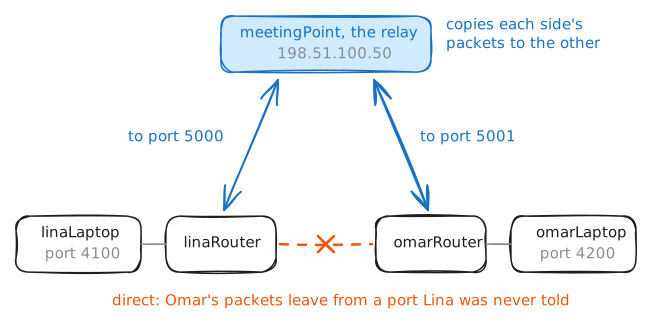
conntrack, while the lab records atlinaRouter.-dkeeps the notes sent to one address.Second, try the way out. When direct paths fail, a real app uses a relay: a public server that passes packets between the two sides. The standard for this is called TURN. A NAT has no objection, because each laptop is only talking to a public server, as it would for a website.
meetingPointis a relay here as well. Lina sends to its port 5000 and Omar to its port 5001, and it copies each side's packets to the other. After your first command, the lab stops the two apps, starts the relay and points Omar's app at it. Then send Lina's line through.linaRouter:~# conntrack -L -p udp -d 198.51.100.22 linaLaptop:~# nc -u -w 2 -p 4100 198.51.100.50 5000
Run these steps on real machines