 Hack the Route Start learning Open app
The idea
Every afternoon the patrons' internet at Brightwater Public Library slows to a crawl, and Marisol, who looks after the library's computers two days a week, has to find out why. The library promises patrons that nobody reads what they do online, so capturing their traffic is out. Flow records are the way in: the Router writes down who talked to whom and how much, and never what was said.
Steps
-
Fetch a page and find its flow
A flow is one conversation, seen from outside.
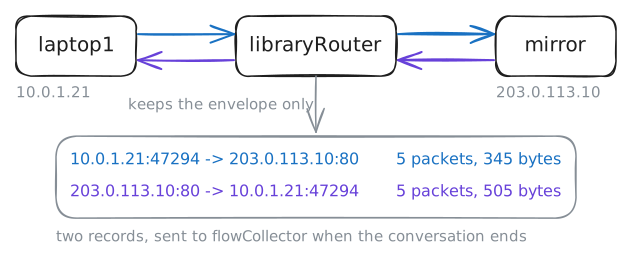
libraryRouterdoesn't keep a word of what's said. It keeps the envelope: who talked to whom, on which ports, over which protocol, how many packets and bytes, and when it started and stopped.Five of those fields make the flow's key, the 5-tuple: both addresses, both ports and the protocol. Every packet with the same five adds to the same record, so a million packets of one download make a single line.
The router runs an exporter, softflowd, which keeps a record for each conversation crossing its
patronscard. When a conversation ends, the record travels toflowCollectoron the office network, where a collector,nfcapd, writes it to a file under/var/flows.nfdumpreads the files back.The whole arrangement is NetFlow, Cisco's name, which stuck for flow records from any vendor.
203.0.113.10is a game company's download server, a mirror, out on the internet. Fetch its front page fromlaptop1. Then ask the collector for every flow involvinglaptop1's address,10.0.1.21.laptop1:~# curl -s http://203.0.113.10/ flowCollector:~# nfdump -R /var/flows 'host 10.0.1.21'
-
Watch a long download arrive in slices
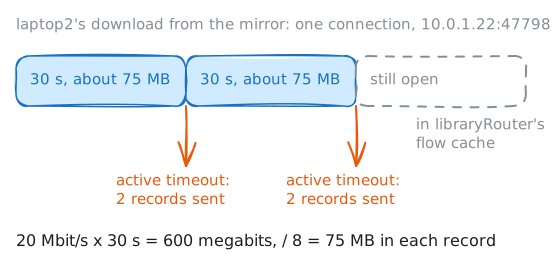
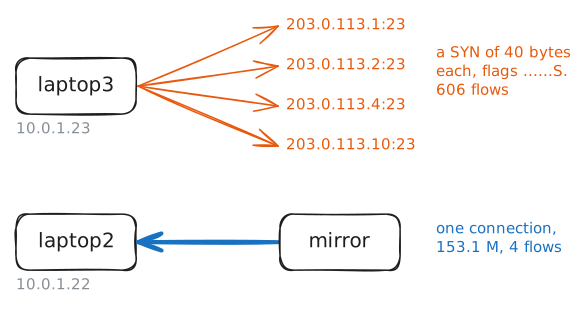
laptop2has been pulling a 2 GB game patch from the mirror since the lab started. At 20 megabits a second that takes about 14 minutes. So when does the router report a conversation that won't stop?An exporter closes a record for one of three reasons:
- The conversation ends: TCP says goodbye, or one end resets it.
- It goes quiet for longer than the inactive timeout.
- It has run for the active timeout. The router sends what it has so far and starts a fresh record for the same 5-tuple.
Without that last rule, a 3-hour backup would reach the collector 3 hours late, all at once.
Real routers use an inactive timeout of about 15 seconds and an active timeout of 1 to 30 minutes.
libraryRouteruses 10 seconds and 30 seconds, so a lab session sees several slices.Records still open live in the router's flow cache until one of those three cuts them off. List the download's records that have reached the collector.
flowCollector:~# nfdump -R /var/flows -c 4 'host 10.0.1.22 and bytes > 100000'
-
Switch the collector off
The records travel as ordinary packets, over UDP to port 2055 on
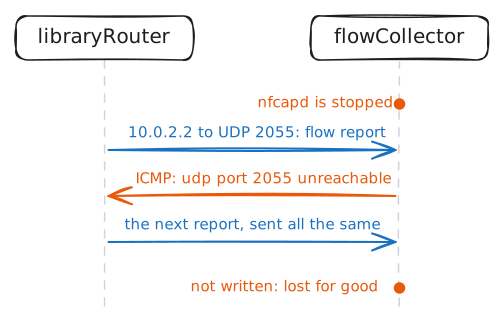
flowCollector, each packet carrying a batch of them. That path is where flow monitoring breaks most often.UDP has no acknowledgements. The router sends each report once and never hears whether anyone took it. When a UDP packet reaches a machine where no program has its port open, the machine says so with an ICMP message.
You're about to break this on purpose. On
flowCollector, stopnfcapd, the program that writes the files, and capture what still arrives on itsofficecard. Then startnfcapdagain, the way the lab started it.flowCollector:~# pkill -x nfcapd flowCollector:~# tcpdump -n -l -c 4 -i office 'udp port 2055 or icmp' flowCollector:~# nfcapd -w /var/flows -p 2055 -t 10 -D
-
Rank the talkers by bytes
Now Marisol's real question: who is filling the line?
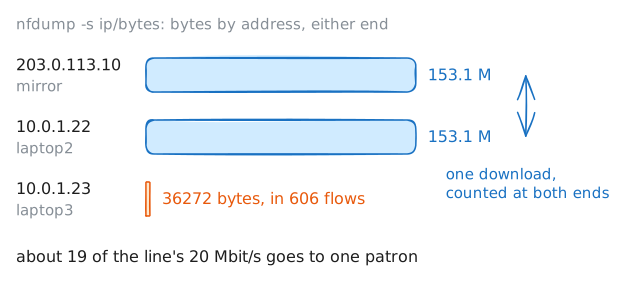
nfdump -sbuilds a top-N table instead of listing records. It adds up the records by one field and sorts the totals:-s ip/bytesgroups by address, counting a record under both its source and its destination, and sorts by bytes.-s srcip/bytescounts only the sender, which tells uploads from downloads.-n 5keeps the top five.
The table shows flows, packets and bytes for each row, then three averages:
ppspackets a second,bpsbits a second andbppbytes a packet. Its percentages are shares of everything in the files read. Every flow tool, from a free script to a big commercial dashboard, is mostly this query with a graph around it.Bytes answer "who uses the line". Flows answer "who starts the most conversations". The two lists are rarely the same, so keep both in mind.
Rank the addresses by bytes, then rank only the senders.
flowCollector:~# nfdump -R /var/flows -s ip/bytes -n 5
flowCollector:~# nfdump -R /var/flows -s srcip/bytes -n 3
-
Count conversations, not bytes
Bytes find the heavy users. Counting flows finds something else: machines that start an odd number of conversations, most of them tiny.
A flow of a packet or two, 40 bytes each, to TCP port 23 is a bare SYN, the first step of a TCP handshake, that went no further. One of those is a typo, and hundreds, each to a different address, are a port scan: a machine knocking on door after door to see which opens.
Port 23 is telnet, which infected devices scan for to find more with factory passwords.
Every record also keeps the TCP flags seen in the flow, all together, and
-o extendedprints them in 8 fixed places, with a dot for each flag never seen.Sis SYN,Ais ACK,Ris reset,Fis FIN andPis push. A finished conversation shows...AP.SF, and a sender that never got past its SYN shows......S..Rank the senders by flows, then read the flags on the busiest one's records.
flowCollector:~# nfdump -R /var/flows -s srcip/flows -n 5
flowCollector:~# nfdump -R /var/flows -o extended -c 6 'src host 10.0.1.23'
Run these steps on real machines