 Hack the Route Start learning Open app
The idea
Every evening, Fulmar FM's live stream stutters, and Tamsin, the station's volunteer engineer, wants numbers instead of hunches. The studio Router counts every byte that crosses each of its cards. Ask it over SNMP from the monitoring box, find the link that's full, and see where the counting itself can fool you.
Steps
-
Ask the router who it is
A router knows a lot about itself: how long it has been up, what each of its cards is called, how many bytes have crossed each one. SNMP, the Simple Network Management Protocol, is how a monitoring box asks for those numbers.
An agent runs on the router and answers, and a manager asks: here that's
nms, the network management station. Requests travel over UDP to port 161.Every value lives at an address in one big tree of numbers, its OID. A MIB is a file that puts names on one branch of that tree: SNMPv2-MIB for the system values, IF-MIB for the interfaces (MIB and OID).
sysName.0is the friendly name for.1.3.6.1.2.1.1.5.0, and the.0says it's a single value rather than a row in a table.SNMP version 2c guards all of this with one shared word, the community string, sent with every request. On
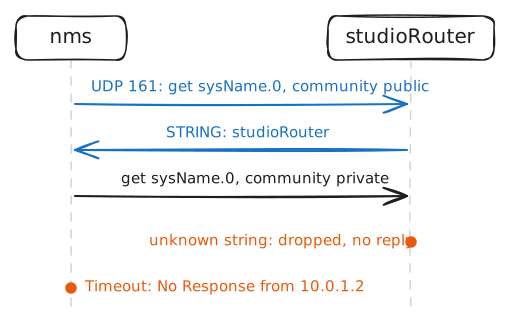
studioRouterit'spublic, which is also the factory default on a great many devices.Ask the router for its name, where it lives and how long it has been up. Then ask again with the wrong community string,
private, and give that one about 6 seconds.nms:~# snmpget -v2c -c public 10.0.1.2 sysName.0 sysLocation.0 sysUpTime.0 nms:~# snmpget -v2c -c private 10.0.1.2 sysName.0
-
Walk the interface table
A router has several cards, so its interface values come as tables. IF-MIB keeps one row per card, and every column is an OID of its own:
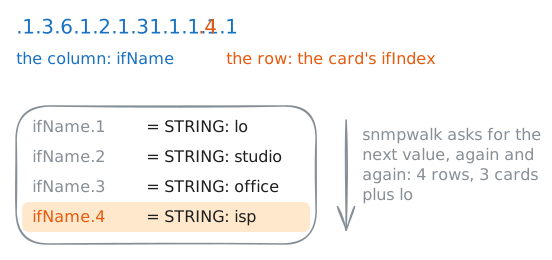
ifNamefor the card's name,ifInOctetsfor bytes received,ifOperStatusfor up or down, and dozens more.A single value in a table is the column's OID with the row number on the end:
ifName.3is the name in row 3. That row number is the card's ifIndex.snmpgetneeds the exact OID, row and all, and you don't know the rows yet.snmpwalkasks the agent for "the next value after this one" again and again, until the answers leave the part of the tree you named. WalkingifNamelists the whole column.The agent never sends a name like
ifName. It sends numbers, and the MIB files installed onnmsturn them into words.-Onaskssnmpwalkto print the numbers as they came.nms:~# snmpwalk -v2c -c public 10.0.1.2 ifName nms:~# snmpwalk -v2c -c public -On 10.0.1.2 ifName
-
Find the full link
Each row in the interface table counts the bytes its card has received (
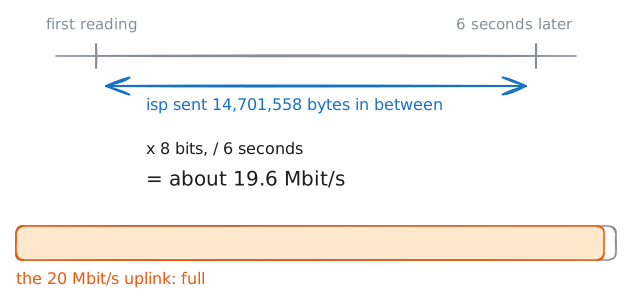
ifInOctets) and sent (ifOutOctets) since the router started. A counter only ever goes up, so one reading on its own says little about now.Two readings a few seconds apart say how fast. The rate is the difference between them, divided by the seconds in between. A byte is 8 bits, and link speeds are sold in bits.
snmpnetstatdoes the walking for you and prints the table by card name, the waynetstat -iwould on the router itself.-Ciasks for the interface table and-Cofor its byte counts. Read the totals first, to see which cards carry the traffic.Then
-CI isp -Cw 6watches one card and prints what it moved in each 6 seconds. It never stops on its own, sotimeout 20ends it after three lines. Fulmar FM buys 20 Mbit/s from its provider: 20 million bits a second, each way.nms:~# snmpnetstat -v2c -c public -Ci -Co 10.0.1.2 nms:~# timeout 20 snmpnetstat -v2c -c public -CI isp -Cw 6 10.0.1.2
-
Watch a 32-bit counter wrap
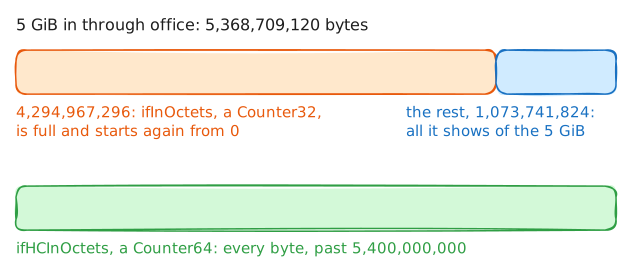
ifInOctetsis a Counter32: 32 bits, so the biggest number it can hold is 4,294,967,295, about 4.3 GB. One byte more and it starts again from 0. SNMP calls that a wrap.A poller that sees a smaller number than last time assumes the counter wrapped once and adds 4,294,967,296. That works while a wrap takes longer than the time between polls. On a 1 Gbit/s link, a Counter32 wraps every 34 seconds at full speed, and on 10 Gbit/s every 3.4 seconds, so a poller asking every minute misses whole wraps and draws a graph that's wrong.
SNMPv2c added Counter64, and IF-MIB has a 64-bit copy of each byte counter:
ifHCInOctets, HC for high capacity. At 100 Gbit/s it takes about 47 years to wrap.iperf3sends test traffic as fast as it can to an iperf3 server, andnmsruns one. Send it 5 GiB from the archive PC, through the router'sofficecard: a GiB is 1024 × 1024 × 1024 bytes, so that's 5,368,709,120.Then read both counters, and find the
officerow by the number step 2 gave it.archivePc:~# iperf3 -c 10.0.1.10 -n 5G nms:~# snmpwalk -v2c -c public 10.0.1.2 ifInOctets nms:~# snmpwalk -v2c -c public 10.0.1.2 ifHCInOctets
-
Read the community string off the wire
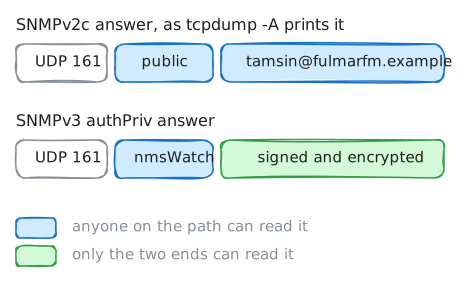
SNMPv1 and v2c send the community string as plain text inside every request. Anyone who captures one packet between
nmsand the router learns it, and can poll the router exactly asnmsdoes. With a read-write community, they could change its settings as well.SNMPv3 replaces the shared word with named users, each with two passwords. At the
authPrivlevel, every message is signed with a key made from the user's authentication password (SHA-256 here), so it can't be forged or altered, and encrypted with a key from the privacy password (AES here), so nobody on the path can read it.studioRouterhas one such user,nmsWatch.The lab starts
tcpdumponnmsbefore each question, and-Aprints every byte that looks like text. Ask for the router's contact address once over v2c and once over v3, and compare what the captures could read.nms:~# tcpdump -n -A -c 2 -i studio udp port 161 nms:~# snmpget -v2c -c public 10.0.1.2 sysContact.0 nms:~# tcpdump -n -A -c 4 -i studio udp port 161 nms:~# snmpget -v3 -l authPriv -u nmsWatch -a SHA-256 -A listen-carefully-42 -x AES -X keep-it-quiet-42 10.0.1.2 sysContact.0
-
Let the router call when a link drops
Polling has a blind spot. A poller that asks every 5 minutes hears of a dead link up to 5 minutes late, and a 30-second flap between two polls never shows up at all.
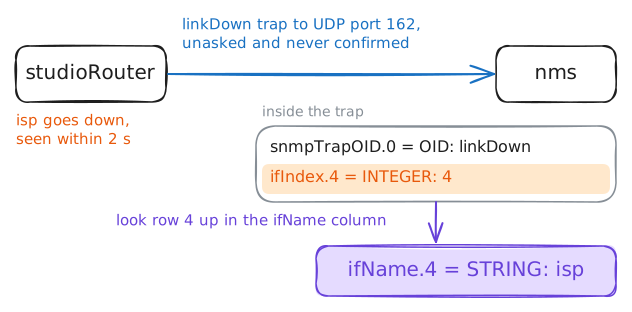
A trap turns the conversation around: the agent sends a message on its own, the moment something changes, to UDP port 162 on the manager.
studioRouterchecks every card'sifOperStatusevery 2 seconds, and sendsnmsalinkDowntrap when one goes down and alinkUptrap when it's back. Onnms, a program calledsnmptrapdwrites each trap it accepts to/var/log/snmptraps.log.A trap is one UDP packet that nobody acknowledges: if it's lost, nobody knows.
Pull the plug on the station's uplink, and plug it back in once the
linkDowntrap is in. Then read the trap log.studioRouter:~# ip link set isp down studioRouter:~# ip link set isp up nms:~# cat /var/log/snmptraps.log
Run these steps on real machines