 Hack the Route Start learning Open app
The idea
Mira's laptop refuses the tide tables site with a security warning, while everyone else in the harbor office loads it fine. The site is fine and her date is wrong, so you have to work out how a machine learns the right time from a network that delays every answer.
Steps
-
Wrong clock: why a good site gets refused
Mira works in a harbor office, and this morning her laptop refused
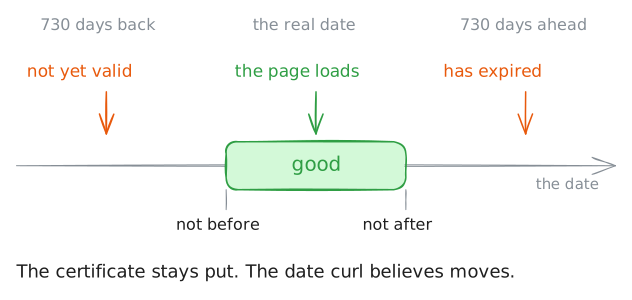
tides.lab, the site with the tide tables, while everyone else loaded it fine. Nothing is wrong with the site. Her laptop has the wrong date, and you're about to see how that one number can break a secure website.A TLS certificate carries two dates, not before and not after, and the browser checks them against the only clock it has, its own machine's. So a wrong date turns a good certificate into a bad one. Company logins, one-time codes and the order of lines in a log lean on the same clock, and they fail in ways that don't look like a clock at all.
One shortcut to admit: every machine here shares one real clock, so you can't move the laptop's.
faketimelies about the date to one program instead. Runcurlas if it were two years ago, then two years from now, then at the real time.laptop:~# faketime -f '-730d' curl -sS https://tides.lab/ laptop:~# faketime -f '+730d' curl -sS https://tides.lab/ laptop:~# curl -sS https://tides.lab/
-
NTP: ask another clock for the time
A machine can't fetch the time the way it fetches a page, because the answer is already old when it lands. NTP, the Network Time Protocol, exists to deal with exactly that. David Mills published its first version in 1985, and the job hasn't changed since.
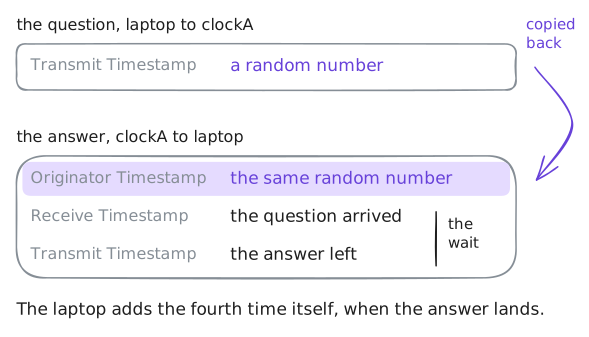
It's one question and one answer over UDP, on port 123, and both carry timestamps. The client notes when it sent the question and when the answer came back, and the server writes down when the question arrived and when the answer left. So one question and one answer leave the client holding four times.
The program doing this on
laptopis chrony, which has been asking three servers since the lab started, andchronycis its control tool. Ask it for the list, while a capture catches the packets to and fromclockAwith their fields spelled out.laptop:~# chronyc sources
-
Offset and delay: two sums from four times
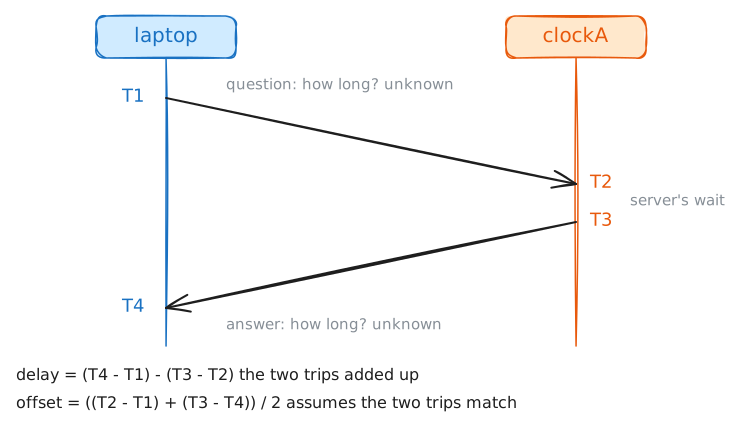
Name the four times in order: T1 the question leaves, T2 it lands, T3 the answer leaves, T4 it lands.
T1 and T4 come from the laptop's clock, and T2 and T3 from the server's. Subtract a laptop time from a server time and you get the trip mixed with the gap between the two clocks. NTP untangles those with two sums.
Delay is the time on the wire, the whole trip minus the server's wait:
(T4 - T1) - (T3 - T2). Each bracket stays on one clock, so a wrong clock can't touch it.Offset is how far the laptop is behind the server.
T2 - T1is the trip out plus the offset, andT3 - T4is the offset minus the trip back. Add them and the trips cancel if they match, which leaves the offset twice:((T2 - T1) + (T3 - T4)) / 2.Try it with the server 10 ms ahead, 5 ms each way and a 1 ms wait: the times are 100, 115, 116 and 111, and the sums give a delay of 10 and an offset of 10.
The offset sum hides an assumption, which is that the trip out took as long as the trip back. NTP can't time either direction alone, so it splits the delay in half. To test that,
chronyc ntpdataprints the latest measurement from one server: first on the bare network, then withofficeRouterholding packets 20 ms each way, then 40 ms one way only.laptop:~# chronyc ntpdata clock-a.lab laptop:~# chronyc ntpdata clock-a.lab laptop:~# chronyc ntpdata clock-a.lab
-
Stratum: how far a clock is from the source
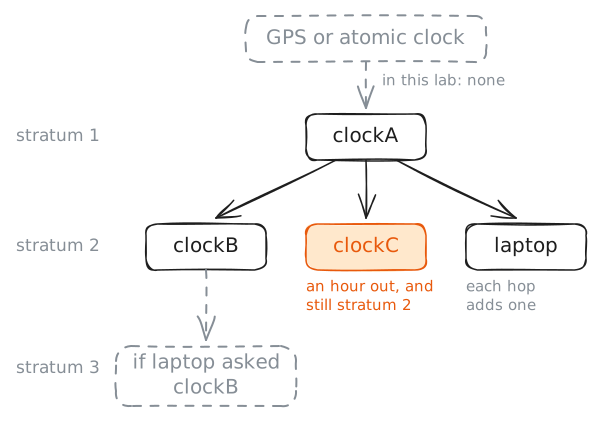
A server has to get its own time from somewhere, and the chain has to end at something that asks nobody. That's a reference clock, such as a GPS receiver or an atomic clock. A server wired to one is stratum 1, a server asking a stratum 1 is stratum 2, and each hop down adds one.
The chain exists because the world can't all ask the same few machines. Time spreads like a family tree, with one server answering thousands of clients and some of those answering thousands more.
One shortcut to admit:
clockAhas no GPS. A setting tells it to call itself stratum 1 and trust its own clock, andclockBandclockCask it.chronyc trackingis a machine's summary of its own time, so read it onclockA, thenclockB, thenlaptop.clockA:~# chronyc tracking clockB:~# chronyc tracking laptop:~# chronyc tracking
-
Drift: why a clock has to keep asking
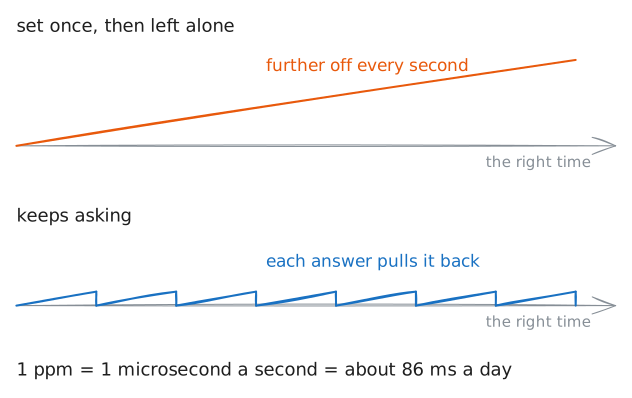
Setting a clock once isn't enough, because every computer clock runs at the wrong speed. It counts the ticks of a quartz crystal, no crystal ticks at exactly its rated speed, and the speed shifts with temperature. The error is measured in parts per million, or ppm: 1 ppm is a microsecond every second, about 86 milliseconds a day.
A cheap clock can be tens of ppm out, so left alone it wanders by a second or more a day. A client therefore measures two things: how far off it is now, and how fast it's drifting. Once it knows the speed it corrects that as well, and it doesn't need to ask as often.
chronyc sourcestatsshows what chrony has learned about each server. The settings it runs from are in/etc/chrony/chrony.conf, or/etc/chrony.confon some systems, and that's the file you'd edit on your own machine.laptop:~# chronyc sourcestats laptop:~# cat /etc/chrony/chrony.conf
-
Vote: three clocks catch a liar
Here's the hard part. One server can say anything, and
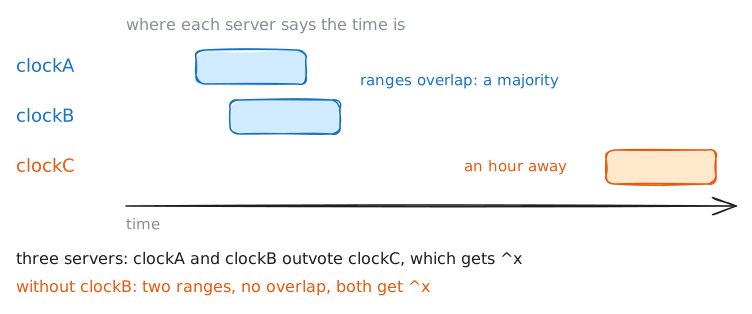
clockCanswers an hour ahead on purpose, thanks to one line in its settings. From a single answer, a client has no way to tell.What it can do is compare. Each answer is really a range, the offset plus or minus how wrong it could be, and chrony looks for a range that most servers share. A server outside it is called a falseticker, and its answers get ignored.
That takes a majority, so the number of servers matters. Look at the list on
laptopwith all three. ThenclockBgoes away, which leaves one honest clock and one an hour out, and you ask again.laptop:~# chronyc sources laptop:~# chronyc sources laptop:~# chronyc tracking
-
SNTP: asking once and believing the answer
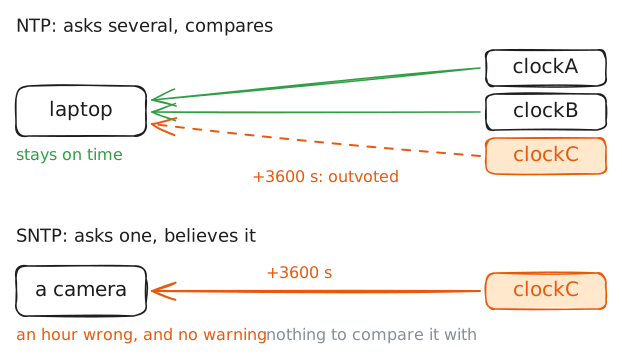
Everything so far relies on a client that keeps asking several servers. Plenty of devices don't: cameras, printers and small routers often run SNTP, Simple NTP, which sends the same packets and does none of the comparing. An SNTP client asks one server, believes the answer and sets the clock.
That's a fair trade for a printer and a poor one for anything that signs logs or checks certificates. To see what it costs, ask one question of
clockAand one ofclockC.chronyd -Qruns chrony once, much the way an SNTP client works: it sends one server a fast burst of questions, prints one result and changes nothing.There's a second gap, and it's older than SNTP. Ask chrony whether it knows who really sent those answers, because
chronyc ntpdatahas a line for that.laptop:~# chronyd -Q 'server 10.0.2.31 iburst' laptop:~# chronyd -Q 'server 10.0.2.33 iburst' laptop:~# chronyc ntpdata clock-c.lab
Run these steps on real machines