 Hack the Route Start learning Open app
The idea
Nadia pressed Send on Monday and her laptop said the message had gone. Ravi says nothing came. To find out who's right she has to follow one message from her laptop to his inbox, and see who was holding it at each stage.

Steps
-
MX record: how mail finds the right server
Nadia runs the timetable office at
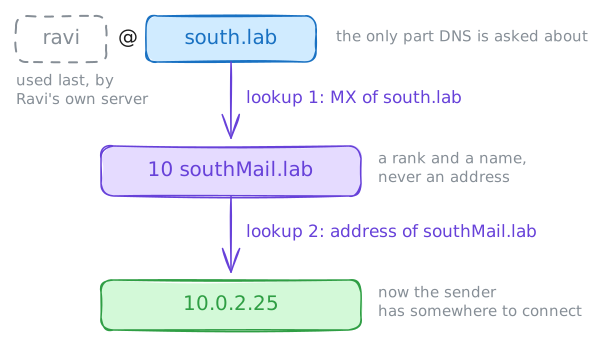
north.lab, and on Monday she sent Ravi atsouth.labthe winter ferry times. Her laptop said Sent, and Ravi says nothing came. To find out who's right, follow a message the whole way, starting with the first thing a mail server has to work out.An email address has two halves, and until the message reaches the right company only the part after the
@counts. So a server sending toravi@south.labasks DNS one question: which machine takes mail forsouth.lab?The answer is an MX record, short for mail exchanger. It exists because a domain and its mail server are often different machines: a company's website can sit with one provider and its mail with another. Look up the record from
laptop, then turn the name it gives into an address.laptop:~# dig +noall +answer MX south.lab laptop:~# dig +short southMail.lab
-
SMTP: hand a message to a server by hand
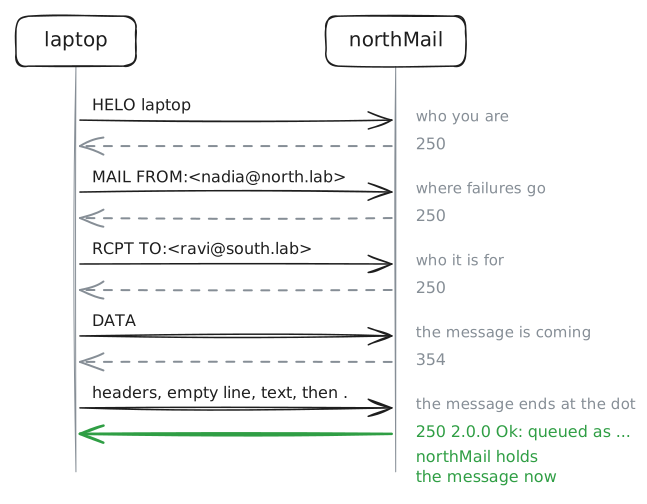
Sending mail is a conversation called SMTP, the Simple Mail Transfer Protocol, written down in 1982. It runs on port 25, in lines of plain text with a three-digit reply to each, so
nclets you type it yourself. The servers here run Postfix, a common mail server.Five commands carry it.
HELOsays who you are,MAIL FROM:<...>gives the address to tell if delivery fails later, andRCPT TO:<...>names who it's for.DATAsays the message is coming, andQUITleaves.The message is lines as well: a few headers, an empty line, the text, and then a line holding one
.to end it. Reply codes work the way they do in the file transfer lab:2done,3go on,4try again later,5failed for good.Talk to
northMail, Nadia's own server, the way her mail program does, and give it a message for Ravi.Two shortcuts to admit. She gets in on port 25 with no password, because this server trusts its own network, and the open relay step shows what real mail programs do instead. And each line has to end in a carriage return as well as a newline, which the page adds for you, so on your own machine you'd use
nc -C.laptop:~# nc northMail.lab 25
-
Relay: one server passes the message to the next
northMailnow holds a message it can't deliver itself. So it turns into a client: it does the MX lookup you did, connects tosouthMailon port 25, and has the same conversation you had. Passing a message along like this is called relaying, and each server only ever has to find the next one.Every mail server keeps a log with a line for each delivery attempt, and that log is the first place an admin looks. To see all of this at once, send Ravi a second copy and record what crosses
routeron itssouthside, the stretch only the two servers use.curlplays the mail program this time, reading the message from a file so you don't type it again. Then read the delivery lines in the log on each server.laptop:~# curl -sv smtp://northMail.lab/laptop --mail-from nadia@north.lab --mail-rcpt ravi@south.lab -T /tmp/note.txt northMail:~# grep status= /var/log/mail.log southMail:~# grep status= /var/log/mail.log
-
IMAP: read the message where it waits
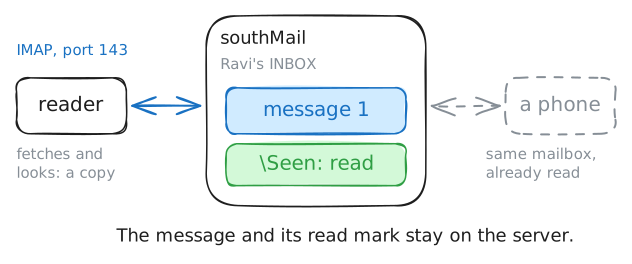
SMTP has finished, and Ravi still has nothing on his screen. A laptop can be asleep or offline, so mail can't be pushed to it, and the message waits on
southMailuntil Ravi's program comes to get it.That takes a second protocol, IMAP, the Internet Message Access Protocol, on port 143. Sending and reading are separate jobs, which is why setting up a mail program asks you for two servers, incoming and outgoing.
IMAP looks a little different from SMTP. Each command starts with a tag you make up, here
a1toa4, and the server repeats that tag on the line that finishes the command, so a program can have several requests running at once.From
reader, Ravi's machine, log in, select the inbox, and fetch message 1, the one you typed.BODY[]asks for all of it, including what servers added on the way.One shortcut to admit: this password crosses in plain text. Real servers usually refuse a plain login on 143, and mail programs use port 993, which is IMAP inside TLS.
reader:~# nc southMail.lab 143
-
Envelope: the addresses your mail program hides
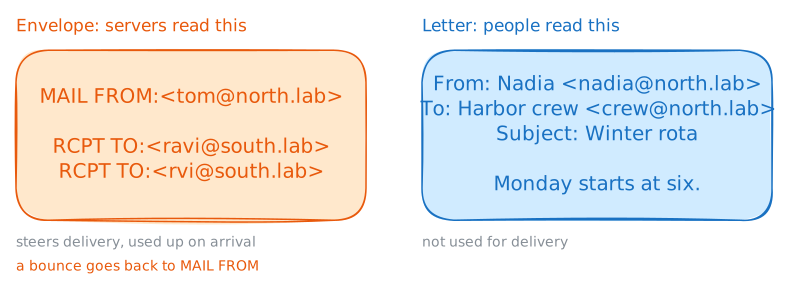
You gave the addresses twice in that first message:
MAIL FROMandRCPT TOin the conversation, thenFrom:andTo:in the headers. Those are two separate things, and the difference explains blind copies, bounces and a lot of fake mail.The commands are the envelope. Servers read it to steer the message, and it's used up on arrival.
The headers are the letter inside, which your mail program shows to the reader and delivery doesn't use. Nothing forces the envelope and the letter to match.
That goes back to 1982, when the few hundred machines on the network knew each other. SMTP works like paper post, where an office can mail a letter signed by someone else.
Try one that pulls them apart. Tom runs the crew list, so he goes on the envelope, and the letter is signed by Nadia and addressed to
crew@north.lab, a name no server will check.It goes to Ravi and to a mistyped
rvi. Then read Ravi's copy, and what comes back. A bounce arrives in parts, and part 1 is the note written for people.laptop:~# nc northMail.lab 25 reader:~# nc southMail.lab 143 laptop:~# nc northMail.lab 143
-
Open relay: why a mail server turns strangers away
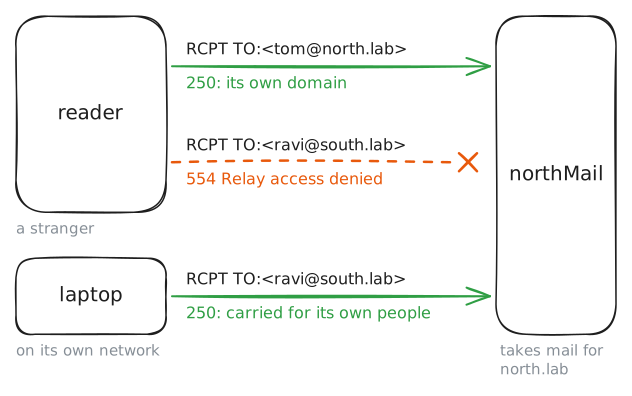
northMailtook a message forsouth.labfrom Nadia's laptop with no password. If it did that for anyone, spammers would use it to send their mail, and the rest of the world would soon refuse everything it sent. A server like that is called an open relay, and spammers scan for them.So a mail server has two jobs with two rules. It takes mail for its own domains from anyone, because the whole world must be able to reach Nadia. It takes mail for anywhere else only from its own people.
readersits on thesouthnetwork, so tonorthMailit's a stranger. Connect from there and try both jobs on one connection: first an addressnorthMailisn't responsible for, then one it is. After that, ask the server how it decides, withpostconf, which prints its settings.reader:~# nc northMail.lab 25 northMail:~# postconf mynetworks smtpd_relay_restrictions
-
Queue: what happens when the next server is down
Time to answer Nadia. The admin of
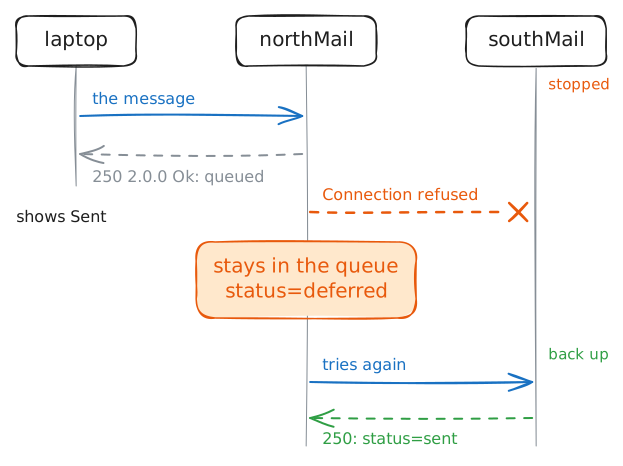
south.labadmits thatsouthMailcrashed on Monday morning, about when she pressed Send.Mail was built for this. Each server takes charge of a message before the last one lets go, so somebody always holds a copy.
The server holding it keeps it in a queue, a folder of messages it still owes someone. If the next server doesn't answer, the message stays there and the server tries again later, for days.
southMailhas been stopped for this step.Send Ravi a message as before, and see what
curlhears. Then asknorthMailwhat it's holding, withmailq. OncesouthMailis back, read the delivery lines in the log again, for the whole story of that message.laptop:~# curl -sv smtp://northMail.lab/laptop --mail-from nadia@north.lab --mail-rcpt ravi@south.lab -T /tmp/note.txt northMail:~# mailq northMail:~# grep status= /var/log/mail.log
Run these steps on real machines