 Hack the Route Start learning Open app
The idea
Otto looks after the two servers at the Quarry Row architecture studio, and an audit is next week. He went over both of them last night and came back with a list of problems, and he has a week to fix what he can. Score each problem by how bad it would be and how likely it is to happen, so Otto fixes the worst first instead of the loudest.
Steps
-
Risk is likelihood times impact
A scan hands you a pile of findings. The mistake is to fix them top to bottom, or to chase the scariest-sounding one. A risk assessment turns the pile into a ranked queue from two questions.
Impact: how bad is it if someone abuses this? Likelihood: how probable is it that someone does?
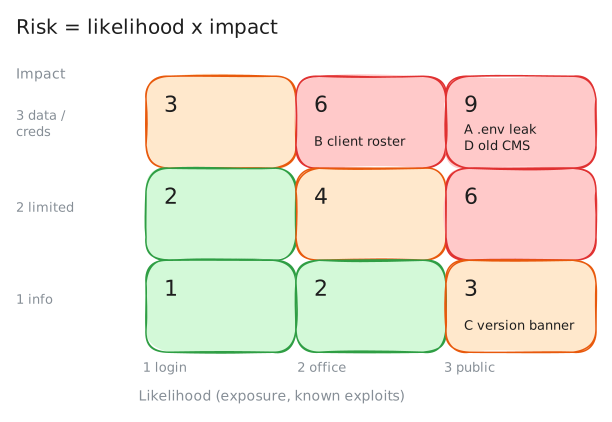
Formal methods combine the two, usually on a matrix: NIST (the United States' standards body), the ISO 27005 standard and OWASP (in the references) each publish one. This lab uses a simple version: score each from 1 to 3 and multiply, risk = likelihood x impact, from 1 to 9.
Score Impact Likelihood 1 information only low: behind a strong, unshared login 2 limited data or access medium: no login, office network only 3 credentials, client data, or host control high: no login, internet-facing, or a flaw with public exploit code A login is a control, not a guarantee: a phished or reused password brings the likelihood back up. Exposure has to be seen from where an attacker stands, so scan both servers twice: from Otto's laptop in the office, and from
outside, the audit machine he rents on the internet.otto:~# nmap -n -p 80,9000 10.0.2.10 10.0.2.20 outside:~# nmap -n -Pn -p 80,9000 10.0.2.10 10.0.2.20
-
Finding A: credentials on the public internet
Take the mystery service on
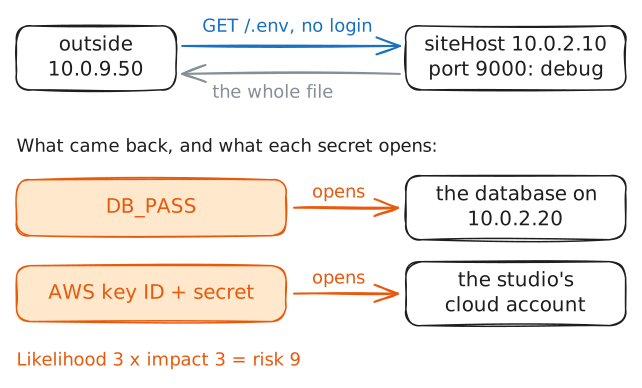
siteHostport 9000 first. It calls itself a deploy/debug service, the kind of thing someone stands up during a release and forgets. Ask it for a.envfile, the file web apps keep their secrets in, and ask fromoutside, the way a stranger would.outside:~# curl -sS -m 3 http://10.0.2.10:9000/.env
-
Finding B: client records on the office server
Now
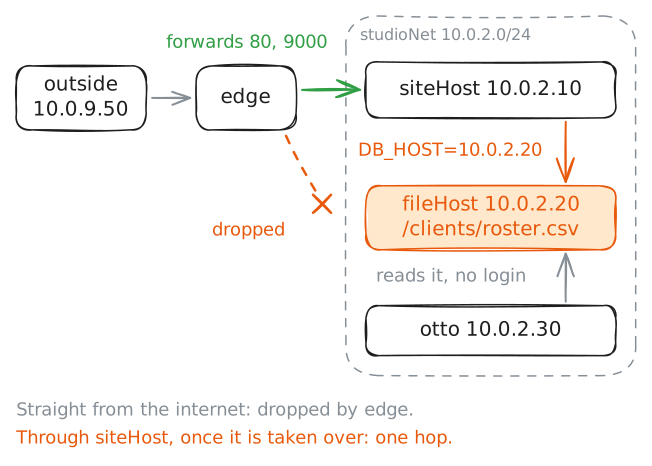
fileHost, the office file server. Its share lists aclientsfolder, and nothing asks who you are before handing a file over. Pull the client roster from Otto's laptop.The content is as sensitive as it gets for a small studio: client names, contacts and fees. But the outside scan already showed the internet cannot reach this server, so an outsider has to get onto the office network first.
otto:~# curl -sS -m 3 http://10.0.2.20/clients/roster.csv
-
Old software, a banner, and the ranking
The public site's
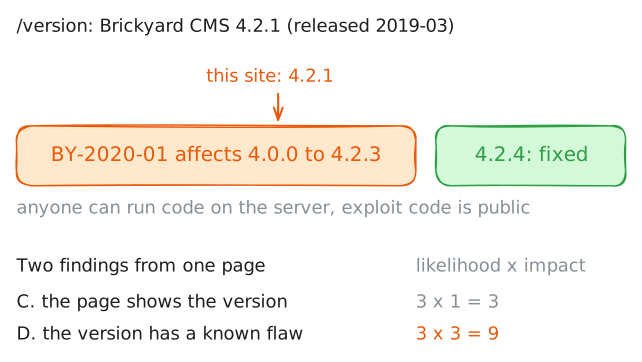
/versionpage announces the exact software it runs. That opens two findings, not one.Showing the version is a small leak on its own. Running a 2019 release on the internet is a bigger question: does it have published flaws?
Pull the page from
outside, then look the version up in the vendor's advisories that Otto saved for the audit.outside:~# curl -sS -m 3 http://10.0.2.10/version otto:~# cat /root/audit/brickyard-advisories.txt
Run these steps on real machines