 Hack the Route Start learning Open app
The idea
Diego runs the security desk at Harbour Point Marina. His analyst machine sits in-path between the office and the marina's berth-booking portal: every packet between the two passes through it. So Zeek and Suricata read every request, and the machine can drop a source with its own firewall.
By three in the morning the alerts come faster than anyone can answer by hand. So the marina keeps a playbook: a small program that an alert triggers, which reads the SIEM, blocks the source, and writes down what it did.
Tonight Diego runs it against a real attacker. Then it meets the marina's own IT contractor, whose authorised scan trips the same alert, and the playbook has to know the difference.
Steps
-
An alert worth answering
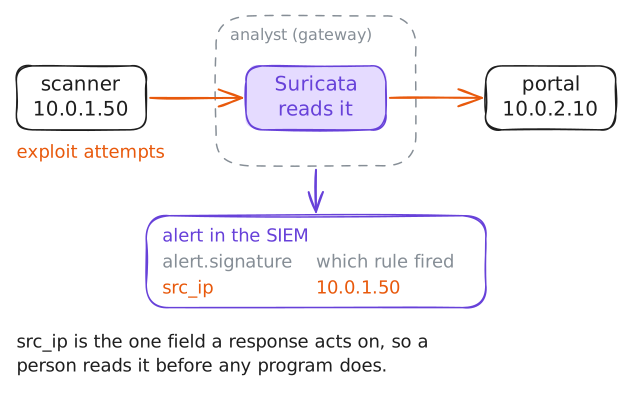
A response that runs on its own starts from an alert. Suricata watches the traffic the gateway forwards and speaks up when a request matches one of its known-bad signatures.
Before you let anything act automatically, read the alert yourself. Ask the SIEM for every alert, grouped by who sent it (
src_ip) and which rule fired (alert.signature).Shellshock and the Drupal flaw you'll see are two known web exploits. All that matters here is that Suricata recognised each one and named the source, because the source is the one fact a response needs: the address to act on.
analyst:~# curl -s 'localhost:9200/_plugins/_ppl?format=csv' -H 'content-type: application/json' -d '{"query":"source=suricata | where event_type = \"alert\" | stats count() as alerts by src_ip, alert.signature | sort - alerts"}' -
Read the playbook
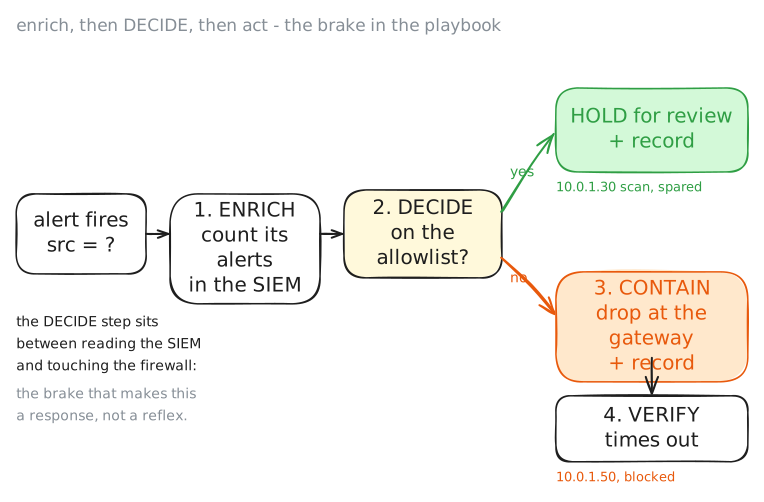
A SOAR playbook (security orchestration, automation and response) is the response written down as code. It does automatically what an analyst would otherwise do by hand at three in the morning. Its value is speed, and so is its danger, so a good playbook knows when not to act.
Read this one before you run it. It takes a single source address and runs four parts in order:
- Enrich: ask the SIEM how many alerts the address raised.
- Decide: check an allowlist of hosts it must never block.
- Block: drop the source with the gateway's firewall.
- Record: write the action back into the SIEM.
The allowlist is the brake. A source on it is held for a person instead of dropped, so one alert on a trusted host can't cut off a real user. You'll need that brake in the last step.
analyst:~# cat /opt/soar/respond.sh
-
Run it against the attacker
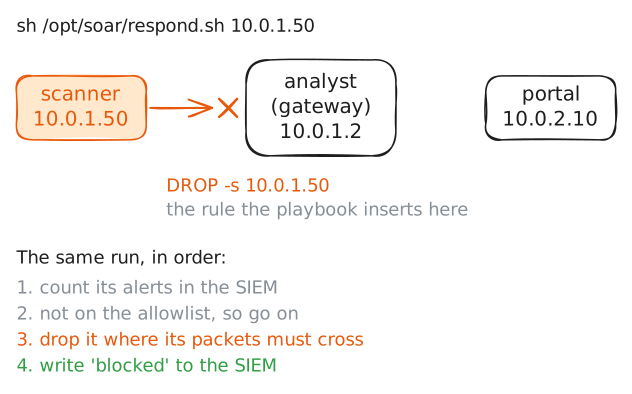
Run the playbook and hand it the attacker's address. In a live security operations centre (SOC), the alert would pass that address in on its own. Here Diego passes it as an argument, the same thing done by hand.
Watch the four parts work in sequence. The playbook asks the SIEM how many alerts
10.0.1.50raised, finds the host is not on the allowlist, inserts a drop for it in the gateway's firewall, and writes the block back into the SIEM as a record.Blocking at the gateway works because the gateway is in-path: every packet between the office and the portal crosses it, so a drop there stops the attacker. A rule on a machine the traffic never touches would change nothing.
analyst:~# sh /opt/soar/respond.sh 10.0.1.50
-
Confirm the containment
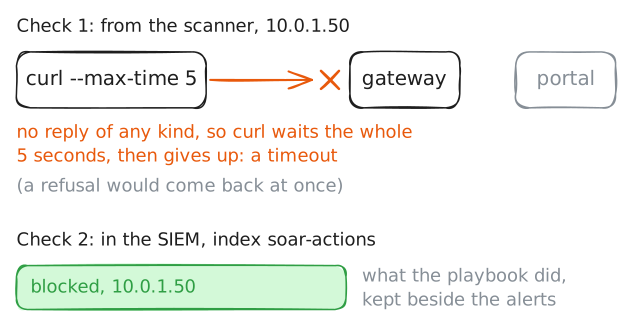
Diego won't trust a block he hasn't checked. Two checks close the loop: the attacker can no longer reach the portal, and the action is in the SIEM for an analyst to find later.
From the attacker's host, try the portal again. The gateway now drops its packets without a reply, so the request does not fail fast. It hangs until
curlgives up at its time limit, which is how a dropped connection looks, as opposed to a refused one.Then ask the SIEM for the response actions. The
blockedrecord for10.0.1.50sits beside the alert that caused it, so anyone can later see what the automation did and why.scanner:~# curl --max-time 5 http://10.0.2.10/ analyst:~# curl -s 'localhost:9200/_plugins/_ppl?format=csv' -H 'content-type: application/json' -d '{"query":"source=soar-actions | stats count() by action, src_ip"}' -
The authorised scan
At four, the marina's IT contractor at
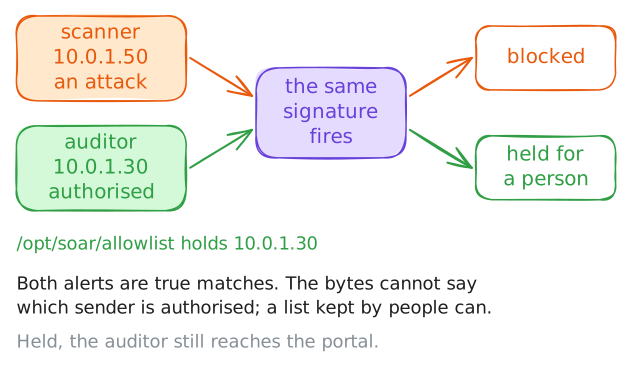
10.0.1.30starts an authorised vulnerability scan. It is part of the marina's own security checks, booked weeks ago.The scan's probe has the shape of an exploit, so Suricata is right to raise the alert: the match is real. What makes the traffic harmless is its context, not its bytes. This scan is authorised.
A real signature match on activity that turns out to be harmless is a benign true positive. You'll also hear it called a false positive, though strictly a false positive has no real match behind it. A playbook that blocked every alerting source would cut off the contractor mid-job, and on a shared address a block can take real customers with it.
Add the contractor's workstation to the allowlist and run the playbook against that source. Instead of a block, the playbook holds the host for a person to judge.
analyst:~# curl -s 'localhost:9200/_plugins/_ppl?format=csv' -H 'content-type: application/json' -d '{"query":"source=suricata | where event_type = \"alert\" | stats count() as alerts by src_ip, alert.signature | sort - alerts"}'
analyst:~# sh /opt/soar/respond.sh 10.0.1.30
auditor:~# curl --max-time 5 http://10.0.2.10/status
Run these steps on real machines