 Hack the Route Start learning Open app
The idea
Noor is on a shipyard's guest Wi-Fi with a crane brake in pieces, and her VPN won't connect. Get it through, then find out what that costs her and who else can answer on that port.
Steps
-
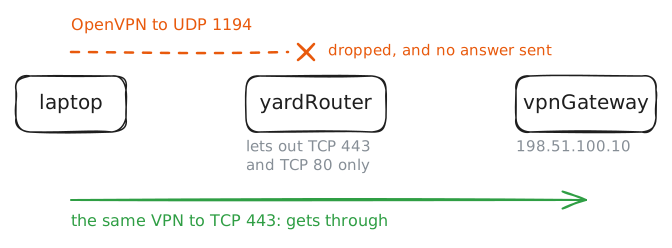
Get out of a web-only network
Noor services cranes for Tern Cranes, and this morning she's on a quay at a shipyard with a hoist brake in pieces. The torque figure for that brake is in the manual on Tern's wiki, at
10.70.1.20. That's a private address, so nothing outside Tern's office can reach it, which is why IT gave her laptop a remote-access VPN profile.The yard's guest Wi-Fi opens web pages without trouble. The VPN software is OpenVPN, free and in use since 2001, and it belongs to a family called SSL VPNs. SSL is the old name for TLS, the encryption behind every
https://address, and the family took the name because it builds on TLS where older VPNs built on IPsec.Try the wiki, then start the VPN.
laptop:~# curl -sS -m 3 http://10.70.1.20/manuals/hoist-brake
laptop:~# openvpn --config /etc/openvpn/office.conf
laptop:~# nc -zv -w 3 vpnGateway.lab 443
laptop:~# openvpn --config /etc/openvpn/office.conf --daemon --log /var/log/openvpn.log
laptop:~# curl -sS -m 3 http://10.70.1.20/manuals/hoist-brake
-
Follow a packet through tun0
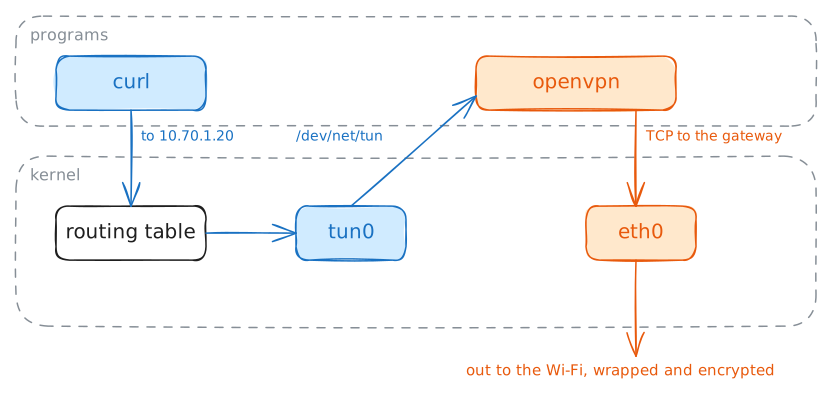
The VPN works, and it's an ordinary program, which is odd. A packet heading for another machine passes through the kernel and never meets a program, which is why IPsec's encryption lives inside the kernel. So how did OpenVPN get hold of
curl's packet?Linux has a device for it, called
tun, a network card with no wire. One side looks like any other card, with an address and routes. The other side is a file,/dev/net/tun, and a program holds it open. When the kernel sends a packet out of the card, the program reads that packet from the file. When the program writes a packet to the file, the kernel treats it as having arrived on the card.So OpenVPN's job on the laptop has three parts: read a packet from
tun0, encrypt it, and write the result into its TCP connection to the gateway. The gateway does the same in reverse and hands the packet to its owntuncard, and from there it's routed like any other.Now look at what that gave Noor's laptop, and who the wiki thinks is asking.
laptop:~# ip -br addr show tun0
laptop:~# ip route
laptop:~# grep Channel /var/log/openvpn.log
wikiServer:~# tail -n 2 /var/log/httpd.log
vpnGateway:~# grep "Peer Connection" /var/log/openvpn-tcp.log
-
Read port 443 as a firewall does
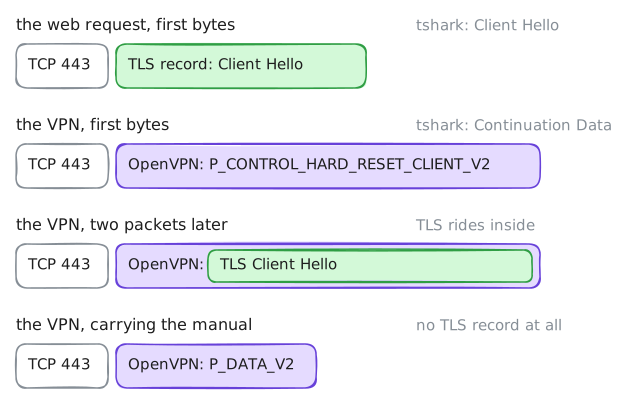
The yard's rule only looks at the port number. Noor's next customer may not be so relaxed: a next-generation firewall reads the first bytes of a connection and decides what it really is, so that a port can't hide a program it wasn't opened for.
That raises a question about the SSL in SSL VPN. TLS is in the name and the traffic is on the web's port, so does this tunnel actually look like the web?
Find out by recording both on the same line. Start a capture on
yardRouter's internet side, fetch a real HTTPS page from the laptop, then start the VPN so that the recording holds its first packets. Then read the file withtshark, the command-line form of Wireshark, which picks a decoder from the port number and reports what it finds.yardRouter:~# tcpdump -nn -U --immediate-mode -i internet -w /tmp/tcp443.pcap tcp port 443 laptop:~# curl -sS -m 3 -o /dev/null -w "%{http_code}\n" https://vpnGateway.lab/ laptop:~# openvpn --config /etc/openvpn/office.conf --daemon --log /var/log/openvpn.log laptop:~# curl -sS -m 3 http://10.70.1.20/manuals/hoist-brake yardRouter:~# tshark -r /tmp/tcp443.pcap -Y "tcp.len > 0" yardRouter:~# tshark -r /tmp/tcp443.pcap -d tcp.port==443,openvpn -Y "tcp.stream == 1 and tcp.len > 0" -
Put a bad line under the tunnel
Noor rings Tern's brake engineer over the VPN to check that torque figure, and the call keeps stuttering. The quay's Wi-Fi is having a bad day, with a crane between her and the access point, and TCP 443 is about to show what it costs.
You'll make that bad day repeatable:
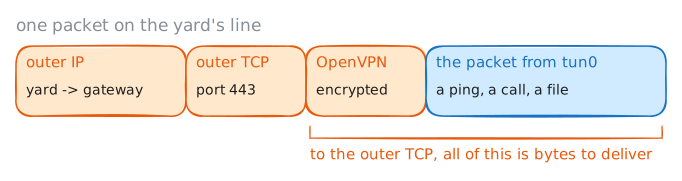
yardRouterwill lose one packet in ten on its way out and add 20 ms of delay, usingnetem, the kernel's line simulator.Then you'll send 60 pings to the wiki through the tunnel. A ping goes once, and if it's lost, nobody resends it. On an ordinary network with this much loss, about 6 of them would never come back. These pings don't cross the line on their own, though: each one is wrapped in the tunnel's TCP connection, as the drawing shows.
The yard has agreed to open UDP 1194 for an hour, and Tern's IT has sent a second profile for it, so the same test can run on a tunnel over UDP.
yardRouter:~# tc qdisc replace dev internet root netem delay 20ms loss 10%
laptop:~# ping -c 60 -i 0.1 -q 10.70.1.20
laptop:~# openvpn --config /etc/openvpn/office-udp.conf --daemon --log /var/log/openvpn.log
laptop:~# ping -c 60 -i 0.1 -q 10.70.1.20
-
Reach the wiki with nothing installed
Noor needs the hoist brake's gap figure again, her laptop is in the van at the far end of the quay, and the yard's visitor office is right here. It has a shared PC,
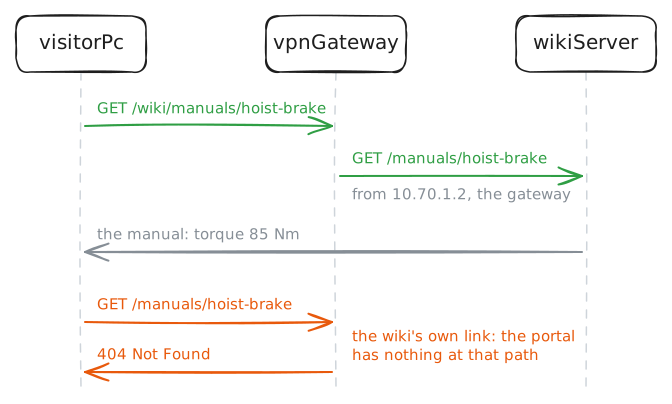
visitorPc, with no VPN software and no certificate of hers, and nobody will let her install either.Tern planned for that. The same gateway runs a clientless VPN, which is a web portal. She signs in over HTTPS, and the gateway fetches internal pages for her and passes them back. It's a reverse proxy with a login.
It lives on the same TCP 443 as the VPN, thanks to one line in the gateway's OpenVPN config,
port-share 127.0.0.1 8443. OpenVPN accepts each connection on 443 and looks at the first bytes. If they aren't OpenVPN, it passes the connection to nginx on127.0.0.1:8443. That's why yourcurlgot a web answer from the VPN's port while you were recording, and it's the same tricktsharkcouldn't do unaided: reading the bytes, not the port.Sign in from
visitorPc. The wiki's home page has a link to the manual, and the portal publishes the wiki under/wiki/.visitorPc:~# curl -sS -m 3 -u noor:crane-hook-42 https://vpnGateway.lab/wiki/ visitorPc:~# curl -sS -m 3 -u noor:crane-hook-42 https://vpnGateway.lab/manuals/hoist-brake visitorPc:~# curl -sS -m 3 -u noor:crane-hook-42 https://vpnGateway.lab/wiki/manuals/hoist-brake visitorPc:~# ip route wikiServer:~# tail -n 2 /var/log/httpd.log visitorPc:~# nc -zv -w 3 10.70.1.30 22 laptop:~# nc -zv -w 3 10.70.1.30 22
-
Meet a gateway that isn't yours
A guest Wi-Fi is somebody else's network, and that's the case an SSL VPN is built for: it must stay safe even when the network under it is hostile. Today it is. Someone has got into
yardRouterand is quietly redirecting Noor's traffic for198.51.100.10to another machine.That machine is
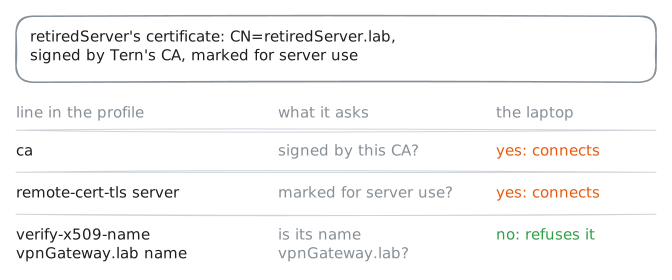
retiredServer. Last year Tern sold an old web server without wiping its disk, and on that disk are a certificate from Tern's own certificate authority, still valid, for the nameretiredServer.lab, and the key that goes with it. Whoever bought it now runs an OpenVPN server on it, and has set up a copy of the wiki with some numbers changed.The laptop's profile says
ca, which names the authority it trusts. Noor is about to reconnect. Everything her laptop will be shown is genuine: a real certificate, properly signed, with a real chain up to the right authority. Only the machine is wrong.laptop:~# openvpn --config /etc/openvpn/office.conf --daemon --log /var/log/openvpn.log laptop:~# grep -E "WARNING|VERIFY|Peer Connection" /var/log/openvpn.log laptop:~# curl -sS -m 3 http://10.70.1.20/manuals/hoist-brake laptop:~# openvpn --config /etc/openvpn/office.conf --daemon --log /var/log/openvpn.log laptop:~# grep -E "WARNING|VERIFY|Peer Connection" /var/log/openvpn.log laptop:~# openvpn --config /etc/openvpn/office.conf --daemon --log /var/log/openvpn.log laptop:~# grep -E "WARNING|VERIFY|Peer Connection" /var/log/openvpn.log laptop:~# openvpn --config /etc/openvpn/office.conf --daemon --log /var/log/openvpn.log laptop:~# curl -sS -m 3 http://10.70.1.20/manuals/hoist-brake
Run these steps on real machines
Keep reading
- openvpn(8): every option in these profiles, from port-share to verify-x509-name article
- OpenConnect's account of how Cisco AnyConnect works: HTTPS, then CONNECT, then DTLS article
- Wikipedia on tunneling protocols, with its section on TCP meltdown article
- Wikipedia on OpenVPN: who built it, and how it uses TLS article