 Hack the Route Start learning Open app
The idea
Noor's two ferry offices use private addresses, and the carrier between them won't carry those. Wrap each packet inside a public one, then find out what the wrapper costs.
Steps
-
Ask the island for its bookings
Noor looks after the computers at a small ferry company. The ticket desk at the harbour needs today's bookings, which live on a server at the island office, and the only thing between the two offices is a carrier, the company that runs the cable under the sea.
Both offices use private addresses, so
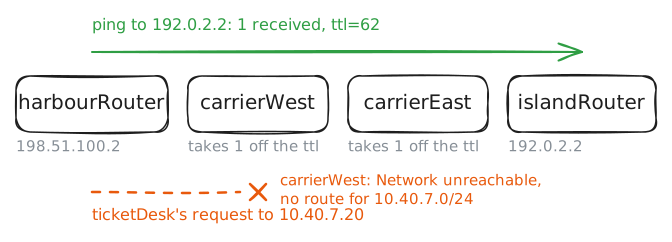
bookingServeris10.40.7.20. Each office Router also has one public IP address on its line to the carrier:198.51.100.2at the harbour,192.0.2.2on the island.Ask for the page from
ticketDesk. Then askcarrierWest, the carrier's router next to the harbour, where it would send that address, and ping the island's public address fromharbourRouter.ticketDesk:~# curl -sS -m 3 http://10.40.7.20/ carrierWest:~# ip route get 10.40.7.20 harbourRouter:~# ping -c 1 -W 1 192.0.2.2
-
Wrap a packet in a packet
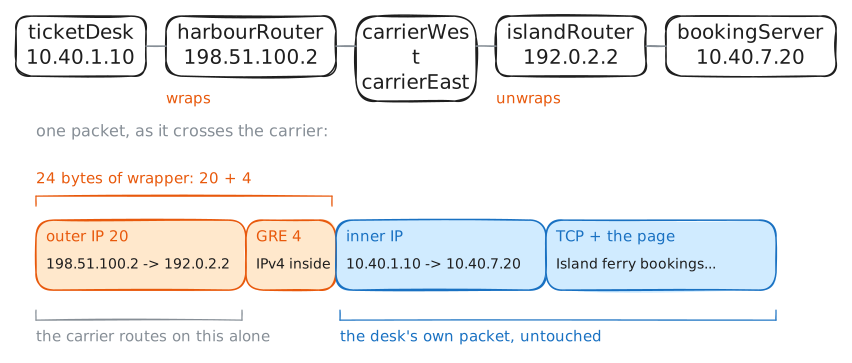
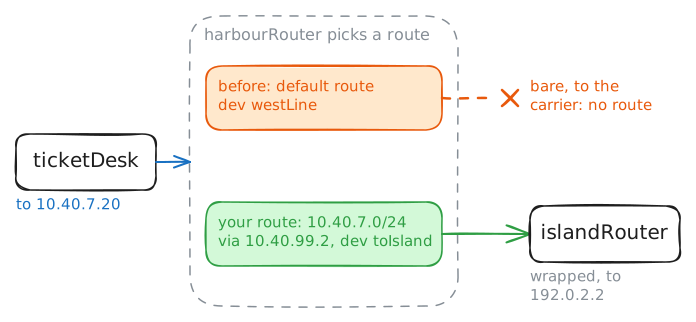
The carrier delivers anything addressed to a public address, so give it one. At the harbour, put the whole private packet inside a new packet addressed to the island's router. At the island, take it out and send it on. The carrier reads the outer addresses and never looks further.
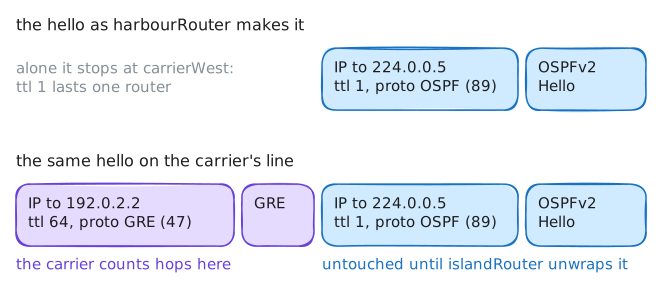
That's a tunnel, and the name for wrapping one packet in another is encapsulation. The idea wasn't invented to hide private addresses. In 1994 big networks still ran several protocols side by side, such as Novell's IPX and Apple's AppleTalk, and every pair needed its own way of carrying one over the other. RFC 1701 offered one general wrapper instead, Generic Routing Encapsulation (GRE), which doesn't care what it carries. RFC 2784 removed the optional fields in 2000, and the header in use today is 4 bytes.
A GRE packet rides directly on IP, the way TCP and UDP do. It has its own protocol number, 47, where TCP has 6 and UDP has 17, and it has no ports.
A router gets a tunnel as a virtual network card, a card with no cable. Whatever it sends through that card comes out wrapped, through the real one.
A card needs an address, and a tunnel counts as a small network with two machines on it, so the two ends get
10.40.99.1and10.40.99.2. Make the card onharbourRouter, give it the first address, and ping the second. The lab records what leaves on the carrier line.harbourRouter:~# ip -echo link add toIsland up type gre local 198.51.100.2 remote 192.0.2.2 ttl 64 harbourRouter:~# ip -echo addr add 10.40.99.1/30 dev toIsland harbourRouter:~# ping -c 1 -W 1 10.40.99.2
-
Open the far end
A tunnel takes two ends.
islandRouterneeds the same card withlocalandremoteswapped, because on the way back the outer packet travels the other way.Make that card, then ping across it. In the first step the ping between public addresses came back with
ttl=62, one less for each carrier router. Watch that number this time.With the tunnel working, try the bookings again from
ticketDesk, and find out whatharbourRouterdoes with that address.islandRouter:~# ip -echo link add toHarbour up type gre local 192.0.2.2 remote 198.51.100.2 ttl 64 harbourRouter:~# ping -c 2 -W 1 10.40.99.2 ticketDesk:~# curl -sS -m 3 http://10.40.7.20/ harbourRouter:~# ip route get 10.40.7.20 harbourRouter:~# ip -echo route add 10.40.7.0/24 via 10.40.99.2 ticketDesk:~# curl -sS -m 3 http://10.40.7.20/
-
Read the carrier's line
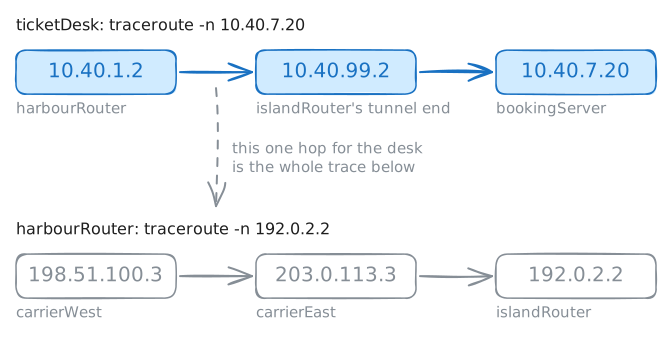
The desk now sees a straight road to the island. The carrier sees something else, and Noor has a question about that, because
bookingServerhas a second page,/manifest, with the names of the passengers on the morning sailing.Compare the two views first with
traceroute, from the desk to the server and then fromharbourRouterto the island's public address. Each line of its output is a router the packet passed through.Then fetch the manifest while the lab records on
carrierWest, on the carrier's own line. On a real network, you'd never get to log in to a carrier's router, and this is the view of anyone who can, or who can tap a link along the way.ticketDesk:~# traceroute -n 10.40.7.20 harbourRouter:~# traceroute -n 192.0.2.2 ticketDesk:~# curl -sS -m 3 http://10.40.7.20/manifest
-
Pay for the wrapper
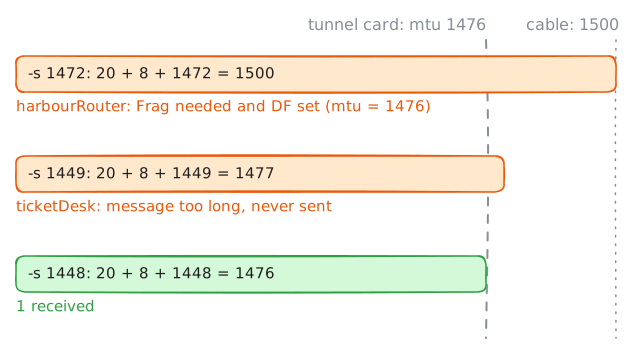
The carrier's lines take packets up to 1500 bytes, their MTU. A wrapped packet has two more headers: 20 bytes for the outer IP header and 4 for GRE. That's 24 bytes the passenger can't use, so the tunnel card took an MTU of 1476 by itself. You saw it in the output when you made the card.
Your desk doesn't know that. Its own cable takes 1500, so it sends full-size packets, and a web page is mostly full-size packets. The question is what
harbourRouterdoes with a 1500-byte packet it can't wrap.Test the edge with
ping.-M dosets the don't fragment flag, which tells routers to refuse the packet instead of cutting it up.-ssets the bytes of data, and ping adds an 8-byte header of its own, on top of the 20-byte IP header. So-s 1472makes a packet of exactly 1500, which fits every cable on the path.Send that one first, then two more around the edge.
ticketDesk:~# ping -c 1 -W 1 -M do -s 1472 10.40.7.20
ticketDesk:~# ping -c 1 -W 1 -M do -s 1449 10.40.7.20
ticketDesk:~# ping -c 1 -W 1 -M do -s 1448 10.40.7.20
ticketDesk:~# ip route get 10.40.7.20
-
Let the routers talk through it
Noor's tunnel has two routes typed by hand, and the company is about to open a second network on the island. Each new network means logging in at both ends, and each mistake means a silent failure. Routers usually learn this for themselves by talking, with a routing protocol such as OSPF.
OSPF routers find each other with hellos, short "I'm here" messages sent every few seconds, and those can't cross a carrier by themselves, for two reasons. They go to a multicast address,
224.0.0.5, which means "every OSPF router on this wire", and they leave with a TTL of 1, so they stop at the next router.This is where GRE earns its keep. Wrapped, those messages are ordinary public packets to the carrier, and to the routers the tunnel is one wire with two ends. That's a big part of why GRE is still in use, 30 years on.
harbourRouterandislandRouteralready run OSPF on their other cards, with no neighbour to talk to. Turn it on for each tunnel card, in area 0, the one group of routers this network has. Then read a hello as it crosses the carrier, and check that the two have become neighbours.There's a catch in those other cards.
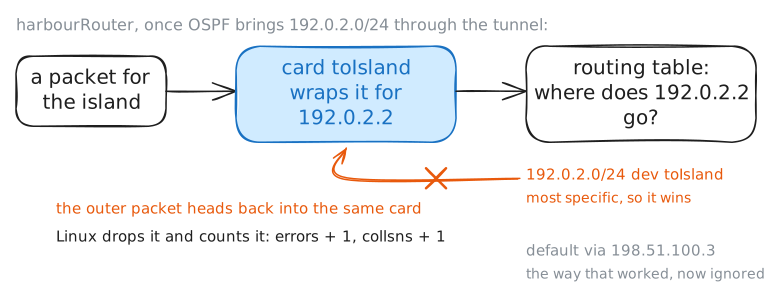
islandRoutertells its neighbours about every network it has OSPF on, and that includes192.0.2.0/24, its carrier line. So once the two are talking,harbourRouterwill hear of a route to that block through the tunnel, and the most specific route always wins: a/24beats the default route that has been carrying the tunnel so far.harbourRouter:~# vtysh -c 'configure terminal' -c 'interface toIsland' -c 'ip ospf area 0' islandRouter:~# vtysh -c 'configure terminal' -c 'interface toHarbour' -c 'ip ospf area 0' harbourRouter:~# vtysh -c 'show ip ospf neighbor' harbourRouter:~# ip route get 192.0.2.2 harbourRouter:~# ip -s link show toIsland harbourRouter:~# ip route get 192.0.2.2
-
Keep the far end outside
There's one rule for routing over a tunnel: the far end's address must always be reached around the tunnel, never through it.
Real networks keep that rule in one of three ways. They pin the far end with a static route to that one address, which is the fix in Cisco's note, because a
/32is as specific as a route gets. They filter the far end out of what the tunnel's routers accept. Or they keep the carrier lines out of the routing protocol altogether, so that nobody ever hears about them, and that's the cleanest here: the outer network and the inner one are separate, and neither should be talking about the other.Turn OSPF off for the carrier card at each end, and check that
192.0.2.2stays around the tunnel. Then take out the routes you typed, and see whether the bookings still load.islandRouter:~# vtysh -c 'configure terminal' -c 'interface eastLine' -c 'no ip ospf area 0' harbourRouter:~# vtysh -c 'configure terminal' -c 'interface westLine' -c 'no ip ospf area 0' harbourRouter:~# ip route get 192.0.2.2 harbourRouter:~# ip route del 10.40.7.0/24 via 10.40.99.2 harbourRouter:~# ip route ticketDesk:~# curl -sS -m 3 http://10.40.7.20/
Run these steps on real machines