 Hack the Route Start learning Open app
The idea
Ines is at a hotel, and the drawing she needs sits on a private network at head office. A VPN gets her in. Find out what it hides, what it leaves out, and who can still see her traffic.
Steps
-
Reach the office from the hotel
Ines repairs wind turbines. Tonight she's in a hotel on the coast, on the hotel's Wi-Fi, and tomorrow's job needs a drawing from
plansServerat head office.That server has a private address,
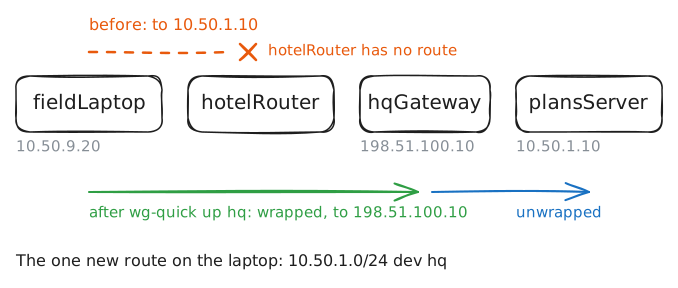
10.50.1.10, and no Router on the public internet will carry a packet for one, so the hotel can't reach it. A virtual private network, or VPN, is how a machine outside joins a network it has no cable to.Before she left, the IT team put a VPN config named
hqonfieldLaptop. The VPN software is WireGuard, andwg-quickturns it on. Try the server, turn the VPN on, and try again.fieldLaptop:~# curl -sS -m 3 http://10.50.1.10/ fieldLaptop:~# wg-quick up hq fieldLaptop:~# curl -sS -m 3 http://10.50.1.10/
-
Stand where the hotel stands
Companies used to buy privacy by the mile. A branch rented a private line from a phone company, and staff on the road dialled a bank of modems at head office. Nobody else was on the wire, and it cost a fortune.
A VPN gets the same reach out of the cheap public internet, where strangers share every wire, by doing three jobs at once. It's a tunnel: each packet for the office gets wrapped inside a new packet addressed to
hqGateway, head office's way in from the internet, and the internet carries that like any other. It's encrypted, so the wrapped packet can't be read on the way. And it proves who's at each end: each machine knows the other's public key, and only the machine holding the matching private key can prove that it's the one.Read the config at each end of the tunnel, then ask
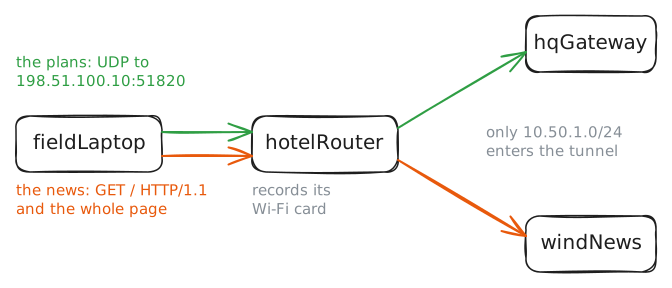
hqGatewayhow the laptop looks from its side.Then stand where the hotel stands. Whoever runs a network can record everything that crosses it, so the lab runs
tcpdumponhotelRouter's Wi-Fi card while the laptop fetches the plans, and again while it fetches a public site,http://windnews.example/.fieldLaptop:~# cat /etc/wireguard/hq.conf hqGateway:~# cat /etc/wireguard/hq.conf hqGateway:~# wg show fieldLaptop:~# curl -sS -m 3 http://10.50.1.10/ fieldLaptop:~# curl -sS -m 3 http://windnews.example/
-
Send everything through the tunnel
IT's rule has changed: nothing from a work laptop crosses a hotel's network in the open. That takes a full tunnel, and the change is one line,
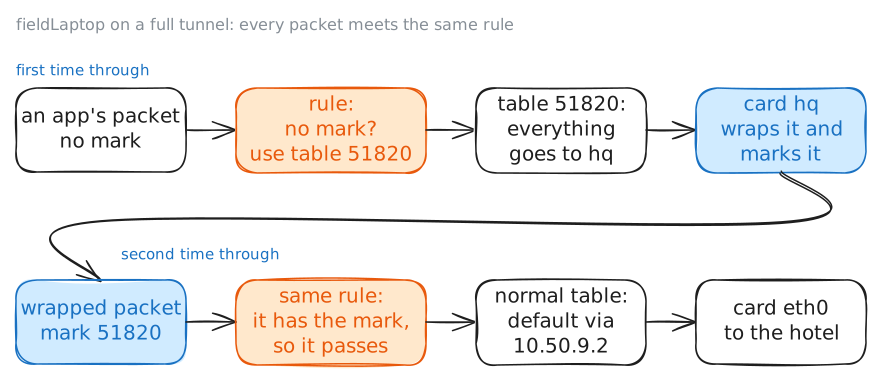
AllowedIPs = 0.0.0.0/0, where/0means every address there is.There's a catch in that line. The wrapped packets go to
198.51.100.10, and that's an address too. If every address entershq, the wrapped packets enter it as well, get wrapped again, and never leave the laptop. A tunnel can't be its own way out.wg-quickgets around this with a fact about Linux: a machine can keep several routing tables, and a short list of rules picks one for each packet. It makes a second table, numbered 51820, whose single line sends everything tohq. It tells WireGuard to stamp a mark on each wrapped packet, the number 51820 again, which exists only inside this machine. Then it adds a rule: a packet with no mark uses the new table, and a marked packet goes on to the normal one. The port, the table and the mark share a number for convenience, and nothing else links them.Turn the tunnel off, change the line, and turn it on. Then ask about the gateway's address twice, once as an ordinary packet and once with the mark. Last, fetch the news while the lab records on
hotelRouterand at the far end of the tunnel.fieldLaptop:~# wg-quick down hq fieldLaptop:~# wg-quick up hq fieldLaptop:~# ip route get 198.51.100.10 fieldLaptop:~# ip route get 198.51.100.10 mark 51820 fieldLaptop:~# curl -sS -m 3 http://windnews.example/
-
Look up the news site
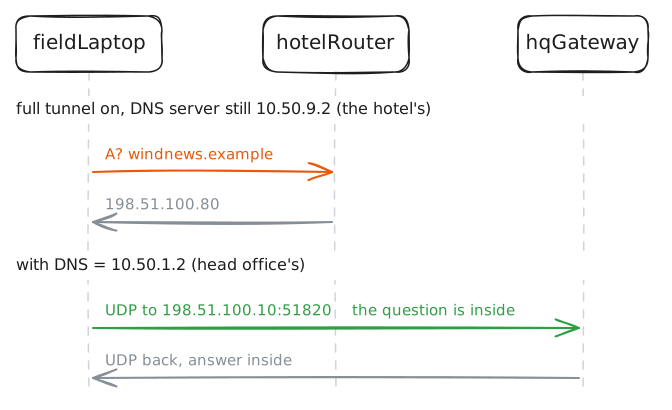
The hotel's recording in the last step watched for web traffic and WireGuard, and nothing else. There's a packet that comes first. A machine can't fetch
windnews.exampleuntil it has an address for that name, so it asks a DNS server./etc/resolv.confsays which one, and like most networks, the hotel's Wi-Fi told the laptop to ask the hotel's own router,10.50.9.2.Run
dig, which looks up a name and nothing else, while the hotel records DNS and WireGuard. Then read the laptop's rules and routes, becausewg-quickadded a second rule that you haven't met yet.fieldLaptop:~# dig windnews.example fieldLaptop:~# ip rule fieldLaptop:~# ip route fieldLaptop:~# wg-quick down hq fieldLaptop:~# wg-quick up hq fieldLaptop:~# dig windnews.example
-
Move the tunnel to the router
The firm also has a depot on an industrial estate, with 30 PCs that need the plans.
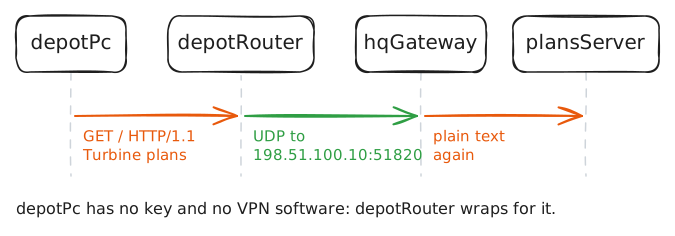
depotPcis one of them. Nobody wants to install software and look after keys on 30 machines, and the label printers there couldn't run it anyway.So put the VPN on the Router, and every machine behind it joins at once. That's a site-to-site VPN. The laptop's kind, remote access, joins one machine to a network when that machine wants to. Site-to-site joins two whole networks, stays on all the time, and nobody at the depot needs to know it's there. Both kinds can run the same software. What differs is what sits at the end of the tunnel.
Two lines make it work. On
depotRouter,AllowedIPs = 10.50.1.0/24sends the office into the tunnel, the same line the laptop started with. In the gateway's config you read earlier, the depot's[Peer]saysAllowedIPs = 10.50.200.3/32, 10.50.5.0/24: the router's own tunnel address, then the network behind it.Try the plans from
depotPc, turn the tunnel on atdepotRouter, and try again while the lab records ondepotRouter, on both of its cards. Then read the routes onhqGateway.depotPc:~# curl -sS -m 3 http://10.50.1.10/ depotRouter:~# wg-quick up hq depotPc:~# curl -sS -m 3 http://10.50.1.10/ hqGateway:~# ip route
-
Forge the depot's address
An address on a packet is only a number the sender wrote. Head office might trust the depot's network more than it trusts laptops, with a firewall rule that lets
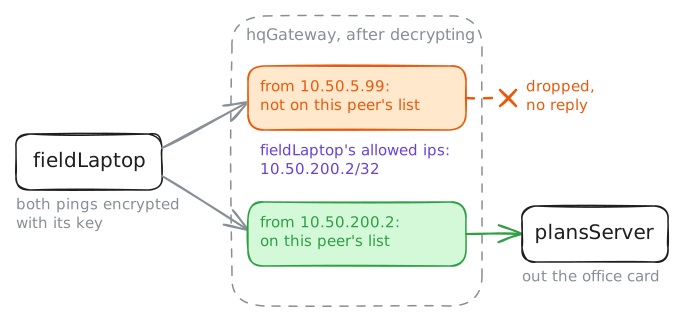
10.50.5.0/24reach the payroll server, say. Laptops get stolen. So what can a thief with a working key do?wg showlistedallowed ipsunder each peer, and so far that list has worked like a route: a packet's destination decides which tunnel it takes. The laptop's own list is now0.0.0.0/0, so it'll wrap anything.So try it. Give
fieldLaptopa depot address,10.50.5.99, on its tunnel card, and pingplansServerfrom that address, becauseping -Ipicks a packet's source address. The lab records at two places onhqGateway: the internet card, where wrapped packets arrive, and the office card, where unwrapped ones leave. After that, the address comes off, and you ping again from the laptop's tunnel address.fieldLaptop:~# ip -echo addr add 10.50.5.99/32 dev hq fieldLaptop:~# ping -c 2 -W 1 -I 10.50.5.99 10.50.1.10 fieldLaptop:~# ping -c 2 -W 1 10.50.1.10
-
Name every kind you've built
Exam papers and sales pages sort VPNs into kinds, and the names can sound like different products. You've built most of them on one gateway, and four questions sort any of them.
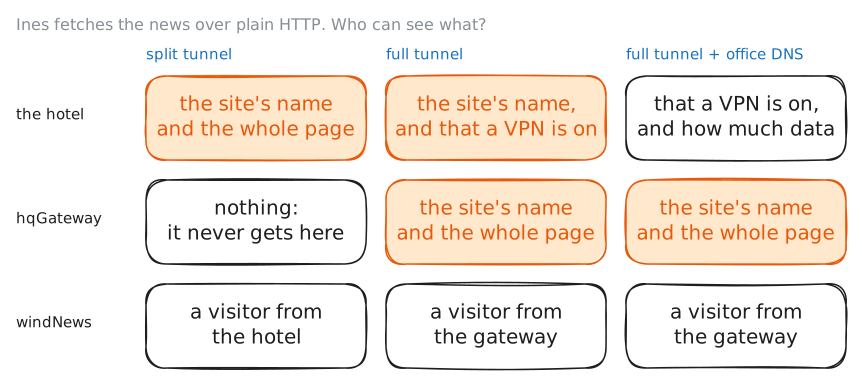
Who's at the end of the tunnel? One machine is remote access, and a whole network is site-to-site. What goes in? If only some networks do, it's a split tunnel, and if everything does, it's a full tunnel.
Who keeps it private? Encryption and authentication make a secure VPN, like this one, so nobody on the path has to be trusted. A trusted VPN is the older deal: a carrier's MPLS service keeps your traffic apart from other customers' inside its own network, encrypts nothing, and you take its word for it.
And which protocol runs it? WireGuard, IPsec and the TLS-based VPNs known as SSL VPNs can each do any of this. They differ in age, in what firewalls let them through, and in how much they make you configure.
Ask
hqGatewayfor its whole list once more, now that both peers have connected.hqGateway:~# wg show
Run these steps on real machines
Keep reading
- WireGuard's overview, with the Cryptokey Routing section behind the forged address article
- WireGuard's note on routing all traffic, and the fwmark trick wg-quick uses article
- wg-quick(8): every line a config file can hold, including DNS article
- Microsoft's plain introduction to what a VPN is and what firms use one for article