 Hack the Route Start learning Open app
The idea
Ines films the village football match from the far stand, and the clubhouse screen shows it live. A picture that arrives a second late is worse than one that never arrives, because the game has moved on.
Steps
-
Send the score in one packet
Ines's camera,
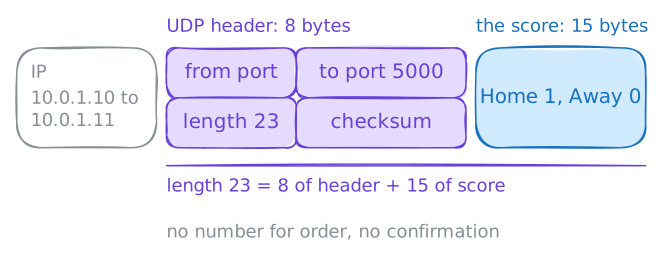
10.0.1.10, reaches the clubhouse screen,10.0.1.11, over one long link. A small program on the screen waits for the score on Port 5000.A score is one short message. Send it again every few seconds and a lost packet heals itself, and setting up a connection first would cost more packets than the score. So a connection is a poor fit for this job.
Send the score with
nc -u. The lab records every packet on the score's port in a capture, andcatthen shows what the screen received.camera:~# nc -u -w 1 10.0.1.11 5000 screen:~# cat /srv/score.txt
-
Find the port that answers
With TCP, a program soon finds out whether a port is open or closed, because the setup works or fails. If a Firewall drops the setup, the program waits for a timeout instead. UDP has no setup, so
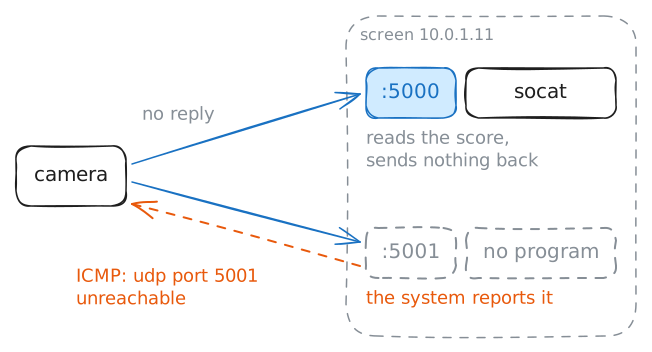
nc -uhands the packet to the system, the machine's operating system, and does not wait for an answer.That makes UDP ports hard to check, and it fools people often. A tool can look happy while no program holds the port.
Port 5000 has a program behind it, and port 5001 has none. Send the score to each port and compare the two captures. Then ask the screen itself with
ss -ulnp.camera:~# nc -u -w 1 10.0.1.11 5000 camera:~# nc -u -w 1 10.0.1.11 5001 screen:~# ss -ulnp
-
Race UDP against TCP
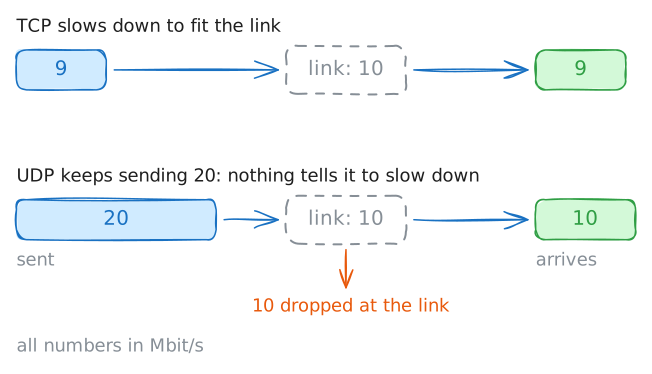
People often say that UDP is faster. Part of that is true: UDP skips the setup and sends no confirmations, and that saves a little time at the start. Whether the data then moves faster is a separate question.
So test it. The lab holds the link to 10 Mbit/s, and
iperf3, which already runs on the screen, measures what gets through.Run it over TCP first, then over UDP with
-u. The UDP run sends 20 Mbit/s, double what the link carries.camera:~# iperf3 -c 10.0.1.11 -t 3 camera:~# iperf3 -c 10.0.1.11 -u -b 20M -t 3
-
Watch the match over UDP, then TCP
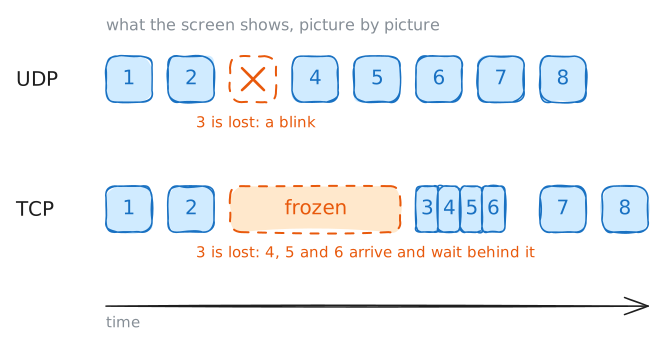
Speed is not the reason to pick UDP, so what is? A live match shows it.
Now the link goes bad from camera to screen: it loses about 1 packet in 7, and each packet takes 100 ms to cross.
watch-matchasks the camera for 5 seconds of the match, 125 pictures at 25 a second. It then reports what reached the screen.screen:~# watch-match udp screen:~# watch-match tcp
-
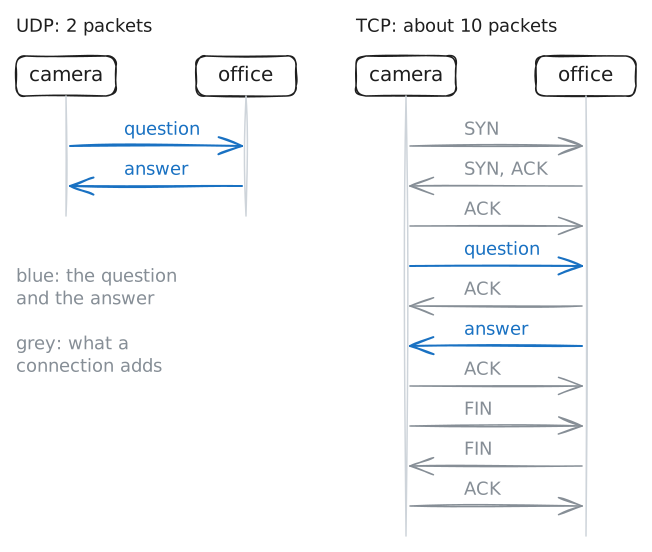
Count the packets of one DNS question
Live pictures are one job for UDP, and short questions are another. DNS turns a name into an address, and a busy name server answers thousands of questions a second. A connection for each question would cost far more than the question itself.
The office machine,
10.0.1.12, runs a name server. Ask it forscores.ground.labwithdig, which uses UDP. Then ask again with+tcp, and count the rows in each capture.Last, ask for the season's fixtures, which is a long answer.
camera:~# dig +short @10.0.1.12 scores.ground.lab
camera:~# dig +short +tcp @10.0.1.12 scores.ground.lab
camera:~# dig @10.0.1.12 fixtures.ground.lab TXT
Run these steps on real machines