 Hack the Route Start learning Open app
The idea
The Corner Bakery runs everything on one small machine in the back room, and that machine has one address on the network. Find out how the till, the computer at the counter, reaches the right program every time, then fix it when that stops working.
Steps
-
One address, two answers
The bakery's machine is called backroom. Like every machine on a network, it has an address that others use to reach it:
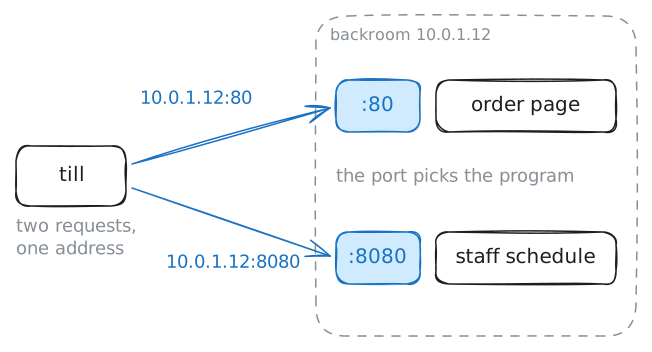
10.0.1.12.An address leaves one question open. It gets a request to the right machine, but backroom runs many programs at once, and the request is for only one of them. So a request for a program also carries a second number, written after a colon in a web address.
The till needs the order page and the staff schedule from backroom. Both requests go to that one address, and only the second number differs.
The terminal on this page runs commands on the till, and a wrong try does no harm. Type the command and press Enter.
till:~# curl -s http://10.0.1.12:80 http://10.0.1.12:8080
-
Ask backroom who listens on each port
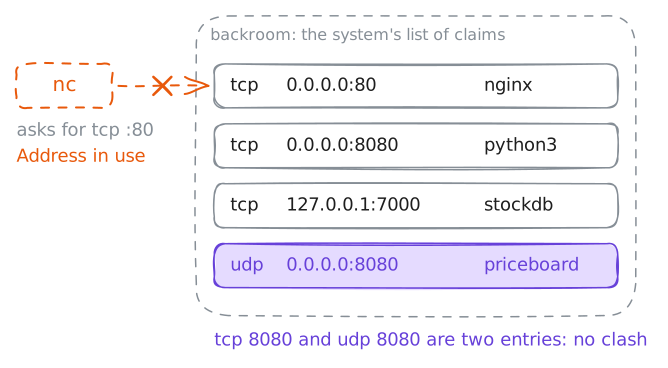
The till can only try a port and see what answers. backroom itself keeps the list of which program uses which port, so ask backroom.
A program that wants requests asks the operating system, here Linux, for a port and then waits. That waiting is called listening. When a request arrives, the system reads its port and hands the request to the program listening there.
Mina thinks backroom runs two programs. Run
ss -tlnpon backroom and look for the wordLISTEN. Then run two more commands: a second program on port 80, and the same list with one more letter.backroom:~# ss -tlnp backroom:~# nc -l -p 80 backroom:~# ss -tulnp
-
Try the third program from the till
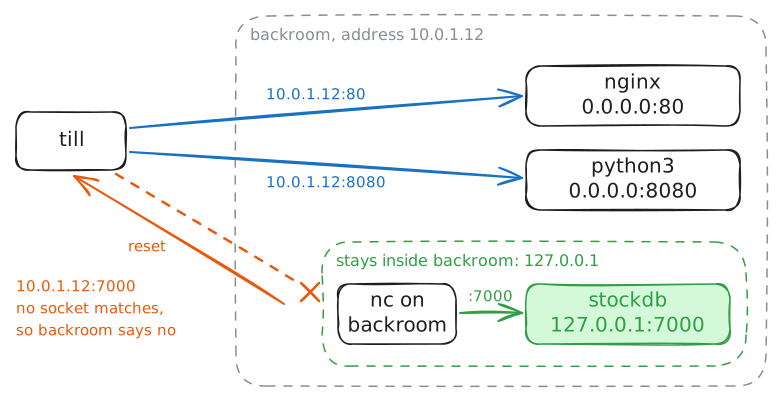
stockdbkeeps the bakery's stock count. Theo wants that count on the till, so try port 7000 from there.Two kinds of failure are worth telling apart, because each one tells you something different. In a timeout, nothing comes back, and the sender waits until it gives up, about two minutes later on Linux. In a refusal, the machine replies at once and says no.
Before you run the commands, look at the
stockdbrow again. Its address differs from the other rows. Trystockdbfrom the till first, then from backroom itself.till:~# curl -sv http://10.0.1.12:7000 backroom:~# nc -w 1 127.0.0.1 7000
-
Two connections on one port
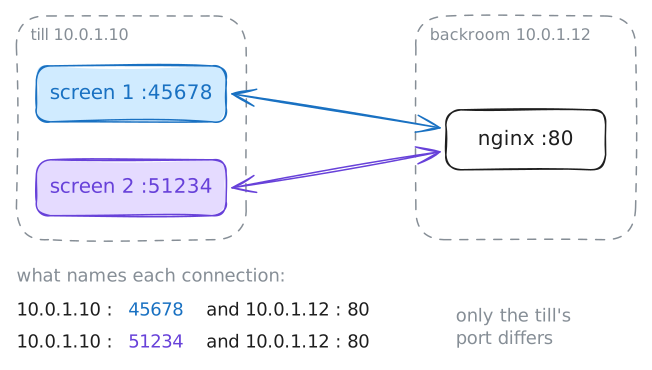
The till now has two order screens open. Each screen keeps a connection to port 80 on backroom, and each one needs its own replies.
A program that answers requests is called a server, and so is the machine it runs on. A server's port has to stay fixed, because everyone needs to know it before they connect.
So both screens reach the same address and the same port. How does backroom keep them apart?
Ask backroom for the connections it has open now. Then run two more commands. They print two of the machine's settings and its list of service names, which show who picks each port number.
backroom:~# ss -tn
till:~# sysctl net.ipv4.ip_local_port_range net.ipv4.ip_unprivileged_port_start
till:~# grep -w -e ^ssh -e ^domain -e ^http -e ^https /etc/services
Run these steps on real machines